
Ever tried shooting a video with your iPhone, only to watch it back and feel like you were on a roller coaster? We’ve all been there! Shaky footage can ruin even the most amazing moments. But don’t despair – that’s where a fantastic iPhone gimbal comes in handy. These ingenious devices are game-changers for anyone serious about elevating their mobile videography.
A gimbal is essentially a handheld stabilizer that uses motors to keep your phone perfectly level, no matter how much you move. Think of it as your personal camera crew, ensuring super smooth, cinematic shots that’ll make your friends wonder if you bought a professional camera. Whether you’re a seasoned vlogger, a budding content creator, or just want to capture family memories without the jitters, finding the best iPhone gimbal for video is key.
In this guide, we’ll dive into five top-notch smartphone gimbals that will help you ditch the shakes and embrace buttery-smooth footage. Let’s find the perfect phone stabilizer for your next masterpiece!
1. DJI Osmo Mobile SE, 3-Axis Phone Gimbal

The DJI Osmo Mobile SE is a brilliant entry-point into the world of professional-looking mobile video. What truly sets it apart is its incredibly intuitive design, especially the magnetic quick-snap feature that lets you attach and detach your iPhone in seconds. No more fiddling around and missing that perfect shot! Plus, with upgraded ActiveTrack 6.0, this phone gimbal is remarkably good at keeping your subject, whether it’s a playful pet or an energetic child, perfectly in frame. It’s truly designed for effortless capture and smooth footage.
Key Features:
– Portable, Foldable, and Magnetically Quick-Snap design
– Stay on Point with ActiveTrack 6.0 for enhanced tracking
– Remote Control via Apple Watch using DJI Mimo app
– Effortless Editing with ShotGuides and LightCut templates
– 3-axis stabilization for buttery smooth footage
– Quick switch between Landscape and Portrait modes
– New Status Panel for easy mode and battery checks
– Stain-resistant with ergonomic, non-slip grip
Pros:
– Super easy and fast magnetic phone attachment
– Excellent subject tracking with ActiveTrack 6.0
– Compact and highly portable
– Good for beginners and casual users
– Apple Watch remote control is a neat bonus
Cons:
– Lacks a built-in extension rod
– Limited physical controls compared to higher-end models
– DJI Mimo app download might require visiting DJI website for Android users
User Impressions:
Users frequently praise the Osmo Mobile SE for its ease of use and portability, highlighting the magnetic clamp as a standout feature. Many appreciate how quickly they can start shooting and the effectiveness of ActiveTrack. It’s often recommended for those looking for a reliable, no-fuss gimbal that delivers smooth results without a steep learning curve.
2. hohem iSteady X3 SE Gimbal Stabilizer for iPhone

The hohem iSteady X3 SE is an absolute gem for its combination of portability and advanced features, especially its unique detachable remote controller. This magnetic remote allows you to control your shots from up to 32 feet away, making it incredibly versatile for solo travelers, group shots, or creative angles. Its upgraded 3-axis stabilization, powered by iSteady 8.0 Technology, ensures that even your most action-packed videos come out remarkably smooth, perfect for those dynamic vlogging sessions.
Key Features:
– Detachable Magnetic Remote Controller for remote shooting
– Advanced iSteady 8.0 Technology for upgraded 3-axis stabilization
– Portable and Foldable Design, weighing only 0.79 lbs
– Unlock Creativity with the Hohem Joy App (AI tracking, gesture control, templates)
– 11-Hour Long Battery Life on a 2-hour charge
– Beginner-Friendly Stabilizer with easy controls
– High Payload Capacity (0.66 lbs) for various smartphones
– Quick Horizontal and Vertical Screen Switching
Pros:
– Detachable remote control is incredibly convenient
– Excellent battery life for extended shoots
– Lightweight and ultra-portable, pocket-friendly
– User-friendly for beginners
– Robust stabilization for dynamic movements
Cons:
– Remote might be small and easy to misplace
– App features might have a slight learning curve for some
– Build quality might feel less premium than higher-end gimbals
User Impressions:
Customers frequently highlight the impressive battery life and the handy remote control as major selling points. Many beginners find it incredibly easy to get started with, appreciating its straightforward operation and effective stabilization. It’s often cited as great value for money, providing professional-grade stabilization without breaking the bank.
3. DJI Osmo Mobile 7P Gimbal Stabilizer for iPhone

The DJI Osmo Mobile 7P takes smartphone stabilization to a new level, thanks to its innovative Multifunctional Module. This compact unit integrates intelligent tracking, DJI Mic 2/Mini reception, and lighting, transforming your phone into a portable, all-in-one content creation powerhouse. Its robust 3-axis gimbal stabilization delivers truly lossless stability, making cinematic, creative shots a breeze. If you’re serious about your mobile filmmaking and want integrated professional features, the 7P is a fantastic choice.
Key Features:
– Multifunctional Module for intelligent tracking, mic reception, and lighting
– Robust 3-axis gimbal stabilization for seamless stability
– Capture Like a Pro with ShotGuides and One-Tap Edit via DJI Mimo app
– So Quick, So Easy: Unfold to power on, magnetic mount for instant filming
– Streamline Your Creativity with built-in extension rod and tripod
– Empower Your Steady Creativity with up to 10 hours of operating time
– Dual-Lens Enhanced Tracking for smarter, steadier subject tracking
– Includes phone gimbal, Multifunctional Module, Magnetic Phone Clamp
Pros:
– All-in-one module enhances professional workflow
– Excellent, robust 3-axis stabilization
– Built-in extension rod and tripod are incredibly convenient
– Advanced dual-lens tracking for precise subject lock
– Quick setup and start filming process
Cons:
– Higher price point due to advanced features
– Multifunctional Module adds a bit of bulk
– DJI Mimo app download for Android users might need manual installation
User Impressions:
Users are consistently impressed by the Osmo Mobile 7P’s professional capabilities and the convenience of the integrated Multifunctional Module. The built-in extension rod and tripod are frequently praised for adding versatility, making it a favorite for vloggers and serious content creators who value integrated features and top-tier stabilization.
4. DJI Osmo Mobile 6, 3-Axis Phone Gimbal

The DJI Osmo Mobile 6 continues DJI’s legacy of excellence, offering a refined and highly capable experience for any iPhone videographer. Its standout feature is arguably the lightning-fast quick-launch – it powers on as soon as you unfold it, meaning you’re ready to shoot in mere seconds, ensuring you never miss a fleeting moment. Combined with the silky-smooth 3-axis stabilization and the extendable built-in rod for unique angles, this smartphone gimbal makes professional-looking videos incredibly accessible.
Key Features:
– Stay on Point with ActiveTrack 6.0 for upgraded subject tracking
– Remote Control via Apple Watch using DJI Mimo app
– Silky Smooth Shots with 3-Axis Stabilization
– So Quick, So Easy: Powers on upon unfolding for instant shooting
– Lightweight, Compact, and Extendable with built-in extension rod
– Shoot Like a Pro with ShotGuides, suggesting shot sequences
– Use Side Wheel to Get Cinematic Effects (focus and zoom control)
– Stain-resistant with ergonomic, non-slip grip
– New Parents and Kids Mode for autonomous shooting
Pros:
– Ultra-fast power-on and shooting readiness
– Excellent 3-axis stabilization for smooth footage
– Built-in extension rod adds versatility
– Intuitive side wheel for cinematic focus and zoom
– Compact, foldable, and highly portable
Cons:
– No built-in tripod (must attach separately)
– Apple Watch remote control might not be a feature everyone uses
– DJI Mimo app download might require visiting DJI website for Android users
User Impressions:
Reviewers frequently highlight the OM 6’s speed and ease of use, particularly the instant-on feature. Many praise its effective stabilization and the convenience of the integrated extension rod. The side wheel for focus and zoom is also a popular feature, allowing users to create more cinematic effects. It’s often recommended as a robust all-rounder for everyday use and creative projects.
5. AOCHUAN Phone Gimbal Stabilizer 3-Axis Smartphone Foldable
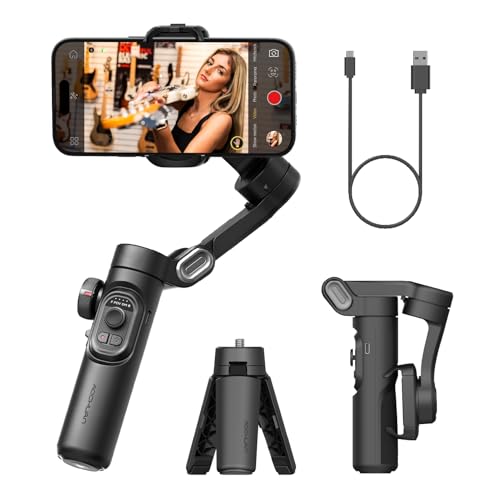
The AOCHUAN Smart XE stands out as a powerful and versatile 3-axis foldable gimbal stabilizer designed to handle a wide range of smartphones, even those with larger screens. What makes it particularly impressive is the innovative focus wheel and zoom slide, giving you precise manual control over your shots, just like a professional filmmaker. Coupled with an impressive 10-hour battery life and advanced AI Face Track 4.0, this gimbal ensures you have the power and intelligence to capture steady, high-quality video all day long.
Key Features:
– Powerful and Versatile 3-Axis Foldable Gimbal Stabilizer
– Innovative Focus Wheel and Zoom Slide for professional control
– Portable Foldable Design, Compact and Lightweight (0.78 lbs)
– All-day Long Video Creation with 2600mAh battery (up to 10 hours)
– AI Face Track 4.0 and Gestural Control via AOCHUAN APP
– SMART 7.0 Anti-Shake Smooth for professional videography
– One-Click video button to effortlessly switch between horizontal and vertical modes
– High payload capacity (250-gram) to support most big-screen smartphones
Pros:
– Excellent manual control with focus wheel and zoom slide
– Long battery life is great for extended shooting
– Strong motors handle larger phones effectively
– AI tracking and gestural control add convenience
– Beginner-friendly with tutorial videos in the app
Cons:
– App interface might not be as polished as DJI’s
– Some advanced features might require a learning curve
– Brand might be less recognized than DJI
User Impressions:
Users are generally impressed by the AOCHUAN Smart XE’s robust motors and its ability to stabilize heavier phones effectively. The long battery life is a frequent point of praise, as is the manual focus wheel for achieving cinematic looks. Many find it to be a reliable and feature-rich option for serious content creation, especially given its competitive price point.
Frequently Asked Questions About iPhone Gimbals
Q1: What is a gimbal and why do I need one for my iPhone video?
A: A gimbal is an electronic stabilizer that uses motors to keep your phone level and steady, compensating for your movements. You need one for your iPhone video to eliminate shaky, unprofessional-looking footage and achieve smooth, cinematic shots, even while walking, running, or moving dynamically.
Q2: How do iPhone gimbals work?
A: iPhone gimbals typically use a 3-axis stabilization system (pan, tilt, and roll). Small, brushless motors respond to your movements in real-time, counteracting any unintended shakes or tilts, ensuring your phone’s camera stays perfectly stable and pointed at your subject.
Q3: Are gimbals worth it for iPhone video?
A: Absolutely! If you’re serious about mobile filmmaking, vlogging, or just want your home videos to look much more professional, a gimbal is a worthwhile investment. It dramatically improves video quality by eliminating blur and jitters, making your content more engaging and watchable.
Q4: What’s the difference between 2-axis and 3-axis gimbals?
A: A 2-axis gimbal stabilizes along two axes (usually tilt and roll), while a 3-axis gimbal stabilizes along all three axes (pan, tilt, and roll). Three-axis gimbals offer superior stabilization, providing the smoothest footage possible by counteracting movement in all directions, which is why they are generally recommended for serious video creators.
Q5: How do I connect my iPhone to a gimbal?
A: Most iPhone gimbals connect to your phone via Bluetooth. You’ll typically download the gimbal’s companion app (like DJI Mimo or Hohem Joy), turn on your gimbal and Bluetooth on your iPhone, and then pair them through the app. The app often unlocks additional features like tracking, creative modes, and camera controls.
Q6: Can I use my iPhone gimbal for photos too?
A: Yes, absolutely! While primarily designed for video stabilization, most iPhone gimbals also enhance your photography. They help you capture sharper, clearer photos by eliminating camera shake, which is especially useful in low light or when using longer exposure times. Many gimbal apps also offer panoramic or time-lapse photo modes.
Q7: What features should I look for when buying an iPhone gimbal?
A: Key features to consider include:
– 3-axis stabilization: For the smoothest footage.
– Portability and foldability: Easy to carry around.
– Battery life: Longer is better for extended shoots.
– Tracking features (e.g., ActiveTrack, AI tracking): To keep subjects in focus.
– Companion app features: Creative modes, editing tools, remote control.
– Payload capacity: Ensure it can hold your specific iPhone model (especially larger ones).
– Ease of use: Quick setup and intuitive controls.

