
Ever tried to capture that perfect sunset or your child’s first steps, only to end up with shaky, dizzying footage? We’ve all been there! That’s where a smartphone gimbal comes in, transforming your wobbly videos into buttery-smooth, professional-looking masterpieces. If you’re just dipping your toes into mobile videography, finding the best smartphone gimbal for beginners can feel a bit overwhelming. But don’t you worry! We’ve done the legwork for you.
In this guide, we’ll walk you through why a gimbal is a game-changer and review 10 fantastic options that are incredibly user-friendly, even if you’ve never used one before. Get ready to shoot like a pro without breaking the bank or needing a film school degree!
Why a Gimbal is a Game-Changer for Beginners
Think of a gimbal as your phone’s personal steady-cam. It uses motors and intelligent sensors to counteract your hand movements, keeping your phone perfectly level and stable. For beginners, this means:
- Goodbye, Shaky Footage: No more unwatchable, wobbly videos. Every shot will look smooth and cinematic.
- Easy Tracking Shots: Capture dynamic scenes by following subjects with ease, like kids playing or pets running.
- Professional-Looking Content: Elevate your vlogs, TikToks, YouTube videos, or family memories with a polished, high-quality feel.
- Creative Freedom: Many gimbals come with smart features like time-lapse, panorama, and object tracking, making it simple to get artsy with your shots.
What to Look for in a Beginner-Friendly Smartphone Gimbal
Before we dive into the reviews, here are a few key things that make a smartphone gimbal perfect for someone just starting out:
- Ease of Use: Simple setup, intuitive controls, and a quick learning curve are paramount.
- Stabilization: Look for 3-axis stabilization for the smoothest results. Some simpler 1-axis options are also great for basic stability and portability.
- Portability: A foldable and lightweight design is a huge plus for on-the-go shooting.
- Battery Life: You don’t want your gimbal dying in the middle of a shoot!
- Smart Features: AI tracking, gesture control, or companion apps with beginner-friendly templates can make a big difference.
- Compatibility: Ensure it works well with your specific iPhone or Android device.
Ready to find your perfect match? Let’s check out the top contenders for the best smartphone gimbal for beginners!
1. DJI Osmo Mobile 6 Gimbal Stabilizer for Smartphones, 3-Axis

The DJI Osmo Mobile 6 is often lauded as the gold standard for smartphone gimbals, and for good reason. It blends high-end performance with an intuitive design, making it an exceptional choice for beginners. Its standout feature, ActiveTrack 6.0, locks onto your subject with uncanny precision, whether it’s your energetic pet or a friend walking by. Plus, it powers on as soon as you unfold it, meaning you’re ready to shoot in seconds, capturing those fleeting moments without any fuss. The built-in extension rod is a bonus for getting creative angles and perfect selfies, and the innovative ShotGuides offer helpful tips to shoot like a pro from day one.
- Stay on Point with ActiveTrack 6.0 for enhanced subject tracking.
- Remote Control with Apple Watch for convenient operation.
- Silky Smooth Shots with 3-Axis Stabilization for ultra-steady footage.
- So Quick, So Easy: Powers on instantly upon unfolding.
- Lightweight, Compact, and Extendable with a built-in extension rod.
- ShotGuides suggest sequences for stunning films, even for newbies.
- Side Wheel for precise focus and zoom control for cinematic effects.
- Ergonomic grip and stain-resistant, non-slip texture.
- New Parents and Kids Mode for autonomous shooting of family moments.
- Note: DJI Mimo app needs to be downloaded from the DJI official website for Android users.
Pros:
– Exceptional 3-axis stabilization for professional smoothness.
– Quick and easy setup for instant shooting.
– Advanced ActiveTrack 6.0 is incredibly reliable.
– Helpful ShotGuides guide beginners through complex shots.
– Compact, foldable, and features a built-in extension rod.
– Apple Watch control adds a unique layer of convenience.
Cons:
– Android users need to manually download the DJI Mimo app from DJI’s website, which can be an extra step.
– Premium price point compared to some other options.
User Impressions: Users consistently praise the Osmo Mobile 6 for its robust stabilization and intelligent features like ActiveTrack and ShotGuides, which genuinely make professional-looking videos achievable for beginners. The quick setup is a frequent highlight.
2. AOCHUAN Gimbal Stabilizer for Smartphone, iPhone Gimbal (Smart XE)

The AOCHUAN Smart XE gimbal stabilizer is a fantastic contender that balances advanced features with user-friendliness, making it a strong choice for the best smartphone gimbal for beginners. Its Smart 8.0 Anti-Shake technology delivers professional-grade stability, ensuring your videos are always smooth. What truly sets it apart is its comprehensive Smart Tracking 6.0, offering face, body, object, and even third-party live tracking. This means your subject stays perfectly framed, automatically. Coupled with a 10-hour battery life and a portable, foldable design, it’s ready for any adventure without constant recharging worries.
- Wide Compatibility with most iPhones and Android phones under 7 inches.
- Smart 8.0 Anti-Shake technology for professional stability.
- Smart Tracking 6.0 with four modes: face, body, object, and third-party live tracking.
- Gesture Control function for effortless shooting.
- Professional focus wheel and zoom slider for real-time adjustments.
- Fast charging and over 10 hours of battery life (2600mAh).
- Portable and Foldable design for easy carrying.
- APP features: Hitchcock, Inception, slow motion, time lapse, panorama.
Pros:
– Excellent anti-shake performance for smooth videos.
– Versatile and accurate tracking modes.
– Impressive battery life for extended shooting sessions.
– Foldable and lightweight, highly portable.
– Offers professional controls like focus and zoom wheels.
Cons:
– May require removing phone case for optimal fit.
– App functionality needs to be explored for full feature access.
User Impressions: Users love how stable and reliable the AOCHUAN Smart XE is, especially appreciating the intelligent tracking features that simplify solo vlogging. The long battery life is a definite crowd-pleaser for all-day shoots.
3. AOCHUAN Phone Gimbal Stabilizer 3-Axis Smartphone Foldable (Smart XE – likely similar/updated model)
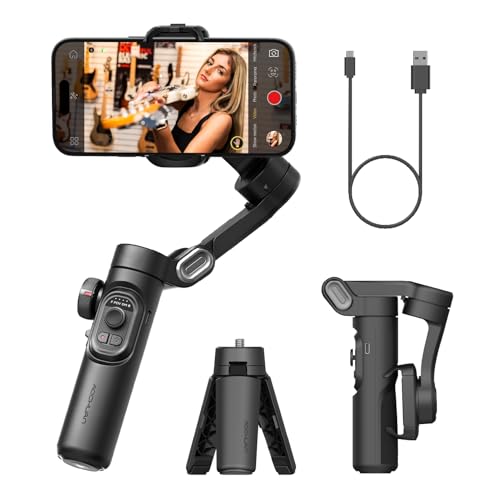
Another excellent offering from AOCHUAN, this 3-axis foldable smartphone gimbal (likely an iteration or re-listing of the Smart XE series) re-emphasizes portability and powerful stabilization. It boasts SMART 7.0 Anti-Shake technology and enhanced brushless motors, ensuring super steady video output even with larger smartphones. The innovative focus wheel and zoom slide empower beginners to achieve cinematic effects easily, without needing advanced filmmaking skills. Designed for vloggers, TikTokers, and YouTubers, its one-click horizontal/vertical switching is perfect for rapidly adapting to different platform needs, making it a strong contender for the best smartphone gimbal for beginners.
- Powerful and Versatile 3-Axis Foldable Gimbal Stabilizer.
- Compatible with iPhones and most Android phones, suitable for various scenarios.
- Portable Foldable Design, Compact and Lightweight (0.78 lbs).
- Innovative focus wheel and zoom slide for professional control.
- All-day Long Video Creation with 2600mAh battery (up to 10 hours).
- One-click video button for effortless horizontal/vertical mode switching.
- AI Face Track 4.0 and Gesture Control via the intuitive AOCHUAN APP.
- SMART 7.0 Anti-Shake with enhanced brushless motors for smooth video.
- Includes tripod, USB-C charging cable, and user manual.
Pros:
– Robust 3-axis stabilization for consistently smooth footage.
– Extremely portable with a foldable, lightweight design.
– Impressive 10-hour battery life for extended use.
– Intuitive focus and zoom controls simplify cinematic shooting.
– Quick switching between horizontal and vertical modes for social media.
Cons:
– Requires app usage to unlock full features like AI tracking and creative modes.
– Might be redundant if you already own the very similar AOCHUAN Smart XE.
User Impressions: Customers frequently commend this AOCHUAN model for its strong stabilization and long-lasting battery, making it a reliable tool for creating engaging content on the go. Its compact size is also a big hit.
4. Hohem iSteady M7 Gimbal Stabilizer for Smartphone, Magnetic

The Hohem iSteady M7 introduces some truly innovative features that can significantly enhance a beginner’s videography journey. Its “Upgraded On-Device AI” allows tracking of any subject (not just people) and is compatible with your phone’s native camera and live streaming apps, which is a massive convenience. The detachable touchscreen remote is a game-changer, letting you easily select tracking targets or control settings from a distance. With a high 500g payload and multiple expansion ports, you can even attach external lenses or microphones. Plus, the integrated RGB and CCT fill light ensures your shots are always perfectly lit.
- Upgraded On-Device AI for tracking any subject (people, pets, objects) with native camera and apps.
- Detachable Touchscreen Remote for simple target selection and control up to 10 meters.
- Upgraded 500g Payload and three expansion ports for accessories.
- Integrated RGB and CCT fill light with 360 lighting colors and remote control.
- Built-in Extension Pole for versatile high and low-angle shots.
Pros:
– Highly versatile AI tracking that works with native camera apps.
– Unique and convenient detachable touchscreen remote.
– Integrated fill light is a major advantage for improving video quality.
– High payload capacity for adding accessories.
– Built-in extension pole for diverse shooting angles.
Cons:
– The premium features might make it slightly pricier than basic beginner gimbals.
– Learning all the remote’s capabilities might take a little time.
User Impressions: Users are blown away by the Hohem iSteady M7’s smart AI tracking and the sheer convenience of the detachable remote. The built-in light is frequently highlighted as a fantastic addition that truly elevates footage.
5. FeiyuTech VB 4SE Gimbal Stabilizer for Smartphone, Foldable

For beginners who prioritize portability without sacrificing performance, the FeiyuTech VB 4SE is an excellent pick. Weighing a mere 315 grams, it’s incredibly lightweight, making it easy to carry everywhere. Despite its minimal weight, it still delivers solid 3-axis anti-shake performance to keep your footage stable. The newly upgraded 4.0 AI tracking is excellent for locking onto subjects, and the fast vertical shooting feature (double-click the M button) makes it a dream for quickly creating TikToks or Instagram Reels. Its fast charging ensures you’re ready to shoot again in no time.
- Lightweight (315g) but with a decent load capacity (260g).
- Anti-Shake Smooth with 3-axis stabilization.
- 4.0 AI Tracking function for accurate subject capture.
- Fast Charging (3.5 hours for full charge) and 9-hour battery life.
- Fast Vertical Shooting: double-click M button to switch modes instantly.
- “Feiyu ON” app for additional features like Gesture Control, Time-lapse, Panorama, and BeautyCam.
Pros:
– One of the lightest 3-axis gimbals, highly portable.
– Effective AI tracking for hands-free shooting.
– Quick and easy switching between horizontal and vertical modes.
– Good battery life and fast charging.
– App adds extra creative shooting modes.
Cons:
– Battery life is slightly less than some competitors, though still very good.
– Some advanced features require the companion app.
User Impressions: Owners appreciate the FeiyuTech VB 4SE for its extreme portability and rapid mode switching, which is perfect for social media content creation. The reliable stabilization also receives high marks.
6. AOCHUAN Gimbal Stabilizer for Smartphone, 4 in 1 Phone (M1 Pro)

The AOCHUAN M1 Pro stands out by simplifying the core gimbal experience, making it incredibly appealing for beginners. Its biggest draw is the built-in AI Vision Sensor, which automatically tracks your subject without needing any app or Bluetooth connection. This is huge for ease of use! While it offers 1-axis stabilization, it compensates with a versatile 4-in-1 design: it’s a gimbal, an extendable selfie stick, a desktop stand, and a tripod. This multi-functionality, combined with seamless 360° rotation and the option for magnetic fill lights, makes it a true all-in-one solution for casual users looking for simplified stability and tracking.
- AI Vision Sensor: Built-in sensor for automatic subject tracking, no app or Bluetooth needed.
- Seamless Stability: 1-axis gimbal stabilizer for steady horizontal or vertical shots.
- Seamless 360° Rotation for panoramic shots and dynamic angles.
- Versatile 4-in-1 Design: Gimbal, extendable selfie stick, desktop stand, tripod.
- Extendable Selfie Stick: Built-in 19-inch aluminum alloy rod.
- Experience Portable Brilliance: Compatible with three magnetic attachable fill lights (optional).
Pros:
– Remarkably easy to use with app-free AI tracking.
– Highly versatile 4-in-1 design saves money on separate accessories.
– Compact and lightweight, ideal for carrying anywhere.
– Extendable selfie stick is great for group shots and higher angles.
– 360° rotation for creative flexibility.
Cons:
– Only 1-axis stabilization, meaning it offers less comprehensive shake reduction than 3-axis gimbals, particularly for vertical and roll movements.
– Fill lights are optional, not included.
User Impressions: Users absolutely love the AOCHUAN M1 Pro for its “no-fuss” app-free tracking and its incredibly versatile design. It’s often praised as the perfect grab-and-go solution for casual content creators who want simplicity and multi-functionality.
7. kacylzom Gimbal Stabilizer for Smartphones – Auto Face

The kacylzom Gimbal Stabilizer caters to beginners who prioritize effortless auto-tracking for live streaming, video calls, or simple vlogging. Its intelligent AI system and optical lenses allow it to quickly recognize and track faces or objects, rotating 360° to keep you perfectly framed without any manual adjustment. While it might lean more towards an auto-tracking phone stand with some stabilization capabilities rather than a traditional multi-axis gimbal, its simplicity is its strong suit. The magnetic phone clamp is quick and easy, and its compact size with a 1/4 inch tripod interface ensures versatility.
- AI Auto Face/Object Tracking: Intelligent AI system for 360° following.
- Compact with 1/4 Inch Tripod Interface for compatibility with various tripods.
- Snap Into Place: Magnetically secure your smartphone in seconds.
- Horizontal & Vertical Screen Free Switch & 360 Rotation.
- Gimbal Stabilizer for Smartphone: Aims to transform shaky footage (though primary feature is tracking).
Pros:
– Extremely easy to set up and use with magnetic phone attachment.
– Effective AI auto-tracking for hands-free video recording.
– Compact and very portable, ideal for travel.
– Works with popular apps like Facebook, Zoom, and TikTok.
– Versatile 360-degree rotation.
Cons:
– Its primary function seems to be auto-tracking, with less emphasis or clarity on multi-axis stabilization compared to other true gimbals.
– Battery life details are not provided.
User Impressions: Customers appreciate the kacylzom stabilizer for its straightforward auto-tracking and magnetic mount, making it incredibly convenient for hands-free video calls and basic vlogging. Its ease of use is frequently highlighted.
8. 3-Axis Gimbal Stabilizer for Smartphone, Handheld Gimbal (F11)

The F11 3-Axis Gimbal Stabilizer brings robust performance and smart features to the beginner table. It boasts upgraded 8.0 Anti-Shake technology for silky-smooth footage and features an advanced magnetic AI tracking system that works without Bluetooth or an app – truly plug-and-play convenience! This AI sensor also supports gesture control, adding to the ease of use. What’s more, it includes an adjustable fill light with three color temperatures and nine brightness levels, ensuring you’re always well-lit. With a massive 10-hour battery life and a compact, foldable design, it’s a reliable companion for all your shooting needs.
- Upgraded 8.0 Anti-Shake Technology for silky smooth shooting.
- Magnetic AI Tracking & Gesture Control: No Bluetooth or app needed for tracking.
- Adjustable Fill Light: 3 color temperatures, 9 brightness levels, gesture control.
- 10-Hour Long Battery Life (3200mAh) with overheating protection.
- Lightweight and Foldable Design (0.82 pounds) with lanyard.
- Easy to Control and Widely Compatible with most smartphones.
- “Gimbal Joy” Smart App for additional shooting modes and templates.
Pros:
– Exceptional 3-axis anti-shake performance.
– Truly app-free and Bluetooth-free magnetic AI tracking for ultimate convenience.
– Integrated, customizable fill light is a huge advantage.
– Outstanding 10-hour battery life.
– Highly portable with a foldable design and included lanyard.
– Intuitive controls and wide smartphone compatibility.
Cons:
– AI tracking performs best in well-lit environments.
– Full creative modes require downloading the “Gimbal Joy” app.
User Impressions: Users are highly impressed with the F11’s hassle-free app-free AI tracking and the sheer longevity of its battery. The built-in, adjustable fill light is also a major plus, making it a favorite for diverse shooting conditions.
9. Smartphone Gimbal Stabilizer with Remote, Aluminum
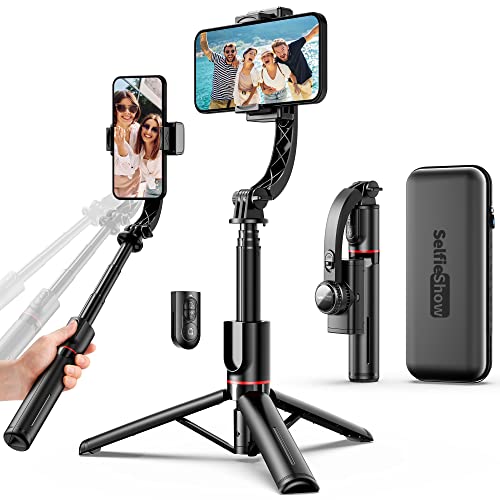
This smartphone gimbal stabilizer is designed for ultimate portability and straightforward functionality, making it a strong candidate for beginners who want a versatile, no-fuss device. While it doesn’t specify 3-axis stabilization, its high-performance brushless motor aims to reduce shakes for smoother footage. Its standout feature is the integrated compact selfie stick (extendable up to 2.8 feet) and tripod, all built into the handle. This means you have a stabilizer, selfie stick, and tripod in one super portable unit. The standalone wireless control button further simplifies shooting, allowing you to capture moments remotely without touching your phone.
- High Performance Automatic Anti Shake System (brushless motor).
- 360° Rotatable Phone Holder for horizontal or vertical shooting.
- Highly Versatile with Integrated Compact Selfie Stick (up to 75cm) and Tripod.
- Foldable Portable Lightweight design for effortless carrying.
- Great Battery Performance: 450 mAh battery, up to 2 hours continuous use.
- Universally Compatible with Most Smartphones (iOS/Android) via Wireless.
Pros:
– Extremely compact and lightweight, perfect for travel.
– All-in-one design (stabilizer, selfie stick, tripod).
– Simple to use with a wireless remote control.
– Quick and easy smartphone pairing.
Cons:
– Battery life (2 hours) is significantly shorter than most other gimbals.
– The level of stabilization (likely 1-axis or electronic) is less robust than dedicated 3-axis gimbals.
– Fewer advanced smart features like AI tracking or comprehensive app controls.
User Impressions: Customers love this product for its incredible portability and multi-functionality. It’s highly recommended for casual users who want a simple, all-in-one tool for basic stabilization, selfies, and group photos without the bulk.
10. Gimbal Stabilizer for Smartphone, 3-Axis Phone Gimbal (L7C Pro)

The L7C Pro 3-Axis Phone Gimbal offers serious stabilization in a beginner-friendly package. It’s designed to transform shaky footage into “silky smooth cinematic shots,” making it an ultimate tool for anyone looking to level up their videography game. This gimbal makes life easy with its intuitive “JCROBOT Gimbal Pro” app, which includes one-tap templates like Inception and Dolly Zoom, letting beginners create stunning effects with minimal effort. It also features AI Smart Tracking and Gesture Control, so your subject stays in focus automatically, and you can control shots with simple hand movements. Fast charging ensures you’re ready to shoot in no time.
- SMOOTH 3-AXIS GIMBAL STABILIZER for professional-grade stability.
- EASY TO USE GIMBAL AND APP (“JCROBOT Gimbal Pro”) with one-tap templates (Moment Mode).
- AI SMART TRACKING AND GESTURE CONTROL for subject focus and remote control.
- FAST CHARGING WHILE IN USE (80 min for full charge).
- FOLDABLE AND PORTABLE design (0.78 lbs, 5.98 inches folded).
- Status panel for battery power and gimbal mode.
- M button for simple switching between four gimbal modes.
Pros:
– Robust 3-axis stabilization for exceptionally smooth video.
– User-friendly app with creative one-tap templates.
– Reliable AI smart tracking and gesture control.
– Very fast charging time (80 minutes).
– Highly portable with a foldable and lightweight design.
Cons:
– Requires app usage for full creative features and moment modes.
– Specific “JCROBOT Gimbal Pro” app download is necessary.
User Impressions: Users find the L7C Pro incredibly intuitive, praising its powerful 3-axis stabilization and the “Moment Mode” templates in the app that make cinematic shots accessible to everyone. The fast charging is also a frequently mentioned benefit.
Conclusion
Picking the best smartphone gimbal for beginners really boils down to your specific needs and priorities. Whether you prioritize the lightning-fast setup of the DJI Osmo Mobile 6, the versatile multi-functionality of the AOCHUAN M1 Pro, or the app-free AI tracking of the F11, there’s a fantastic option out there for you.
Any of these gimbals will be a huge upgrade from shaky handheld footage, opening up a world of creative possibilities for your mobile videos. So, go ahead, choose your weapon, and start capturing those unforgettable moments with professional smoothness!
Frequently Asked Questions (FAQ)
Q1: What exactly is a smartphone gimbal, and how does it work?
A: A smartphone gimbal is a device that uses motors and intelligent sensors (like gyroscopes and accelerometers) to stabilize your smartphone. When you move, the gimbal’s motors counteract your movements, keeping your phone level and steady. This eliminates shakiness and creates smooth, professional-looking video footage.
Q2: Why do beginners specifically need a gimbal for their smartphone?
A: For beginners, a gimbal is a game-changer because it instantly improves video quality without requiring advanced filming skills. It helps overcome common beginner issues like shaky hands, makes tracking shots easy, and enables creative modes like time-lapse or panoramas with stability, boosting confidence and results from day one.
Q3: What’s the difference between 1-axis, 2-axis, and 3-axis gimbals?
A: This refers to the number of directions the gimbal stabilizes your phone:
* 1-Axis: Stabilizes only on one axis (usually tilt, to prevent up-and-down shaky movements). Best for basic stability and ultra-portability.
* 2-Axis: Stabilizes on two axes (tilt and roll, preventing side-to-side wobbles and up-and-down movements). Offers better stability than 1-axis.
* 3-Axis: Stabilizes on three axes (tilt, roll, and pan – preventing up-and-down, side-to-side, and rotational wobbles). This provides the most comprehensive and buttery-smooth stabilization, which is often recommended for the best results.
Q4: How do I connect my phone to a gimbal, and do I need a special app?
A: Most gimbals connect to your phone via Bluetooth. You usually attach your phone securely to the gimbal’s clamp, then power on the gimbal and enable Bluetooth on your phone to pair them. Many gimbals also have a dedicated companion app (like DJI Mimo or AOCHUAN app) that unlocks advanced features like AI tracking, creative modes (time-lapse, panorama), and precise controls. Some newer models, like the AOCHUAN M1 Pro or F11, offer basic AI tracking without an app, which is super convenient for beginners!
Q5: Are smartphone gimbals compatible with all phones, including older models?
A: Most modern smartphone gimbals are designed to be widely compatible with both iPhones and Android phones, regardless of generation, as long as they fit within the gimbal’s size and weight limits (often specified by the manufacturer). It’s always best to check the product’s compatibility list or the maximum phone dimensions (width, thickness, weight) before purchasing, especially if you have a very large phone or use a bulky case.
Q6: How long does a smartphone gimbal battery typically last?
A: Battery life varies significantly between models. Many beginner-friendly gimbals offer excellent battery life, ranging from 8 to 10 hours or more on a single charge. Some ultra-compact or simpler models might offer 2-4 hours. Always check the specifications, especially if you plan long shooting sessions. Many also support fast charging or can be charged while in use.
Q7: Can I use a gimbal for live streaming or video calls?
A: Absolutely! Gimbals are fantastic for live streaming on platforms like Instagram, TikTok, YouTube Live, or for video calls on Zoom/FaceTime. The stabilization keeps your feed steady and professional, while AI tracking features can keep you perfectly framed even if you move around, making your live content much more engaging.
Q8: Is a gimbal worth it for casual users who just want to capture family moments or vacations?
A: Yes, definitely! Even for casual users, a gimbal dramatically improves the quality of everyday videos. Those precious family moments, vacation highlights, or pet antics will look infinitely better, clearer, and more enjoyable to watch without jarring shakiness. It elevates casual footage to something truly memorable.

