
Tired of shaky, amateur-looking videos from your Android phone? Want to create smooth, cinematic footage that rivals professional productions? Then you, my friend, need a phone gimbal! These handy devices transform your smartphone into a powerful filmmaking tool, eliminating camera shake and unlocking a world of creative possibilities. Finding the best phone gimbal for Android can feel like a quest, with so many options out there.
Whether you’re a budding vlogger, an aspiring TikTok star, or just someone who loves capturing life’s moments in stunning detail, a good smartphone stabilizer is a game-changer. It helps you get incredible, butter-smooth video, even when you’re on the move. But which one is right for your Android device?
We’ve done the heavy lifting and rounded up seven of the top contenders for the best phone gimbal for Android users. We’ll dive into what makes each one special, looking at their features, pros, cons, and what real users are saying. Get ready to elevate your mobile videography!
1. hohem iSteady X3 SE Gimbal Stabilizer

The hohem iSteady X3 SE stands out as a fantastic choice for anyone seeking a beginner-friendly yet feature-rich gimbal. What truly sets it apart is its focus on ease of use combined with powerful stabilization, making professional-grade content accessible without a steep learning curve. The detachable remote controller adds incredible convenience, freeing you up to capture dynamic shots or group photos from a distance.
Key Features:
– Detachable Magnetic Remote Controller (up to 32.81 feet range)
– Advanced iSteady 8.0 Technology for upgraded 3-axis stabilization
– Portable and Foldable Design, weighing only 0.79 lbs
– Hohem Joy App with AI tracking, gesture control, and creative templates
– 11-Hour Long Battery Life on a 2-hour charge
– Beginner-Friendly Stabilizer design
– High Payload Capacity of 0.66 lbs
– Quick Horizontal and Vertical Screen Switching
Pros:
– Super lightweight and pocket-sized for ultimate portability.
– Excellent stabilization, even during movement.
– Long-lasting battery life for extended shoots.
– Detachable remote adds significant convenience for solo creators or group shots.
– User-friendly for first-time gimbal owners.
Cons:
– Payload capacity might be a limitation for very large or heavy phones with thick cases.
– Relies on the Hohem Joy app for full functionality.
User Impressions:
Users frequently praise the iSteady X3 SE for its impressive stabilization at an affordable price point. Many appreciate how easy it is to set up and start using, making it a hit with beginners. The detachable remote is a particularly popular feature, adding versatility to shooting scenarios.
2. DJI Osmo Mobile 7P Gimbal Stabilizer

The DJI Osmo Mobile 7P is a powerhouse designed for serious content creators who demand premium features and seamless integration. Its standout feature is the Multifunctional Module, which cleverly combines intelligent tracking, DJI Mic 2/Mini reception, and even lighting capabilities into one compact unit. This level of integrated functionality makes it an incredibly versatile tool for achieving cinema-quality masterpieces right from your Android phone.
Key Features:
– Multifunctional Module with intelligent tracking, DJI Mic 2/Mini reception, and lighting
– Robust 3-axis gimbal stabilization for lossless stability
– Integration with DJI Mimo for ShotGuides and One-Tap Edit
– Quick power-on and magnetic smartphone mounting
– Built-in extension rod and tripod for versatile shooting
– Max operating time of 10 hours; gimbal can power your phone as a mic receiver
– Dual-Lens Enhanced Tracking for smarter, steadier subject focus
– Includes the gimbal, Multifunctional Module, and magnetic phone clamp
Pros:
– Unparalleled stability and advanced tracking features.
– Integrated module significantly enhances production value with mic and lighting options.
– Built-in extension rod and tripod reduce the need for extra accessories.
– DJI Mimo app offers professional editing and shooting guides.
Cons:
– Higher price point compared to entry-level gimbals.
– DJI Mimo app needs to be downloaded directly from DJI’s official website due to Google Play compatibility issues.
User Impressions:
Customers highlight the OM 7P’s professional capabilities and robust build. The enhanced tracking and the convenience of the integrated module receive high marks. While the price is a consideration, users feel it’s a worthwhile investment for its comprehensive feature set.
3. DJI Osmo Mobile SE

The DJI Osmo Mobile SE offers a fantastic balance of portability, ease of use, and DJI’s renowned stabilization technology. What makes it particularly appealing is its magnetic quick-snap design, allowing you to instantly attach or detach your phone, ensuring you never miss a spontaneous moment. Combined with the upgraded ActiveTrack 6.0, this gimbal makes keeping your subjects in focus incredibly simple, even if they’re constantly on the move.
Key Features:
– Portable, Foldable, and Magnetically Quick design
– Stay on Point with ActiveTrack 6.0 for enhanced tracking
– Remote Control via DJI Mimo app on Apple Watch
– Effortless Editing with ShotGuides and LightCut templates
– Smooth 3-axis stabilization with a next-gen control algorithm
– Seamless Landscape and Portrait mode switching
– New Status Panel for quick checks on battery, system, and gimbal mode
– Ergonomic, stain-resistant, non-slip grip
Pros:
– Extremely compact and easy to carry on any adventure.
– Reliable and precise ActiveTrack 6.0 for tracking subjects.
– Quick setup and magnetic phone clamp save time.
– Watch control adds a unique layer of convenience.
– Excellent value for DJI’s quality stabilization.
Cons:
– Lacks a built-in extension rod.
– Some advanced features may require the DJI Mimo app.
User Impressions:
Reviewers frequently commend the Osmo Mobile SE for its compact size and solid performance. The magnetic clamp is a crowd-pleaser for its speed and simplicity, and the ActiveTrack’s ability to keep up with energetic subjects is highly praised, making it a reliable choice for everyday users.
4. Gimbal stabilizer for Smartphone, 3-Axis Phone Gimbal (JCROBOT L7C Pro)

The JCROBOT L7C Pro is designed to transform shaky phone footage into polished, professional-grade video with minimal effort. Its standout feature is the combination of advanced 3-axis stabilization with an intuitive app that offers one-tap templates for cinematic effects like Inception and Dolly Zoom. This makes it a fantastic tool for content creators looking to add a creative flair to their mobile videography without extensive editing knowledge.
Key Features:
– Smooth 3-axis gimbal stabilizer for cinematic shots
– Easy-to-use Gimbal Pro app with one-tap templates (Moment Mode)
– AI Smart Tracking and Gesture Control for hands-free operation
– Fast Charging (80 minutes to full) and “Charge While In Use” capability
– Foldable and Portable design (0.78 lbs, 5.98 inches folded)
– Ergonomic handle for comfortable all-day use
– M button for simple switching between four gimbal modes
– Handy status panel for battery, system, and mode checks
Pros:
– Delivers remarkably smooth and professional footage.
– Quick charging time and ability to charge while in use are very practical.
– AI tracking and gesture control enhance ease of solo shooting.
– App-based creative modes make cinematic effects accessible.
– Highly portable with a comfortable grip for long sessions.
Cons:
– Requires the companion app for full utilization of creative features.
– Less recognized brand compared to industry leaders.
User Impressions:
Users are often impressed by the L7C Pro’s ability to quickly stabilize footage and its rapid charging capabilities. The AI tracking and gesture controls are highlighted as convenient features for vlogging and self-shooting, making it a solid choice for those seeking easy, high-quality results.
5. DJI Osmo Mobile 6, 3-Axis Phone Gimbal

The DJI Osmo Mobile 6 is a fan favorite for its seamless user experience and advanced features packed into a highly portable design. What truly makes it shine is its unique ability to power on automatically as soon as you unfold it, coupled with a built-in extension rod. This means you can go from pocket to shooting cinematic content in mere seconds, capturing those fleeting moments or perfect wide selfies without missing a beat.
Key Features:
– ActiveTrack 6.0 for superior object tracking
– Remote Control With Apple Watch via DJI Mimo app
– Silky Smooth Shots with 3-Axis Stabilization
– Quick power-on upon unfolding and magnetic phone clamp
– Lightweight, Compact, and Extendable with a built-in extension rod (305g)
– ShotGuides for AI-powered scene recognition and shooting suggestions
– Side Wheel to control focus and zoom for cinematic effects
– Stain-resistant and non-slip ergonomic grip
– New Parents and Kids Mode for autonomous shooting
Pros:
– Extremely fast setup and deployment.
– Built-in extension rod adds great versatility for angles and selfies.
– Excellent ActiveTrack 6.0 for precise subject following.
– Side wheel provides tactile control over focus and zoom.
– Intelligent ShotGuides make pro-level shooting accessible to novices.
Cons:
– DJI Mimo app needs to be downloaded from DJI’s official website due to Google Play compatibility.
– Pricier than some basic gimbals.
User Impressions:
The Osmo Mobile 6 consistently receives rave reviews for its intuitive design, particularly the automatic power-on and the integrated extension rod. Users love its robust stabilization and the creative control offered by the side wheel and intelligent shooting modes, making it an ideal companion for diverse filming needs.
6. AOCHUAN Gimbal Stabilizer for Smartphone (Smart XE)

The AOCHUAN Smart XE gimbal offers remarkable versatility and advanced tracking features, making it a compelling option for a wide range of Android users. Its standout quality is the Smart Tracking 6.0 system, which boasts four different modes – face, body, object, and third-party live tracking – alongside intuitive gesture control. This comprehensive tracking capability ensures your subject always remains the center of attention, empowering you to create dynamic and engaging mobile videography.
Key Features:
– Wide Compatibility with most Android and iPhone models (under 7 inches, 0.62 lbs, 6.3×3.5×0.4 inches)
– Smart 8.0 Anti-Shake technology for professional stabilization
– Smart Tracking 6.0 with four modes (Face, Body, Object, 3rd-Party Live) and Gesture Control
– Professional focus wheel and zoom slider for real-time adjustments
– Fast charging (3.5 hours) and over 10 hours of long battery life (2600mAh)
– Portable and Foldable design (0.77 lbs weight, 0.55 lbs payload capacity)
– Easy one-click switching between portrait and landscape modes
Pros:
– Extensive tracking options, including third-party live tracking, are highly versatile.
– Physical focus and zoom wheels provide precise manual control.
– Excellent battery life for long shooting sessions.
– Broad compatibility with various smartphone models.
– Impressive anti-shake performance.
Cons:
– Maximum payload of 0.55 lbs might be limiting for some heavier phones, especially with cases.
– Companion app (AOCHUAN) needs to be downloaded separately to check compatibility and unlock all functions.
User Impressions:
Customers frequently commend the AOCHUAN Smart XE for its robust tracking abilities and the convenience of the dedicated focus/zoom wheel. Its long battery life is also a strong point, allowing users to film for extended periods without concern. Many find it to be a powerful and reliable gimbal for diverse content creation.
7. AOCHUAN Phone Gimbal Stabilizer 3-Axis Smartphone Foldable (Smart XE)
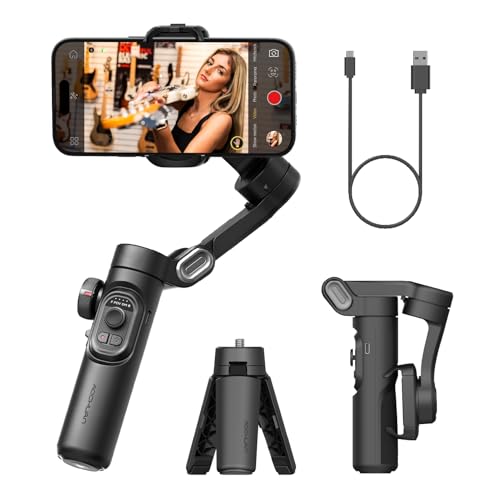
Another excellent offering from AOCHUAN, this Smart XE model emphasizes powerful performance and creative control in a highly portable package. Its key differentiator is the combination of enhanced brushless motors and the 7.0 generation anti-shake algorithm, ensuring incredibly smooth and steady video output, even with larger screen smartphones. Coupled with an innovative focus wheel and zoom slide, it truly lets you shoot like a professional filmmaker. This is a top contender for the best phone gimbal for Android if you prioritize stability and tactile control.
Key Features:
– Powerful and Versatile 3-Axis Foldable Gimbal Stabilizer
– Compatible with iPhones and most Android phones (250-gram payload)
– Portable Foldable Design (0.78 lbs net weight)
– Innovative focus wheel and zoom slide with adjustable speed
– 3 brushless motors for enhanced power and stability
– 2600mAh battery for up to 10 hours of continuous shooting
– One-click video button for effortless horizontal/vertical switching
– AI Face Track 4.0 and Gesture Control via AOCHUAN APP
– SMART 7.0 Anti-Shake algorithm for professional videography
Pros:
– Delivers exceptionally smooth and stable video.
– Intuitive physical controls (focus wheel, zoom slide) elevate the filming experience.
– Strong brushless motors handle a wide range of smartphones.
– Excellent battery life for all-day shooting.
– Quick switch for social media formats (TikTok/YouTube Shorts).
Cons:
– The 250-gram (0.55 lbs) payload might be tight for very heavy or bulky Android phones.
– Requires downloading the AOCHUAN app for full features and tutorials.
User Impressions:
Users are consistently impressed by the video smoothness and the quality of the anti-shake technology. The dedicated focus and zoom controls are highly praised for giving a more “professional camera” feel. Many find it ideal for social media content creation due to its quick mode switching and excellent stabilization.
Frequently Asked Questions about Phone Gimbals
Q1: What exactly does a phone gimbal do?
A phone gimbal is a handheld device that uses motors and sensors to stabilize your smartphone, counteracting unwanted movements like shakes, tilts, and pans. This results in incredibly smooth, professional-looking video footage, even when you’re walking, running, or moving quickly.
Q2: Do I really need a gimbal for my Android phone? Isn’t my phone’s OIS/EIS enough?
While many modern Android phones have optical image stabilization (OIS) or electronic image stabilization (EIS), a 3-axis gimbal provides a far superior level of stabilization. OIS/EIS can only correct minor shakes, but a gimbal physically moves your phone to keep it perfectly level, eliminating much more drastic motion and giving a true “cinematic” feel. If you’re serious about mobile videography, a gimbal is a must-have camera accessory.
Q3: How do I connect my Android phone to a gimbal?
Most phone gimbals connect to your Android phone via Bluetooth. You’ll typically download the gimbal’s companion app (like DJI Mimo, Hohem Joy, or AOCHUAN app), power on the gimbal, enable Bluetooth on your phone, and then pair the devices through the app. The app often unlocks additional features like object tracking, time-lapses, and creative modes.
Q4: Are phone gimbals compatible with all Android phones?
Most gimbals are designed to be compatible with a wide range of Android phones, often specifying a weight and size limit. It’s crucial to check the product’s specifications for maximum payload (the weight of your phone) and dimensions (width/thickness) to ensure your specific Android model, especially if it’s a larger “plus” or “ultra” version, will fit and balance correctly. Removing your phone case is often recommended.
Q5: What’s the difference between 1-axis, 2-axis, and 3-axis gimbals?
– 1-axis: Stabilizes only on the roll axis (keeps the horizon level). Often found in basic selfie sticks.
– 2-axis: Stabilizes on the roll and tilt (pitch) axes, correcting up/down and side-to-side movements. Better for smooth vertical movements.
– 3-axis: The most common and effective type, stabilizing on all three axes: roll, tilt (pitch), and pan (yaw). This provides the most comprehensive stabilization, allowing for smooth tracking shots and dynamic movements without unwanted shakiness. All the gimbals reviewed here are 3-axis.
Q6: What features should I look for when buying the best phone gimbal for Android?
Look for 3-axis stabilization, good battery life, a comfortable and portable design (foldable is a plus), and robust phone compatibility. Useful features include active tracking (for following subjects), a built-in extension rod or tripod, an intuitive companion app with creative modes (time-lapse, panorama), and physical controls for zoom/focus if you want more cinematic control.
Q7: Can I use a gimbal for live streaming or video calls?
Absolutely! Many gimbals include features like face tracking and the ability to easily switch between landscape and portrait modes, making them perfect for stable live streaming on platforms like YouTube, TikTok, or Instagram, as well as for clear, steady video calls.

