
If you’re serious about capturing smooth, professional-looking footage with your gimbal, you know how crucial it is to see exactly what your camera sees. That tiny flip-out screen on your camera often just doesn’t cut it, especially when you’re navigating complex shots or working in bright sunlight. That’s where an external monitor comes into play, transforming your filming experience. But how do you pick the best monitor for gimbal setups, and what other accessories do you need to make it all work seamlessly?
In this guide, we’re diving deep into the world of gimbal monitoring. We’ll explore not just top-tier external displays but also the essential mounting solutions and cables that tie your whole rig together. Our goal? To help you find the perfect display and accessories to boost your workflow and get those cinematic shots you’ve always dreamed of.
Why Do You Need an External Monitor for Your Gimbal?
Using an external monitor with your gimbal isn’t just a luxury; for many filmmakers, it’s a necessity. Here’s why:
- Better View: A larger, brighter screen gives you a much clearer view of your shot, allowing for precise framing and composition. You can spot issues like unwanted elements or soft focus easily.
- Critical Focus: Many external field monitors come with professional tools like focus peaking and false color, which are invaluable for nailing focus and getting exposure just right, even on the fly.
- Client Monitoring: If you’re working with a client or director, an external monitor allows them to see the shot in real-time without crowding around your camera.
- Ergonomics: Holding your camera low or high can be awkward when trying to view its screen. A monitor mounted strategically on your gimbal or gimbal grip offers a far more comfortable and intuitive operating position.
- Workflow Efficiency: Quicker adjustments, better visibility, and advanced tools mean less time fussing with settings and more time actually capturing great footage.
How to Choose the Best Monitor for Gimbal Setups
When looking for the best monitor for gimbal use, consider these key factors:
- Size & Weight: You want a monitor that’s large enough to be useful but not so heavy it throws off your gimbal’s balance or exhausts your arms.
- Brightness (Nits): For outdoor shooting, high brightness (1000 Nits or more) is crucial to combat glare and ensure visibility.
- Resolution: While 4K input is nice, 1080p is often sufficient for a field monitor of this size. What matters more is how sharp and clear the image looks.
- Input/Output: HDMI is standard, but check if you need SDI. Also, look for audio out for monitoring sound.
- Power: Battery life and power options (e.g., NP-F batteries, DC input) are vital for long shoots.
- Mounting Options: How will you attach it to your gimbal? Look for 1/4″-20 threads or specific gimbal mounts.
- Professional Tools: Features like focus peaking, false color, histograms, and waveform monitors are incredibly useful.
Now, let’s explore some of the top picks and essential accessories that will elevate your gimbal work!
Our Top Picks for Gimbal Monitor Solutions & Accessories
Here’s a look at some excellent products that contribute to finding the best monitor for gimbal setups.
DH03 Handheld Gimbal Grip with Cold Shoe for Mounting…
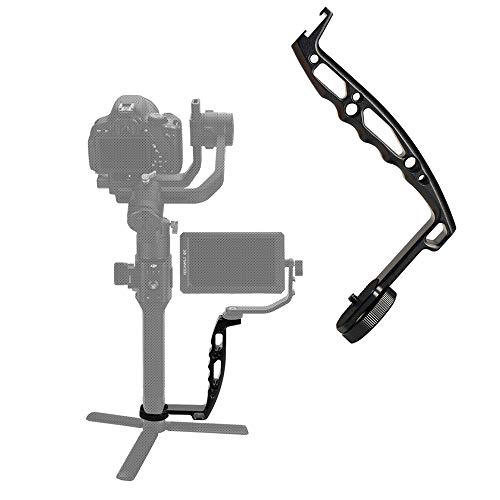
This isn’t a monitor itself, but a super versatile grip that’s essential for anyone serious about building the best monitor for gimbal rig. It transforms your gimbal into a more comfortable dual-handle setup, significantly reducing arm fatigue, especially with heavier camera systems. The cold shoe and multiple 1/4” and 3/8” threaded holes mean you can easily attach your chosen monitor, microphone, or LED lights right where you need them. It’s built from lightweight aerospace aluminum, so it adds strength without unnecessary bulk, making those low-angle shots a breeze.
- Universal Compatibility with DJI, Zhiyun, Feiyu gimbals
- Doubles as a dual grip for reduced arm fatigue
- Lightweight Aerospace Aluminum Alloy construction
- Unibody L Shape Bracket for increased strength
-
Multiple 1/4” and 3/8” thread holes, plus cold shoe for accessories
-
Comfortable dual-grip operation
- Plenty of mounting points for accessories
- Lightweight yet durable
-
Allows for versatile shooting angles
-
Not a monitor, but an accessory
- May require two units for true “dual grip” depending on setup
User Impressions: Users frequently praise this grip for its robust build quality and how effectively it eases the strain of operating gimbals for extended periods. Many appreciate the abundance of mounting options, allowing for highly customized setups. It’s often described as a “must-have” for professional gimbal users.
NEEWER Adjustable Field Monitor Mount, 360° Rotating Camera…

Another indispensable accessory for your gimbal, this NEEWER mount is designed specifically to secure your field monitor to popular DJI gimbals like the RS series. Its robust CNC milled aluminum alloy construction ensures durability, while the unique rosette mount and dual M4 screws provide incredibly safe and stable installation. The real highlight is its 360° smooth rotation and adjustable damping, giving you complete freedom to position your monitor for the optimal viewing angle, no matter how dynamic your shot. It also includes multiple 1/4 inch threads for additional accessories.
- Wide compatibility with DJI RS/RSC series gimbals
- Secure installation with dual M4 screws and rosette mount
- 360° smooth rotation with adjustable damping
- Multiple 1/4 inch threads for additional accessories
-
Robust CNC milled aluminum alloy construction
-
Extremely secure and stable attachment
- Highly adjustable for perfect viewing angles
- Durable and lightweight build
-
Adds versatility to your gimbal rig
-
Only compatible with specific DJI gimbals
- Not a monitor, but a mounting solution
User Impressions: Customers love the solid build and secure locking mechanism of this mount. The 360° rotation is a major plus, allowing for quick adjustments on set. Many highlight its professional feel and how it confidently holds even heavier monitors without sagging.
SmallRig Upgraded Ultra Thin HDMI Cable 55cm/1.8Ft (A to…

When assembling the best monitor for gimbal setup, don’t overlook the importance of a good cable! This SmallRig HDMI cable is specifically designed for gimbal rigs. Its ultra-thin and flexible nature (just 3.6mm diameter!) makes it perfect for tight spaces, preventing snagging or adding unwanted weight that could throw off your gimbal’s balance. Supporting 4K@60Hz and various advanced HDMI features, it ensures high-speed, stable signal transmission, which is crucial for real-time monitoring. It’s compatible with a wide range of devices and even comes with a handy cable tie for neat management.
- Ultra-thin (3.6mm) and flexible design
- Supports HDMI 2.0 standard: 4K@60Hz, Full HD 1080P, 3D, ARC, HDR
- Wide compatibility with standard HDMI Type A devices
- Ensures stable and pure signal transmission
-
Includes a cable tie for cable management
-
Prevents tangles and snags on the gimbal
- High-speed data transfer for clear video
- Durable and reliable connection
-
Perfect length for compact rigs
-
Only 55cm long, may be too short for some setups
- Specific to HDMI A to A (check your device ports)
User Impressions: Filmmakers consistently praise this cable for its flexibility and thin profile, which is perfect for keeping gimbal setups clean and free of snags. Users report reliable 4K signal transmission and appreciate the included cable tie for organization. It’s often called a “game-changer” for rigging efficiency.
DJI Transmission (High-Bright Monitor Combo), 20,000ft…

This is where you get a truly integrated and professional solution for the best monitor for gimbal experience. The DJI Transmission combo isn’t just a monitor; it’s a powerful wireless image transmission system designed for high-end professional use. Offering a staggering 20,000ft range with 1080p/60fps transmission and ultra-low latency, it brings cinematic-grade monitoring to your fingertips. The included High-Bright Remote Monitor integrates the receiver, allowing for seamless auto frequency hopping, independent recording to a microSD card, and even gimbal/focus/camera control. This is the ultimate tool for large sets and complex productions.
- 20,000ft 1080p/60fps transmission range with O3 Pro technology
- Seamless auto frequency hopping (2.4 GHz, 5.8 GHz, DFS)
- End-to-end ultra-low latency for real-time monitoring
- Integrated wireless receiver in the High-Bright Remote Monitor
- Supports gimbal, focus, and camera control
-
Independent recording and playback (1080p/60fps H.264)
-
Unparalleled transmission range and stability
- Integrated monitor and receiver for streamlined workflow
- Ultra-low latency for critical focus and timing
- Advanced control features for gimbals and cameras
-
High-bright display for outdoor visibility
-
Premium price point
- Potentially overkill for casual users
- Proprietary DJI ecosystem
User Impressions: Professionals rave about the reliability and range of the DJI Transmission system. The integrated monitor and control capabilities are frequently highlighted as workflow enhancers. Users confirm the ultra-low latency is critical for complex camera movements and remote focus pulling.
SMALLRIG Adjustable Camera Monitor Mount for DJI…

SmallRig is known for its clever camera accessories, and this adjustable monitor mount is no exception. It’s designed to securely hold your monitor onto popular handheld stabilizers from DJI and Zhiyun, making it easier to achieve the best monitor for gimbal viewing angle. What sets it apart is its broad compatibility, attaching securely with either built-in thumbscrews or an included rosette adapter for DJI Ronin-S/SC. It offers a 360° tilt range, ensuring you can always find the perfect viewing position, and features multiple 1/4″-20 threads for adding other accessories like cold shoes for microphones.
- High customization with compatibility for DJI and Zhiyun gimbals (Ronin-S/SC, Crane 2S/3/3S, Weebill-S, Moza AirCross 2)
- Rosette mounting plate included for DJI Ronin-S/SC
- 360° tilt range for flexible monitor positioning
- Supports monitors up to 2.2 lbs (1kg)
-
Firm locking with rubber pad and Allen wrench slots for thumbscrews
-
Highly versatile for multiple gimbal brands
- Secure and stable monitor attachment
- Excellent 360° tilt adjustment
-
Additional mounting points for accessories
-
Max weight limit of 1kg might be restrictive for some larger monitors
- Requires careful tightening with an Allen wrench for maximum security
User Impressions: Customers consistently praise this SmallRig mount for its robust construction and secure locking. The versatility across different gimbal brands is a major selling point. Users appreciate the smooth tilt mechanism and the ability to add extra accessories, making it a highly functional piece of their rig.
Portkeys HD7H Camera Field Monitor 7” 1000nit High…

The Portkeys HD7H is a fantastic standalone monitor option if you’re looking for the best monitor for gimbal use without needing an entire wireless system. Its standout feature is the bright 7-inch, 1000-nit display, making it perfectly visible even during challenging outdoor shoots. With 4K HDMI input, a headphone jack for audio monitoring, and professional tools like luma histogram, false color, and focus peaking, it gives you precise control over your image. Weighing only 278g, it’s incredibly lightweight and portable, featuring 1/4″-20 mounting threads on three sides for flexible rigging.
- Bright 7-inch, 1000-nit, 1280 x 720 HD display
- 4K HDMI Input & 3.5mm Audio Output
- Professional monitoring tools: luma histogram, false color, focus peaking, anamorphic de-squeeze
- Lightweight (278g) and portable design
- Multiple 1/4″-20 mounting threads
-
Flexible power options (NP-F batteries or 7.4~24V DC input)
-
Excellent brightness for outdoor use
- Comprehensive professional monitoring tools
- Very lightweight and portable
-
Versatile mounting options
-
Only 720p resolution (though 4K input is supported)
- Battery not included
- Anti-glare screen might reduce ultimate sharpness slightly compared to glossy
User Impressions: Users frequently highlight the Portkeys HD7H’s impressive brightness and the effectiveness of its professional monitoring tools, particularly focus peaking. Its lightweight design is a significant advantage for gimbal work, and the flexible power options are also well-received. Many consider it a strong contender for the money.
EaxanPic Adjustable Gimbal Monitor Mount Phone Mount with…

Rounding out our list of essential accessories for the best monitor for gimbal setups is the EaxanPic Adjustable Gimbal Monitor Mount. Designed with a wide range of DJI Ronin gimbals in mind (including RS 4, RS 3, and RS 2 series), this mount offers exceptional flexibility. It boasts impressive 360° horizontal and 160° vertical adjustment, allowing for precise positioning of your monitor or even a phone. Equipped with a stable NATO clamp for quick attachment to either side of your stabilizer and multiple 1/4″ and 3/8″ threaded holes, it provides abundant mounting options for all your additional accessories. Crafted from durable aluminum alloy, it’s built to last.
- Designed specifically for DJI Ronin RS/RSC series gimbals
- 360° horizontal and 160° vertical adjustment
- Multiple 1/4″ and 3/8″ threaded holes, plus cold shoe mount
- Stable NATO clamp for quick release and secure attachment
-
Durable aluminum alloy, CNC precision machined
-
Highly versatile adjustability for perfect angles
- Quick and secure attachment via NATO clamp
- Abundant mounting points for extra gear
-
Robust and durable construction
-
Limited to DJI Ronin gimbals with NATO rails
- Not a monitor, but a mounting solution
User Impressions: Users are very impressed with the build quality and stability of this EaxanPic mount. The NATO clamp system is a hit for its quick release and secure hold. The extensive range of adjustment and multiple mounting points are frequently praised for their utility in various shooting scenarios.
Finding the Best Monitor for Gimbal: What Matters Most?
Ultimately, the best monitor for gimbal setup depends on your specific needs, budget, and the type of content you create. For professional productions requiring ultimate range and control, the DJI Transmission combo is a clear winner. If you need a bright, feature-rich standalone monitor, the Portkeys HD7H offers excellent value. And don’t forget that a great monitor is only as good as its mounting solution and connecting cables. Accessories like the SmallRig mounts, NEEWER mount, DH03 grip, and the SmallRig HDMI cable are crucial for creating a truly ergonomic and efficient setup.
Investing in the right external monitor and its accompanying accessories will undoubtedly elevate your gimbal footage, providing clearer visuals, better control, and a more streamlined workflow. Happy shooting!
FAQs
Q1: Why should I use an external monitor instead of my camera’s built-in screen on a gimbal?
A1: External monitors offer a larger, brighter, and often higher-resolution view, making it easier to judge focus, exposure, and composition accurately. They also provide professional monitoring tools like focus peaking and false color, which are rarely found on camera screens. Plus, they improve ergonomics, allowing for more comfortable viewing angles.
Q2: What’s the ideal size for a gimbal monitor?
A2: Most filmmakers find that monitors between 5 and 7 inches offer the best balance. They’re large enough for detailed viewing but small and light enough not to unbalance the gimbal or add excessive weight, which can lead to arm fatigue.
Q3: Do all gimbals support external monitors?
A3: Most modern gimbals themselves don’t directly “support” a monitor, but they provide mounting points (like 1/4″-20 threads or NATO rails) where you can attach a monitor mount. You’ll then connect the monitor to your camera via an HDMI cable. Some high-end gimbals (like certain DJI Ronin models) might have integrated solutions or specific accessories.
Q4: How do I power an external monitor on a gimbal?
A4: Most field monitors are powered by standard camera batteries like Sony NP-F series batteries. Some also offer a DC input, allowing you to power them from a V-mount battery or other power solutions if your rig supports it. Battery life is a crucial consideration for long shoots.
Q5: What’s the difference between a “field monitor” and a regular computer monitor?
A5: Field monitors are specifically designed for on-location video production. They are typically more rugged, feature higher brightness for outdoor viewing, have professional monitoring tools built-in (like histograms, waveforms, false color, focus peaking), and are designed to be lightweight and portable with specific camera battery plate options.
Q6: Are wireless monitors worth it for gimbal work?
A6: Wireless monitors (like the DJI Transmission combo mentioned) are a game-changer for professional productions, especially if you need to monitor from a distance, have clients or directors viewing, or need remote camera control. They eliminate cables, reduce setup time, and offer immense freedom. However, they are significantly more expensive than wired solutions and may introduce a tiny bit of latency, though modern systems have minimized this.
Q7: What kind of cables do I need for a gimbal monitor setup?
A7: You’ll typically need a short, flexible HDMI cable (like the SmallRig Ultra Thin HDMI Cable) to connect your camera’s HDMI output to your monitor’s HDMI input. Ensure you have the correct HDMI type (e.g., Type A, C, or D) for both your camera and monitor. Short, high-quality, flexible cables are best to avoid snagging and maintain gimbal balance.

