Elevate Your Content: A Detailed Review of the DJI OM 4 Smartphone Gimbal Stabilizer
In the world of content creation, shaky footage is the ultimate enemy. Whether you’re a burgeoning vlogger, a seasoned YouTuber, a live streamer, or just someone who loves capturing life’s moments on your phone, smooth, cinematic video is non-negotiable. Enter the DJI OM 4 – Handheld 3-Axis Smartphone Gimbal Stabilizer, a device that promises to transform your smartphone videography. But does it truly deliver on its ambitious claims? We’ve put this popular phone stabilizer through its paces, and here’s our honest, in-depth review.
If you’re ready to say goodbye to wobbly shots and hello to professional-looking videos, then the DJI OM 4 is definitely worth your attention. You can check out its full specifications and current pricing here: DJI OM 4 Handheld 3-Axis Smartphone Gimbal Stabilizer.
What is the DJI OM 4, and Why Do You Need It?
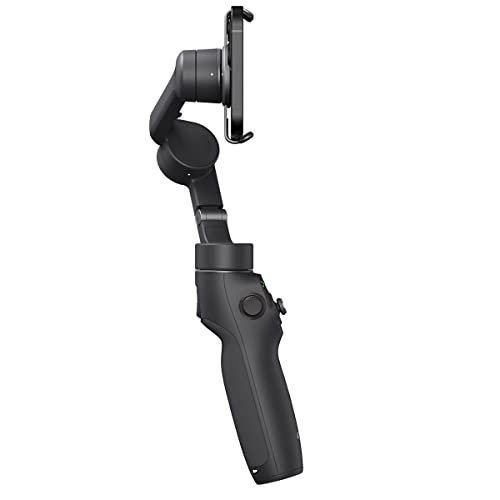
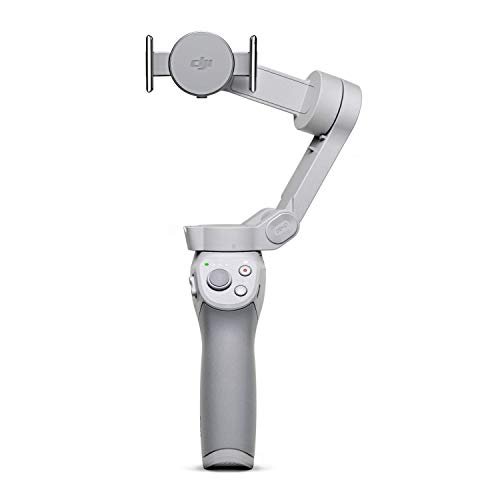
The DJI OM 4 is more than just a phone holder; it’s a compact, intelligent, 3-axis gimbal stabilizer designed to eliminate shaky footage and unlock a world of creative possibilities for your smartphone. It’s essentially a robotic arm for your phone that keeps it perfectly level and stable, no matter how much you move. Ideal for vlogging, YouTube videos, live streaming, travel videos, or simply capturing everyday memories with a professional touch, it’s compatible with a wide range of iPhone and Android devices.
For those exploring alternative high-performance options, you might also consider the Hohem iSteady M7 Gimbal Stabilizer for iPhone Android Smartphone, which offers advanced AI tracking and an integrated fill light for enhanced mobile production quality.
Key Features That Make the DJI OM 4 Stand Out
DJI is known for innovation, and the OM 4 is packed with features designed to make mobile filmmaking easier and more intuitive than ever before.
- Magnetic Quick-Release Design: This is arguably the biggest game-changer. The OM 4 ditches the traditional clamping mechanism for a revolutionary magnetic mount. You get two options: a sleek magnetic phone clamp or a magnetic ring holder that sticks directly to your phone (or case). Snapping your phone on and off the gimbal takes mere seconds, making setup and packing away incredibly efficient.
- Powerful 3-Axis Stabilization: At its core, the DJI OM 4 utilizes a sophisticated 3-axis stabilization system. This means it actively counteracts unwanted movements across three axes – pan, tilt, and roll – resulting in incredibly smooth, cinematic footage even when you’re running, walking, or filming dynamic scenes.
- Intelligent Shooting Modes via DJI Mimo App: The magic truly happens when paired with the DJI Mimo app (available for both iPhone and Android).
- ActiveTrack 3.0: Simply draw a box around your subject on screen, and the gimbal will automatically follow them, keeping them perfectly centered in the frame. It’s fantastic for vlogging yourself, tracking pets, or capturing dynamic action.
- DynamicZoom (Hitchcock Effect): This cool feature creates a dramatic visual effect where the background appears to zoom in or out while your subject stays the same size.
- Story Mode: Pre-set templates guide you through capturing a series of clips that are then automatically edited into a shareable video with music and transitions. Perfect for quick, engaging social media content.
- Gesture Control: Start recording or take a photo with a simple hand gesture – great for hands-free selfies or group shots.
- Time-lapse, Motionlapse, Hyperlapse: Capture stunning compressed time sequences with ease, adding a professional touch to landscapes or cityscapes.
- SpinShot: Rotates your phone 270 degrees for a unique effect.
- Built-in Grip & Tripod: The OM 4 comes with a small, detachable tripod that screws into the bottom of the handle, allowing you to easily set up stationary shots or perform hands-free tracking. The ergonomic grip feels comfortable in hand, making extended shooting sessions less tiring.
- Durable & Portable Design: Foldable and relatively lightweight, the DJI OM 4 is easy to slip into a backpack or even a larger purse, making it perfect for on-the-go content creators.
Another compelling choice for smartphone videographers seeking intelligent tracking capabilities is the Hohem iSteady V3 Ultra Gimbal Stabilizer for iPhone Android Smartphone, which integrates AI tracking with a built-in fill light and a detachable touchscreen remote for precise control.
Hands-On Impressions & User Experience
From the moment you unbox the DJI OM 4, you notice the premium build quality that DJI is known for. Setup is incredibly straightforward, especially with the magnetic mount. Once connected, balancing your phone is usually automatic and quick.
- Performance: In our tests, the stabilization was consistently excellent. Walking shots looked incredibly fluid, and even light jogging didn’t introduce noticeable shakes. ActiveTrack 3.0 was surprisingly accurate, holding onto subjects well even when they moved quickly.
- DJI Mimo App: The app is intuitive and unlocks the full potential of the gimbal. While it can take a little practice to master all the different modes, the interface is user-friendly. Some advanced users might prefer to shoot with their phone’s native camera app for ultimate control, but the Mimo app is essential for the intelligent features.
- Battery Life: The OM 4 boasts a decent battery life, typically lasting around 15 hours on a single charge. This is more than enough for a full day of shooting for most users.
When comparing top-tier smartphone gimbals, it’s also worth checking out the DJI Osmo Mobile 7P Gimbal Stabilizer for iPhone, Android, Lighting, which brings DJI’s renowned stabilization technology and innovative lighting solutions to mobile content creators.
The Good, The Bad, and The Verdict
Every product has its strengths and weaknesses, and the DJI OM 4 is no exception.
Pros:
- Revolutionary Magnetic Quick-Release: The ultimate convenience feature.
- Exceptional 3-Axis Stabilization: Delivers incredibly smooth, professional-looking video.
- Intelligent Features (ActiveTrack 3.0, DynamicZoom, Story Mode): Takes your mobile videography to the next level.
- Ergonomic Design & Included Tripod: Comfortable to hold and versatile for various shooting scenarios.
- Portable and Foldable: Easy to carry anywhere.
- Great Battery Life: Lasts for extended shooting sessions.
- Wide Compatibility: Works seamlessly with most iPhone and Android smartphones.
Cons:
- Learning Curve for App Features: While intuitive, mastering all the intelligent modes takes a bit of practice.
- Magnetic Ring Holder Permanent (or semi-permanent): Some users might not want to stick a ring holder directly onto their phone or phone case. The clamp offers an alternative, but it adds a tiny bit more bulk.
- Can Interfere with Bulky Phone Cases: Very thick or unusually shaped phone cases might prevent proper magnetic attachment or balancing.
- No Native App Integration for All Features: While the Mimo app is powerful, some users might wish ActiveTrack or other smart features were available directly in their phone’s camera app.
Who is the DJI OM 4 Best For?
The DJI OM 4 – Handheld 3-Axis Smartphone Gimbal Stabilizer with Grip, Tripod, Gimbal Stabilizer Ideal for Vlogging, YouTube, Live Video, Phone Stabilizer Compatible with iPhone and Android is an exceptional tool for:
- Vloggers and YouTubers: Elevate your content with smooth, engaging footage that stands out.
- Live Streamers: Keep your phone stable and your audience engaged.
- Travel Enthusiasts: Capture breathtaking, steady shots of your adventures.
- Aspiring Filmmakers: Experiment with cinematic techniques using just your smartphone.
- Parents and Pet Owners: Document precious moments with unparalleled smoothness.
- Anyone who wants better smartphone videos: Even for casual users, it dramatically improves video quality.
Final Verdict
The DJI OM 4 is a standout product in the smartphone gimbal market. Its innovative magnetic design, combined with top-tier 3-axis stabilization and intelligent shooting modes, makes it an incredibly powerful and user-friendly tool for anyone looking to seriously upgrade their mobile videography. While there’s a slight learning curve for some of the advanced app features, the results are undeniably professional. It’s a fantastic investment for anyone serious about creating high-quality, stable video content with their smartphone.
Ready to transform your smartphone into a cinematic powerhouse? Don’t let shaky footage ruin your creations any longer.
Click here to get your DJI OM 4 – Handheld 3-Axis Smartphone Gimbal Stabilizer and start creating stunningly smooth videos today! DJI OM 4 on Amazon
FAQ
Q.1: What smartphones are compatible with the DJI OM 4? A.1: The DJI OM 4 is designed to work with most smartphones, both iPhone and Android, that fall within its supported dimensions and weight range. Specifically, it accommodates phones with a width of 67-84mm, a thickness of 6.9-10mm, and a weight of 170-290g. For the best experience and full feature access, ensure your phone is running the latest operating system and is compatible with the DJI Mimo app.
Q.2: How does the new magnetic quick-release design work on the DJI OM 4? A.2: The DJI OM 4 features an innovative magnetic quick-release design that allows you to attach and detach your smartphone instantly. It comes with two magnetic accessories: a sleek magnetic phone clamp and a magnetic ring holder. You simply attach either accessory to your phone, and then it magnetically snaps onto the gimbal, making setup and transitions incredibly fast and convenient for on-the-go content creation.
Q.3: What intelligent features does the DJI OM 4 offer that are ideal for vlogging, YouTube, and live video? A.3: The DJI OM 4 is packed with intelligent features to enhance your content. Key features include ActiveTrack 3.0, which precisely follows a subject of your choice; Story Mode, offering creative templates for easy video creation; DynamicZoom (Hitchcock effect) for a dramatic cinematic look; SpinShot for a rotating effect; and Gesture Control, allowing you to start recording or take a photo with a simple gesture. These features make it highly versatile for various video needs.
Q.4: What is the battery life of the DJI OM 4, and how long does it take to fully charge? A.4: The DJI OM 4 boasts an impressive battery life of up to 15 hours on a single charge, providing ample power for extended shooting sessions. A full charge typically takes approximately 2.5 hours using a 10W charger. Please note that actual battery life can vary depending on usage, such as using ActiveTrack or charging an external device.
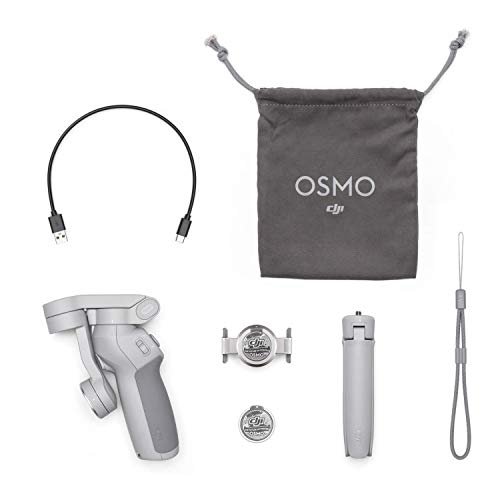
Q.5: Does the DJI OM 4 come with a tripod or other essential accessories? A.5: Yes, the DJI OM 4 comes with several essential accessories to get you started. Included in the box are the DJI OM 4 gimbal itself, a magnetic phone clamp, a magnetic ring holder, a grip tripod (which acts as an extension rod as well), a power cable, a storage pouch, a wrist strap, and manuals. The included tripod allows for stable tabletop shots and extends your reach for more dynamic angles.
Q.6: Is it difficult to balance my phone on the DJI OM 4 before shooting? A.6: No, balancing your phone on the DJI OM 4 is incredibly simple and largely automatic, thanks to its magnetic design. Once you’ve attached your phone using either the magnetic clamp or ring holder, the gimbal itself will perform most of the necessary adjustments to ensure stable footage. Unlike older gimbals, there is no intricate manual axis adjustment required, making it very user-friendly for both beginners and experienced users.
Q.7: What is the DJI Mimo app, and what functionality does it add to the OM 4 experience? A.7: The DJI Mimo app is the dedicated application for the DJI OM 4 and is essential for unlocking its full potential. Through the app, you can access all the intelligent features like ActiveTrack 3.0, Story Mode, DynamicZoom, and various shooting modes (Panorama, Timelapse, Slow Motion). It also provides a live camera view, manual camera controls (ISO, shutter speed), and a robust editor to refine your footage and share it directly to social media platforms, enhancing your overall content creation workflow.
![FeiyuTech SCORP Mini 3 [Kit] Gimbal Stabilizer for Mirrorless Cameras&Smartphone](https://gimbalhq.com/wp-content/uploads/2025/11/product_18_img_1-1.jpg)