DJI Osmo Mobile 6 Review: Your Ultimate Guide to Silky Smooth Smartphone Videos
Are you ready to elevate your smartphone videography from shaky home movies to professional-looking cinematic masterpieces? In today’s world, our smartphones are powerful creative tools, but even the best optical image stabilization can’t compete with the buttery-smooth footage a dedicated gimbal provides. That’s where the DJI Osmo Mobile 6 Gimbal Stabilizer for Smartphones comes in.
[ ]
]
As content creators, travel vloggers, or even just parents wanting to capture precious family moments without the jitters, we’re constantly on the lookout for tools that make our lives easier and our output better. The Osmo Mobile series has long been a favorite, and the Osmo Mobile 6 promises to refine the experience even further. We’ve put this sleek device through its paces to give you an honest, detailed look at what makes it tick and whether it’s the right investment for your mobile filmmaking journey. You can check out the DJI Osmo Mobile 6 for yourself right here: DJI Osmo Mobile 6 Gimbal Stabilizer for Smartphones.
Key Features That Make the Osmo Mobile 6 Shine
DJI is renowned for its stabilization technology, and the Osmo Mobile 6 packs some impressive features into its compact frame.
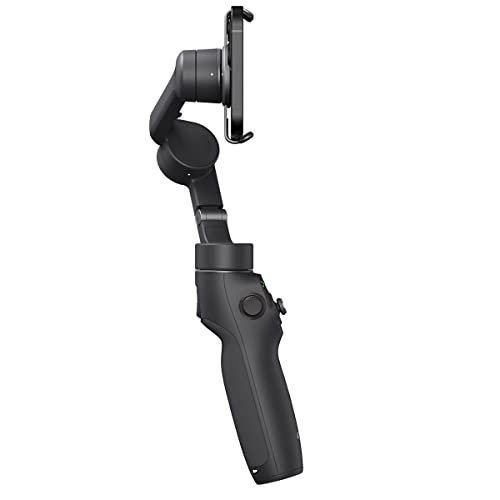
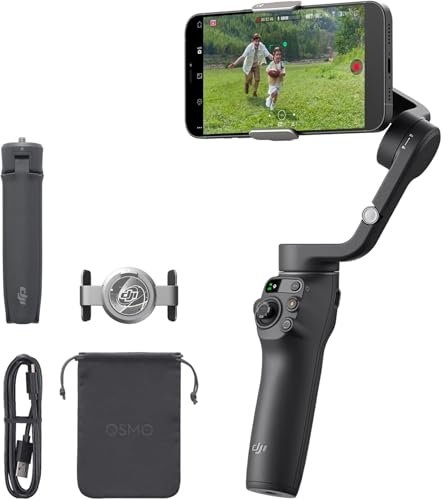
- Magnetic Quick-Release Design: This is a game-changer! The strong magnetic clamp allows you to attach and detach your phone in seconds. No more fumbling with clamps and balancing your phone every time you want to shoot. Snap on, shoot, snap off – it’s that simple.
- Built-in Extension Rod: A fantastic addition for solo creators, vloggers, and anyone needing a higher or wider angle. This integrated rod extends up to 215mm (about 8.5 inches), making it easy to get everyone in the shot or achieve dynamic low-angle shots without additional accessories.
- Quick Launch Feature: Ever missed a shot because your gimbal took too long to power on? Not with the Osmo Mobile 6. Unfold the gimbal, and it automatically powers on, and if connected, the DJI Mimo app launches instantly, getting you ready to shoot in mere seconds.
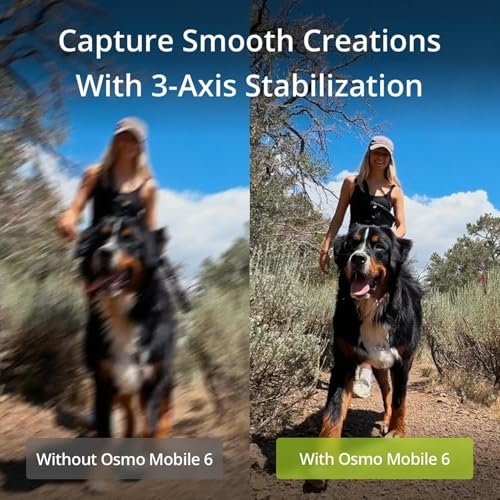
- Enhanced 3-Axis Stabilization: At its core, a gimbal is about stabilization, and the Osmo Mobile 6 delivers. It effectively counteracts unwanted camera shake across three axes, ensuring your videos are incredibly smooth, even when you’re on the move.
- ActiveTrack 5.0: DJI’s intelligent subject tracking has been upgraded. ActiveTrack 5.0 is more stable, reliable, and can follow subjects at longer distances, even if they’re briefly obscured. Perfect for capturing fast-moving kids, pets, or sports.
- Intuitive Controls and Status Panel: The new built-in status panel displays essential information like battery level and gimbal mode at a glance. The side wheel allows for seamless zoom and focus control, giving you a tactile, camera-like experience.
- Creative Shooting Modes: Beyond basic stabilization, the Osmo Mobile 6 offers a suite of intelligent shooting modes:
- Timelapse & Motionlapse: Compress time into stunning cinematic sequences.
- DynamicZoom (Dolly Zoom): Create that iconic “Vertigo effect” with ease.
- Gesture Control: Start recording or take a photo with a simple hand gesture, ideal for hands-free selfies or group shots.
- Story Mode: Pre-designed templates with music and effects to create engaging short videos.
User Impressions and Performance
From the moment you unbox the DJI Osmo Mobile 6 Gimbal Stabilizer for Smartphones, its premium feel and thoughtful design are apparent. It’s surprisingly lightweight and fits comfortably in hand.
[ ]
]
Setup is incredibly fast thanks to the magnetic clamp and quick-launch feature. Within moments of unfolding, you’re ready to record. The accompanying DJI Mimo app is crucial for unlocking the gimbal’s full potential. It’s generally user-friendly, offering various shooting modes, settings, and tutorials. While the app itself has a slight learning curve for some advanced features, the basic recording functions are straightforward.
In terms of performance, the stabilization is excellent. Walking, light jogging, or even navigating uneven terrain results in impressively smooth footage that makes your phone camera look like a much more expensive setup. ActiveTrack 5.0 is particularly impressive, holding onto subjects tenaciously even when faced with obstacles or changes in movement speed.
The integrated extension rod is a godsend for capturing different perspectives without constantly adjusting your stance or needing a separate selfie stick. The improved joystick control and the new side wheel for zoom/focus offer precise and satisfying control, elevating the shooting experience beyond just tapping on a screen.
Battery life is decent, typically lasting several hours on a single charge, which is more than enough for most shooting sessions. It charges via USB-C, making it convenient to top up.
The Good, The Bad, and The Osmo Mobile 6
Every product has its strengths and weaknesses. Here’s our honest breakdown:
Pros:
- Exceptional Stabilization: Delivers incredibly smooth, professional-looking video.
- Rapid Setup: Magnetic quick-release and auto-on/app launch mean you’re ready to shoot in seconds.
- Integrated Extension Rod: Boosts versatility for vlogging, selfies, and unique angles without extra gear.
- Intelligent ActiveTrack 5.0: Reliably tracks subjects, keeping them in frame even during dynamic movement.
- Improved Controls: The new status panel and side wheel enhance usability and precision.
- Compact & Portable: Folds down to a highly portable size, easy to slip into a bag.
- Durable Build Quality: Feels robust and well-made, typical of DJI products.
Cons:
- App Dependent: Many advanced features require the DJI Mimo app, which, while capable, can sometimes be a bit clunky or overwhelming for beginners.
- Phone Size Limitations: While it fits most phones, very large or unusually shaped phones (especially with thick cases) might struggle with balance or fitting the clamp.
- Learning Curve for Advanced Features: Getting the most out of modes like DynamicZoom or hyperlapses requires some practice.
- No Physical Zoom Button: The side wheel is great, but some might prefer a dedicated zoom rocker.
[ ]
]
Who is the DJI Osmo Mobile 6 Best For?
The DJI Osmo Mobile 6 is a fantastic tool, but it truly shines for specific users:
- Aspiring Content Creators & Vloggers: If you’re serious about creating high-quality mobile video for YouTube, TikTok, or Instagram, this gimbal is a game-changer.
- Travel Enthusiasts: Capture your adventures with incredible smoothness, making your travel films look epic. The integrated extension rod is perfect for solo shots.
- Parents & Pet Owners: Tired of shaky footage of your kids or furry friends? ActiveTrack 5.0 will keep them in focus and frame, even when they’re zooming around.
- Casual Users Who Want Better Videos: Even if you’re not a “pro,” if you value smooth, cinematic footage over shaky smartphone videos, this will elevate your everyday captures.
- Real Estate Agents / Small Business Owners: Create professional-looking walk-throughs or product showcase videos with ease.
Conclusion: Your Gateway to Cinematic Smartphone Videos
The DJI Osmo Mobile 6 Gimbal Stabilizer for Smartphones stands out as an exceptional tool for anyone serious about improving their mobile videography. Its blend of rapid setup, superior stabilization, intelligent tracking, and thoughtful design (especially the integrated extension rod) makes it a top contender in the smartphone gimbal market. While it benefits from the DJI Mimo app, the core functionality is incredibly intuitive and rewarding.
If you’re looking to transform your shaky phone footage into smooth, engaging, and professional-looking videos, the Osmo Mobile 6 is an investment that pays off quickly in terms of quality and creative possibilities. It empowers you to capture moments with confidence and clarity, making your stories more compelling than ever before.
[ ]
]
Ready to Elevate Your Content?
Stop settling for shaky footage and start creating cinematic masterpieces with your smartphone! Click here to get your own DJI Osmo Mobile 6 Gimbal Stabilizer for Smartphones and unlock your full creative potential today:
Unleash Your Inner Filmmaker with the DJI Osmo Mobile 6!
FAQ
Q. What are the main improvements of the Osmo Mobile 6 over its predecessors?
A. The Osmo Mobile 6 introduces a new Quick Launch feature that automatically powers on the gimbal and launches the DJI Mimo app when unfolded and a smartphone is attached. It also boasts improved ActiveTrack 5.0 for more stable and precise tracking, a new built-in status panel for easier mode checking, and enhanced stabilization algorithms for even smoother footage.
Q. Which smartphones are compatible with the DJI Osmo Mobile 6?
A. The Osmo Mobile 6 is compatible with most smartphones that fall within specific dimensions and weight: width 67-84mm, thickness 6.9-10mm, and weight 170-290 grams. This range covers a wide variety of modern iPhone and Android flagship devices, including larger models. For the most up-to-date and specific compatibility list, it’s always recommended to check DJI’s official website.
Q. How do I get started quickly with the Osmo Mobile 6?
A. Getting started is remarkably fast. Simply unfold the gimbal, attach your smartphone using the magnetic clamp, and the Osmo Mobile 6 will automatically power on. If the DJI Mimo app is installed on your phone, it will automatically launch and connect, allowing you to begin shooting almost instantly without additional setup.
Q. What is ActiveTrack 5.0 and how does it benefit my filming?
A. ActiveTrack 5.0 is DJI’s enhanced subject tracking technology. It provides more stable, intelligent, and reliable tracking, even if the subject briefly turns or is obscured. This feature ensures that your chosen subject (person, pet, or object) remains centered in the frame with greater precision and consistency, making it easier to capture dynamic and professional-looking footage without constant manual adjustments.
Q. What is the battery life of the Osmo Mobile 6 and how long does it take to charge?
A. The Osmo Mobile 6 offers approximately 6 hours and 24 minutes of operating time on a full charge under ideal conditions. It takes roughly 1 hour and 24 minutes to fully charge the device when using a 10W charger.
Q. Does the Osmo Mobile 6 have a built-in extension rod, and how long is it?
A. Yes, the Osmo Mobile 6 features a convenient built-in extension rod, which allows for more dynamic shooting angles and easier selfies or group shots. The rod extends up to 215mm (approximately 8.5 inches), providing significant extra reach.
Q. Is a specific app required to use the DJI Osmo Mobile 6?
A. While the gimbal provides basic stabilization out of the box, the DJI Mimo app is essential to unlock the full range of intelligent features and capabilities of the Osmo Mobile 6. The app provides access to modes like ActiveTrack, ShotGuides, Story Mode, time-lapse, panorama, and offers extensive camera controls and editing options for a complete creative experience.
![FeiyuTech SCORP Mini 3 [Kit] Gimbal Stabilizer for Mirrorless Cameras&Smartphone](https://gimbalhq.com/wp-content/uploads/2025/11/product_18_img_1-1.jpg)