DJI Osmo Mobile 7 Review: Your Ultimate Companion for Silky Smooth Mobile Videos
Are you tired of shaky, unprofessional-looking videos captured on your smartphone? In today’s visual-first world, stable footage isn’t just a luxury – it’s a necessity for anyone looking to create engaging content. Whether you’re a seasoned vlogger, a travel enthusiast, or simply a parent wanting to capture precious family moments, a good gimbal can transform your mobile videography.
Enter the DJI Osmo Mobile 7 Gimbal Stabilizer. DJI has long been a pioneer in drone and camera stabilization, and they’ve poured that expertise into their acclaimed Osmo Mobile series. The OM 7 promises to elevate your smartphone filmmaking to new heights with its blend of portability, advanced stabilization, and smart features. But does it live up to the hype? Let’s dive in.
First Impressions: Design & Portability That Travels With You
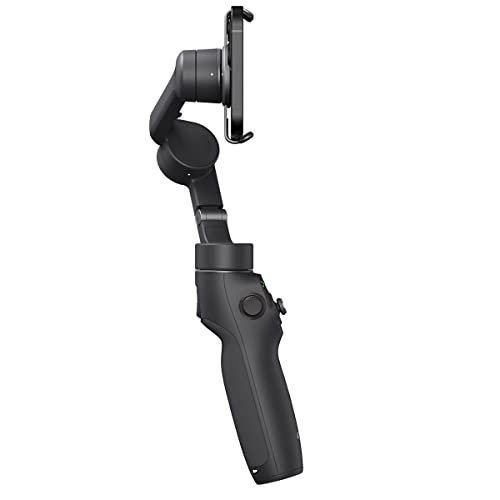
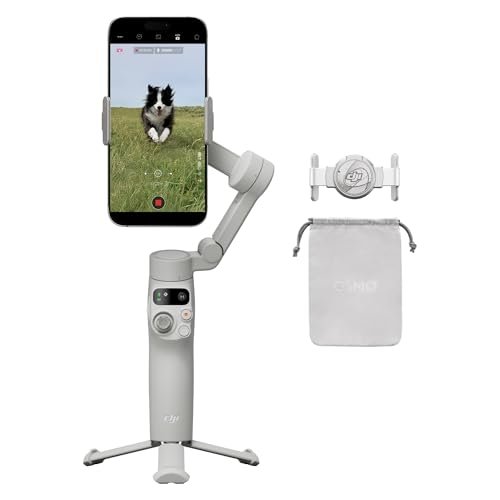
One of the first things you’ll notice about the DJI Osmo Mobile 7 is its remarkably compact and foldable design. It effortlessly collapses to fit into a small bag or even a larger pocket, making it incredibly easy to carry wherever your adventures take you. Gone are the days of bulky equipment weighing you down; this gimbal is designed for life on the go.
But portability isn’t its only trick. The OM 7 features a built-in extension rod that doubles as a selfie stick, giving you extra reach for creative shots or perfect group selfies. Even better, it boasts an integrated tripod tucked away in its handle. This ingenious design means you don’t need to carry a separate tripod, making it perfect for time-lapses, stable interviews, or hands-free recording. The magnetic phone clamp is also a dream, allowing for quick attachment and detachment, so you never miss a moment. If you’re keen to see it for yourself, check out the DJI Osmo Mobile 7 Gimbal Stabilizer on Amazon.
Unrivaled Stabilization: Say Goodbye to Shakes and Jitters
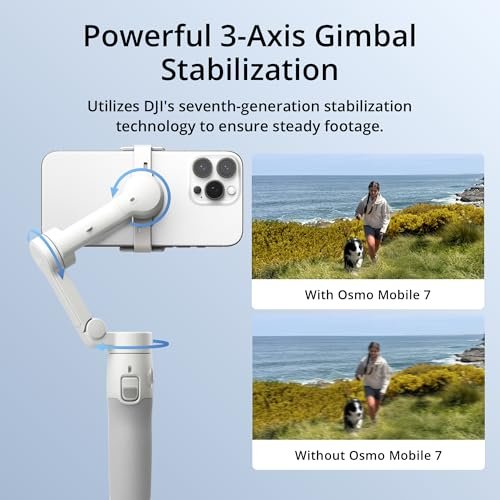
At the core of any good gimbal is its stabilization technology, and the DJI Osmo Mobile 7 delivers in spades. Featuring DJI’s renowned 3-axis stabilization, this device effectively counteracts unwanted movements, ensuring your footage remains incredibly smooth and professional-looking, even when you’re on the move. Whether you’re running, cycling, or just walking through a bustling street, the OM 7 keeps your phone level and steady.
Paired with DJI’s updated ActiveTrack 6.0 technology, the gimbal can intelligently follow subjects with enhanced stability and improved tracking accuracy. This is a game-changer for solo creators, parents chasing active kids, or anyone wanting to keep a moving subject perfectly framed without constant manual adjustments. The OM 7 makes challenging shots look effortless.
Beyond Stabilization: Smart Features That Elevate Your Content
The DJI Osmo Mobile 7 isn’t just about stabilization; it’s a creative powerhouse packed with intelligent features designed to make your content shine:
- Built-in Extension Rod & Tripod: As mentioned, these integrated tools mean you’re always ready for a high-angle shot, a wide group selfie, or a stable static capture.
- Quick Launch: Get recording faster than ever. When unfolded, simply attach your phone, and the DJI Mimo app immediately launches, getting you straight to the action.
- Gesture Control: Control the gimbal with simple hand gestures – perfect for hands-free selfies or starting and stopping recordings when you’re in front of the camera.
- SpinShot: Create dynamic, barrel-roll-like footage that adds a cinematic flair to your videos.
- Dolly Zoom: Recreate the iconic “Vertigo effect” made famous by Hollywood, where the background appears to zoom in or out while the subject remains the same size.
- Story Mode: Pre-set templates guide you through a creative shooting process, providing music, filters, and effects for polished, shareable videos in an instant.
- Panorama: Capture stunning, wide-angle shots with ease.
Performance in Action: A Seamless User Experience
Using the DJI Osmo Mobile 7 is remarkably intuitive. The ergonomic grip feels comfortable in hand, and the joystick and controls are well-placed for easy access. The integration with the DJI Mimo app is seamless, unlocking the full potential of the gimbal with various shooting modes, intelligent features, and comprehensive settings. The app itself is user-friendly, guiding you through calibration and offering creative tools.
Battery life is also impressive, typically offering around 6-8 hours on a single charge, depending on usage. This is more than enough for a full day of shooting for most users, ensuring you won’t be scrambling for a charger mid-session. For a deeper dive into its capabilities, consider exploring the DJI Osmo Mobile 7 Gimbal Stabilizer product page.
Pros & Cons: An Honest Look
Like any product, the DJI Osmo Mobile 7 has its strengths and a few minor drawbacks.
Pros:
- Exceptional 3-Axis Stabilization: Delivers incredibly smooth, professional-grade footage.
- Ultra-Portable & Foldable Design: Easy to carry anywhere, perfect for travel.
- Built-in Extension Rod & Tripod: Eliminates the need for extra accessories, enhancing versatility.
- ActiveTrack 6.0: Superior subject tracking, great for dynamic shots.
- Magnetic Phone Clamp: Quick and secure attachment/detachment of your smartphone.
- Intuitive Controls & DJI Mimo App: User-friendly experience for beginners and experienced creators alike.
- Strong Battery Life: Reliable for extended shooting sessions.
Cons:
- Learning Curve for Advanced Features: While easy to use for basic stabilization, mastering all the creative modes in the Mimo app takes some practice.
- App Dependence: Many advanced features require the DJI Mimo app, which might not be preferred by all users.
- No Physical Zoom Wheel: While digital zoom is available via the app, some users might prefer a dedicated physical zoom wheel for more precise control.
Who Is The DJI Osmo Mobile 7 Best For?
The DJI Osmo Mobile 7 Gimbal Stabilizer is a fantastic tool for a wide range of users:
- Vloggers & Content Creators: Its portability, stabilization, and smart features make it ideal for producing high-quality content on the go.
- Travelers: Compact design and integrated tripod/selfie stick mean you can capture stunning travel footage without extra bulk.
- Parents & Families: Easily capture steady, beautiful videos of kids and family events, even when subjects are constantly moving.
- Casual Users: If you just want to improve the quality of your everyday phone videos and photos, the OM 7 offers an accessible way to do so.
- Anyone looking to reduce camera shake: If your smartphone videos frequently suffer from shakiness, this gimbal is a game-changer.
Conclusion: Is It Worth The Upgrade?
The DJI Osmo Mobile 7 Gimbal Stabilizer isn’t just an incremental update; it’s a thoughtfully designed tool that packs serious stabilization and smart features into an incredibly portable package. Its built-in extension rod and tripod are standout features that truly enhance its versatility, making it a powerful all-in-one solution for mobile videography.
While there’s a slight learning curve to maximize its creative potential, the core stabilization is plug-and-play, offering immediate improvements to your footage. For anyone serious about making their smartphone videos look professionally polished without carrying heavy gear, the OM 7 is an outstanding investment. It simplifies the process of capturing smooth, dynamic shots, freeing you to focus on your creativity.
Ready to Elevate Your Mobile Videography?
Stop battling shaky footage and start creating cinematic-quality videos with your smartphone. The DJI Osmo Mobile 7 Gimbal Stabilizer is a powerful, portable, and intuitive tool that will transform your content. Click here to get your DJI Osmo Mobile 7 Gimbal Stabilizer on Amazon today!
FAQ
Q. Is the DJI Osmo Mobile 7 compatible with both iPhone and Android smartphones?
A. Yes, the DJI Osmo Mobile 7 is designed to be universally compatible with a wide range of iPhone and Android smartphones. Its adjustable phone clamp can accommodate most phone sizes, and the DJI Mimo app, which unlocks the gimbal’s full feature set, supports both operating systems.
Q. What makes the Osmo Mobile 7 stand out for stabilization, and how easy is it to use for beginners?
A. The Osmo Mobile 7 features advanced 3-axis stabilization technology that effectively counteracts unwanted shakes and vibrations, ensuring incredibly smooth, professional-looking video footage. It’s also very user-friendly for beginners, with intuitive controls, quick setup, and intelligent shooting modes accessible via the DJI Mimo app to help you start creating stabilized content right away.
Q. Can the built-in tripod and selfie stick functions be used simultaneously or interchangeably?
A. The Osmo Mobile 7 integrates a versatile built-in extension rod that functions as both a selfie stick and a component of the tripod. You can extend it to use as a selfie stick for wider shots or to capture unique angles. When fully retracted and deployed, it forms a stable base for the built-in tripod, allowing for hands-free shooting and timelapses. These functions are used interchangeably depending on your shooting needs.
Q. What is ActiveTrack 6.0, and how does it benefit my filming?
A. ActiveTrack 6.0 is DJI’s enhanced subject tracking technology, which allows the Osmo Mobile 7 to accurately follow a chosen subject with improved stability and recognition, even if the subject is moving quickly or momentarily obscured. This feature is incredibly beneficial for solo creators, ensuring your subject stays perfectly framed in the shot without manual adjustments, whether you’re vlogging, capturing sports, or filming pets.
Q. How portable is the DJI Osmo Mobile 7, and is it easy to carry around for daily use or travel?
A. The DJI Osmo Mobile 7 is designed with portability in mind. It features a compact, foldable design that makes it easy to collapse and fit into a bag or even a larger pocket. Its lightweight construction ensures it won’t add significant bulk to your gear, making it ideal for daily vlogging, travel, and capturing spontaneous moments on the go.
Q. Does the Osmo Mobile 7 allow for landscape and portrait mode shooting, and how do I switch between them?
A. Yes, the Osmo Mobile 7 supports both landscape (horizontal) and portrait (vertical) mode shooting, making it versatile for different social media platforms and video styles. You can quickly switch between these orientations with a simple double-press of the dedicated switch button on the gimbal itself, allowing for seamless transitions during your shoot.
![FeiyuTech SCORP Mini 3 [Kit] Gimbal Stabilizer for Mirrorless Cameras&Smartphone](https://gimbalhq.com/wp-content/uploads/2025/11/product_18_img_1-1.jpg)