So, you’ve got your hands on the fantastic Canon PowerShot G7 X Mark II – a truly beloved compact camera for vlogging, travel, and everyday content creation. Its impressive image quality and tilting screen make it a go-to for many. But let’s be real: handheld footage can often look a bit shaky, especially if you’re on the move. That’s where a good stabilizer comes in, transforming your wobbly clips into smooth, professional-looking video.
While the G7 X Mark II does have built-in optical image stabilization, adding an external tool can take your videography to the next level. Many content creators wonder, “What’s the best gimbal for Canon PowerShot G7 X Mark II?” It’s a great question, but given the G7 X Mark II’s compact size, a traditional, heavy-duty gimbal might be overkill. However, there are excellent options, from full-fledged gimbals to versatile grips and tripods, that can significantly improve your shooting stability.
In this guide, we’ll dive into the top stabilization solutions perfect for your Canon G7 X Mark II, helping you choose the ideal accessory to capture incredibly smooth footage and elevate your content.
Understanding Your Stabilization Needs
Before we jump into the products, let’s clarify what we’re looking for. A gimbal is a motorized device that actively counteracts camera movement on multiple axes, providing incredibly smooth, cinematic footage. Other tools, like grips and tripods, offer static stability or improved ergonomics for handheld shooting, reducing shake but not actively stabilizing. For the compact Canon PowerShot G7 X Mark II, sometimes a simple grip or a mini tripod is all you need, while for truly dynamic, movement-heavy shots, a proper gimbal might be warranted.
The Best Stabilization Tools for Your Canon PowerShot G7 X Mark II
Here are our top picks, ranging from a powerful gimbal to essential stabilization accessories that complement your G7 X Mark II beautifully.
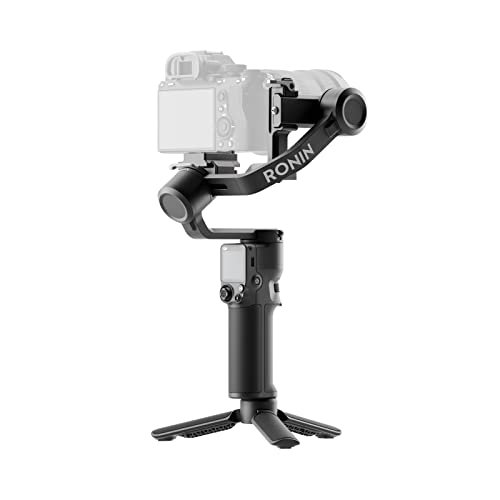
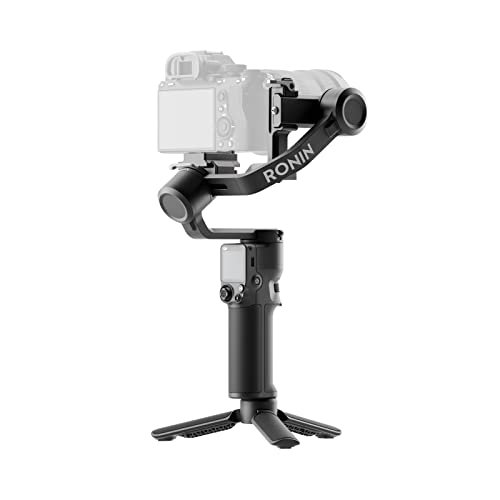
1. DJI RS 3 Mini, 3-Axis Gimbal Stabilizer for Cameras

If you’re serious about getting the absolute smoothest, most cinematic shots with your Canon PowerShot G7 X Mark II, the DJI RS 3 Mini is the closest thing to a full-blown gimbal solution available. While it might seem a bit larger for a compact camera, its lightweight design and powerful motors make it incredibly versatile. It’s an excellent investment if you plan to upgrade to a mirrorless camera down the line, ensuring future compatibility while still providing unparalleled stability for your G7 X Mark II right now. This is truly the best gimbal for Canon PowerShot G7 X Mark II if you’re looking for a professional-grade motorized stabilizer.
Key Features:
– 795g (1.75lbs) Lightweight and Portable
– Wide-Ranging Compatibility (load capacity up to 2 kg/4.4 lbs)
– Bluetooth Shutter Control for easy camera operation
– 3rd-Gen RS Stabilization Algorithm for pro-level stability
– Native Vertical Shooting for social media content
– 1.4″ Full-Color Touchscreen for intuitive control
– Requires DJI Ronin app for activation and full functionality
Pros:
– Delivers exceptionally smooth, cinematic footage
– Highly portable for a gimbal of its capability
– Excellent build quality and intuitive controls
– Future-proof for larger camera upgrades
– Great for dynamic shots and movement
Cons:
– May be overkill/large for the small G7 X Mark II for some users
– Requires balancing, which can take time to learn
– Higher price point compared to basic stabilizers
User Impressions:
Users consistently praise the RS 3 Mini for its lightweight design and impressive stabilization capabilities, especially considering its compact size. Many find it surprisingly capable for smaller cameras, though some note the learning curve for balancing. It’s often highlighted as a fantastic entry point into professional gimbal work.
2. Wireless Shooting Grip and Tripod Camera Remote Control

While not a true gimbal, this wireless shooting grip and tripod combo is an incredibly practical accessory for your Canon PowerShot G7 X Mark II, significantly improving handheld stability and offering remote control convenience. It transforms from a comfortable grip for vlogging or walking shots into a stable mini tripod, perfect for static shots, time-lapses, or group photos. The detachable remote control is a huge bonus, allowing you to start/stop recording or snap photos without touching the camera, minimizing camera shake. It’s a fantastic, versatile tool for content creators seeking better stability without the complexity of a motorized gimbal.
Key Features:
– Compatible with Canon G7 X Mark III (and likely G7 X Mark II due to shared remote protocol with G7X III/G5X II compatibility listed)
– Flexible Usage: Detachable remote control and tripod
– Remote Control Distance: 10m/32.8ft wireless range
– Quick and Easy Direction Changes: Adjustable shooting angles (45° up/90° down, 360° rotation)
– Stable without Shaking: Non-slip pad on tripod base
Pros:
– Doubles as a comfortable shooting grip and a stable tripod
– Wireless remote enhances convenience and reduces shake
– Lightweight and highly portable for travel
– Easy to use, no complex setup or balancing
– Very affordable stability solution
Cons:
– Does not offer active, motorized stabilization like a gimbal
– Limited to certain Canon camera models for remote functionality
– May not provide enough height for all tripod needs
User Impressions:
Users love the versatility of this grip, calling it a “must-have” for Canon vloggers. The remote control functionality is frequently lauded as a game-changer for solo shooting, and the stable tripod base is appreciated for its reliability. It’s seen as a simple yet highly effective way to improve shot stability.
3. 3-Shoe DSLR/Mirrorless/Action Camera Camcorder Phone Handle Grip
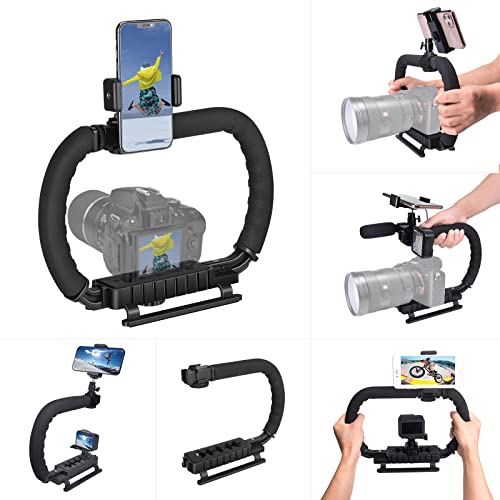
This 3-shoe handle grip is another excellent non-motorized stabilization option for your Canon PowerShot G7 X Mark II, especially if you’re looking to attach multiple accessories. It’s more of a camera cage/rig system designed for ergonomic handheld shooting, providing a much more stable and comfortable grip than holding the compact camera directly. The multiple cold shoe mounts are a huge advantage, letting you easily add a microphone, LED light, or even a monitor, making it a powerful foundation for a mobile vlogging or filmmaking setup.
Key Features:
– High-Quality ABS Material: Lightweight yet durable
– Ergonomic Design: Detachable C-TYPE low-position-shooting stabilizer for reduced strain
– Mobile Phone Monitor Stand: Detachable ball head phone clip for monitoring via app
– 3-Shoe Extension Kit: Easily install external devices like microphones and fill lights
– Wide Compatibility: Universal design for various cameras (including DSLR, mirrorless, action cameras)
Pros:
– Provides a much more stable and comfortable two-handed grip
– Excellent for attaching essential accessories (mic, light)
– Durable and lightweight construction
– Versatile for different shooting styles (low-angle, handheld)
– Affordable solution for improving ergonomics and stability
Cons:
– Does not offer active, motorized stabilization
– Can make the compact G7 X Mark II setup bulkier
– Requires separate accessories for full setup (mic, light)
User Impressions:
Reviewers praise this grip for its robust build and the convenience of its multiple cold shoe mounts. Many find it significantly improves handheld stability for small cameras and mobile phones, making it ideal for vlogging and run-and-gun shooting where adding accessories is key.
4. K&F Concept Camera Tripod, 75″ Lightweight Portable Travel

While strictly a tripod and not a gimbal, the K&F Concept Camera Tripod is an indispensable tool for achieving rock-steady shots with your Canon PowerShot G7 X Mark II. For interviews, static vlogs, time-lapses, or low-light photography where stability is paramount, a good tripod is essential. This particular model stands out for its lightweight, portable design, making it perfect for travel vloggers and photographers who need reliable stability without added bulk. It may not offer the dynamic motion of a gimbal, but for static, professional-looking footage, it’s a must-have.
Key Features:
– Innovative Pentagonal Tube Design: Enhanced durability and easy folding
– Lightweight (1.18 kg) and Compact (50 cm folded)
– Universal Phone & Tablet Compatibility (2-in-1 adjustable holder)
– Extended Height & Precision Control: 48 cm to 190 cm adjustable height, 360° rotatable 3-way pan head, built-in bubble level
– Flexible Shooting Angles: Complete horizontal and vertical rotation
– Wireless Remote for Seamless Operation: Bluetooth remote control (up to 12 meters)
Pros:
– Provides ultimate static stability for photos and videos
– Extremely lightweight and portable for its height
– Versatile for both cameras and mobile devices
– Easy to set up and adjust quickly
– Included wireless remote is a convenient bonus
Cons:
– Not a gimbal; does not provide active movement stabilization
– Can still be somewhat bulky compared to a mini tripod
– Pan head might not be as smooth as dedicated video fluid heads
User Impressions:
Users frequently highlight its portability and ease of use, making it a favorite for travel and outdoor shoots. The ability to extend to a considerable height while remaining stable is a big plus, and the included phone holder and remote are highly valued for versatile shooting.
Conclusion: Finding the Right Stability for Your G7 X Mark II
When it comes to finding the best gimbal for Canon PowerShot G7 X Mark II, the DJI RS 3 Mini stands out as the only true motorized gimbal on our list, offering professional-grade stability for dynamic shots. It’s a fantastic, albeit powerful, choice if you’re serious about cinematic footage and potential future camera upgrades.
However, for most G7 X Mark II users, especially those focused on vlogging or casual content creation, a simpler, more compact stabilization solution might be more practical. The Wireless Shooting Grip is a brilliant all-rounder, offering both a comfortable handheld experience and a convenient mini tripod with remote control. The 3-Shoe Handle Grip is ideal if you’re building a more robust rig with external mics and lights. And, of course, a reliable travel tripod like the K&F Concept model is indispensable for static, perfectly steady shots.
Ultimately, the best choice depends on your specific shooting style and needs. Assess how you plan to use your G7 X Mark II, and pick the stabilization tool that empowers you to create your best content yet!
FAQ: Your Canon PowerShot G7 X Mark II Stabilization Questions Answered
Q1: Does the Canon PowerShot G7 X Mark II need a gimbal?
A1: The Canon G7 X Mark II has built-in optical image stabilization, which helps reduce minor shakes. However, for truly smooth, cinematic, or dynamic footage (like walking or panning shots), a dedicated gimbal or external stabilizer is highly recommended. It significantly improves video quality, making your content look more professional.
Q2: Can I use a phone gimbal with my Canon G7 X Mark II?
A2: Generally, no. Phone gimbals are designed for the size and weight of smartphones and typically won’t be able to hold or balance a camera like the G7 X Mark II. The G7 X Mark II is much heavier and thicker than a phone, making it incompatible with most phone gimbals.
Q3: What’s the difference between a gimbal and a tripod?
A3: A gimbal is a motorized device that actively moves to keep your camera stable and level, even when you’re moving. It’s great for smooth, dynamic video shots. A tripod, on the other hand, is a static support system that holds your camera completely still. It’s perfect for stable photos, time-lapses, or interviews where the camera doesn’t need to move.
Q4: Is the DJI RS 3 Mini too big for the Canon G7 X Mark II?
A4: While the DJI RS 3 Mini is designed for larger mirrorless cameras, its impressive weight capacity (up to 2 kg) and relatively lightweight design (795g) mean it can support the much lighter G7 X Mark II. It might seem a bit larger in scale compared to the camera itself, but it provides superior stabilization, and its versatility makes it a good investment if you plan on using larger cameras in the future.
Q5: What are LSI keywords and why are they important for SEO?
A5: LSI (Latent Semantic Indexing) keywords are words and phrases that are semantically related to your main topic, even if they aren’t direct synonyms. For “best gimbal for Canon PowerShot G7 X Mark II,” LSI keywords would include “smooth video,” “vlogging camera,” “handheld stabilizer,” “camera accessories,” and “travel photography.” They help search engines understand the full context of your content, improving its relevance and ranking potential by signaling comprehensive coverage of the topic.
Q6: What’s a good budget-friendly alternative to a gimbal for the G7 X Mark II?
A6: If a motorized gimbal is out of your budget or seems too complex, consider a shooting grip/mini tripod combo or a handheld rig. Products like the Wireless Shooting Grip offer much-improved handheld stability and tripod functionality without the motorized components, making them excellent, affordable alternatives for reducing shake in your G7 X Mark II footage.