Getting buttery-smooth, professional-looking video footage used to require massive, expensive rigs. But times have changed! If you’re a content creator, vlogger, or filmmaker with a camera weighing under 4 pounds – perhaps a mirrorless camera, a compact DSLR, or even a heavy-duty smartphone setup – you know how crucial stability is. Handheld shaky footage can instantly ruin an otherwise great shot. That’s where a good gimbal comes in.
A gimbal is essentially a motorized stabilizer that counteracts unwanted camera movements, giving your videos that slick, cinematic look. For cameras under 4 pounds, you need a gimbal that’s not only capable of handling your gear’s weight but also remains lightweight and portable enough to carry around without breaking your back. Finding the best gimbal for cameras under 4 pounds means balancing payload capacity, portability, features, and ease of use.
We’ve scoured the market to bring you our top five picks that are perfect for stabilizing your lighter camera setups. Whether you’re shooting run-and-gun style, creating engaging vlogs, or capturing stunning cinematic sequences, one of these gimbals is sure to be your next best friend.
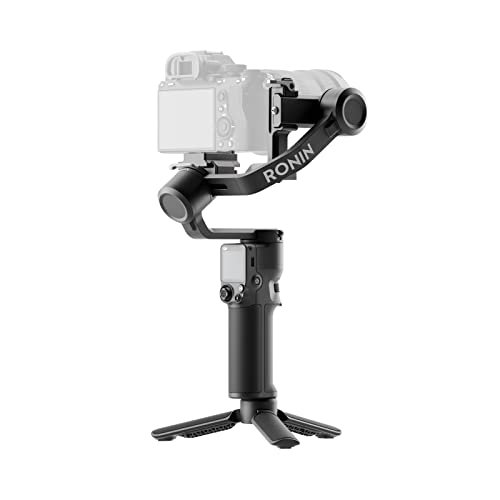
DJI RS 3 Mini, 3-Axis Gimbal Stabilizer for Cameras

The DJI RS 3 Mini is a fantastic choice if portability is your top priority without sacrificing performance. This ultra-compact gimbal is incredibly lightweight, making it a dream for travel and extended shooting sessions. Despite its small stature, it packs a punch with strong, high-torque motors, easily handling a wide range of popular mirrorless cameras and lens combinations that weigh up to 4.4 lbs. It’s truly designed to be an accessible, professional-grade tool for solo creators who want to keep their gear light.
-
Key Features
- 795g (1.75lbs) Lightweight and Portable
- Load capacity up to 2 kg (4.4 lbs), wide compatibility
- Bluetooth Shutter Control for easy photo/video capture
- 3rd-Gen RS Stabilization Algorithm for pro-level stability
- Native Vertical Shooting for social media content
- 1.4″ Full-Color Touchscreen with intuitive UI
-
Pros
- Extremely lightweight and easy to carry
- Excellent stabilization performance for its size
- Quick and easy setup, especially for vertical shooting
- Intuitive touchscreen interface
- Great for travel and vlogging
-
Cons
- Limited payload capacity compared to larger gimbals
- Some users might find the screen a bit small for detailed adjustments
- Requires the DJI Ronin app for full functionality
User Impressions: Users rave about how surprisingly capable this small gimbal is. They frequently highlight its portability and the impressive stability it delivers, even with slightly heavier lenses. The native vertical shooting is a huge hit for social media creators, making it a go-to choice for quick, high-quality content.
DJI RS 4 Mini, Gimbal Stabilizer for Cameras

The DJI RS 4 Mini takes the impressive portability of its predecessor and adds some clever enhancements to make setup even faster and shooting more dynamic. If you’re tired of fumbling with axis locks, you’ll love the RS 4 Mini’s auto axis locks, which get you ready to shoot in just one second. This gimbal also shines with its “Responsive Follow Mode” and “Intelligent Tracking” (with an optional module), ensuring your camera reacts instantly to your movements and keeps your subject perfectly framed. It’s a real time-saver for fast-paced shoots.
-
Key Features
- Ready in 1 second with Auto Axis Locks
- Intelligent Tracking Module keeps subjects framed (module not included with basic kit)
- Teflon Enhanced Balancing for smoother adjustments
- Fast Vertical Switch in 10 seconds for mobile-friendly content
- Responsive Follow Mode for instant reaction to hand movements
- Supports up to 2kg (4.4lbs) payload, handles mirrorless cameras and phones
-
Pros
- Extremely fast setup thanks to auto axis locks
- Improved balancing experience with Teflon coating
- Excellent for dynamic shooting with responsive follow mode
- Seamless and quick vertical shooting transition
- Still very lightweight and portable
-
Cons
- Intelligent Tracking requires an additional module
- DJI Ronin app download outside of Google Play might be inconvenient for some Android users
- Max payload is still limited to lighter cameras
User Impressions: Reviewers often point out the auto axis locks as a game-changer for speed. The smoother balancing and quick vertical switch are also frequently praised, making it a very user-friendly option for solo videographers who need to adapt quickly to different shooting scenarios.
DJI RS 4, 3-Axis Gimbal Stabilizer for DSLR and Mirrorless Cameras

Stepping up in capability, the DJI RS 4 offers a robust solution for a wider range of mirrorless and even some lighter DSLR cameras, supporting up to 3kg (6.6 lbs). This means it can comfortably handle most cameras under 4 pounds with a variety of lenses, giving you more flexibility. What makes the RS 4 stand out are its enhanced features like the extended tilt axis for easier balancing of larger setups and the Teflon-coated axis arms that ensure incredibly smooth adjustments. Plus, the added RSA communication port opens up a world of accessories and professional control options. It’s a versatile workhorse for serious content creators.
-
Key Features
- 2nd-Gen Native Vertical Shooting with new horizontal plate
- Joystick Mode Switch for quick control over gimbal or zoom
- Teflon-Coated Axis Arms for smoother balancing
- 3kg (6.6lbs) Payload Capacity with Extended Tilt Axis (8.5mm longer)
- RSA Communication Port for extensive control ecosystem
- Compatible with new BG70 High-Capacity Battery Grip (sold separately) for extended runtime
-
Pros
- Higher payload capacity handles more camera/lens combos
- Superior balancing experience due to Teflon coating and extended axis
- Flexible control options with joystick and RSA port
- Long battery life, expandable with optional grip
- Effortless vertical shooting
-
Cons
- Heavier than the “Mini” versions
- BG70 battery grip is sold separately
- DJI Ronin app download issue for Android users
User Impressions: Users appreciate the RS 4’s ability to handle heavier setups than its mini counterparts while still being relatively portable. The smooth balancing process and the versatility offered by the RSA port and extended battery options are frequently highlighted as major advantages for professional use.
DJI RS 4 Pro Combo, 3-Axis Gimbal Stabilizer for Cameras

While overkill for just a camera under 4 pounds, the DJI RS 4 Pro Combo is for those who demand the absolute peak of stabilization and control, with plenty of room to grow. This powerhouse gimbal supports a massive 4.5kg (10 lbs) payload and boasts a 20% increase in motor torque, easily accommodating even heavier mirrorless or cinema cameras. If you have a lighter camera but plan to upgrade or use heavier lenses, or simply want the most advanced features available, this is your pick. Features like LiDAR focusing and a comprehensive video transmission ecosystem make it ideal for professional film sets or highly complex solo productions.
-
Key Features
- 2nd-Gen Native Vertical Shooting for social content
- 4.5kg (10lbs) Payload Capacity, 20% Increase in Motor Torque
- Remote Dual Focus & Zoom Motor Control via joystick
- LiDAR Focusing: 76,800 Ranging Points Within 20m for accurate autofocus
- Video Transmission Ecosystem for broad production possibilities
- 29-hour Battery Runtime with optional BG70 High-Capacity Battery Grip (sold separately)
-
Pros
- Handles virtually any mirrorless or cinema camera setup
- Unmatched stabilization and motor power
- Advanced professional features like LiDAR focusing and video transmission
- Extensive control and expandability for pro workflows
- Very long battery life (especially with optional grip)
-
Cons
- Significant investment for a camera under 4 pounds
- Larger and heavier than other options, less portable
- Many advanced features might be overkill for casual users
- BG70 battery grip and some accessories sold separately
User Impressions: Professionals and serious enthusiasts rave about the RS 4 Pro’s robust build, incredible payload capacity, and the precision offered by its advanced features like LiDAR focusing. It’s often described as a “cinema-grade” tool that transforms how they shoot, even if they’re pairing it with a camera that weighs less than its maximum capacity.
ZHIYUN CINEPEER WEEBILL 3E 3-Axis Gimbal Stabilizer for Cameras

ZHIYUN’s CINEPEER WEEBILL 3E offers a compelling alternative if you’re looking for a compact, ergonomic, and powerful gimbal without breaking the bank. Weighing just 1.05 kg (2.3 lbs) and boasting an A4-sized footprint, it’s remarkably portable while still supporting up to 3kg (6.6 lbs) – perfect for cameras under 4 pounds. What really makes the Weebill 3E shine is its ergonomic design, featuring a more comfortable handle that reduces fatigue during long shooting sessions. Plus, its native vertical shooting is super efficient, and the Bluetooth shutter control reduces wire clutter.
-
Key Features
- Native Vertical Shooting with quick-mount system
- Bluetooth Shutter Control for wireless camera operation
- Built-in 2600mAh batteries with 14W fast charging (2h 46m charge time)
- 2.5 Sling Mode compatible (wrist rest/sling handle sold separately) to reduce fatigue
- Weighs only 1.05 kg (2.3 lbs), A4-sized, Lightweight and portable
- 3kg (6.6 lbs) payload capacity
-
Pros
- Excellent balance of portability and payload capacity
- Highly ergonomic design reduces hand fatigue
- Efficient native vertical shooting
- Convenient Bluetooth shutter control
- Good battery life with fast charging
-
Cons
- Sling mode accessories (wrist rest, handle) are sold separately
- Paper-based manual might be less convenient than app-based for some
- Not as feature-rich as the higher-end DJI Pro models
User Impressions: Users frequently praise the Weebill 3E for its comfortable design, which makes it a joy to use for extended periods. Its straightforward functionality, strong stabilization, and ability to handle common mirrorless setups (like those with cameras under 4 pounds) are often highlighted as major positives, offering great value for its price point.
Frequently Asked Questions (FAQ)
Q1: Why do I need a gimbal for my camera under 4 pounds?
A: Even lightweight cameras can produce shaky footage when handheld, especially during movement. A gimbal uses motors and sensors to stabilize your camera on three axes, eliminating shakes and jitters, resulting in smooth, professional-looking video. It’s essential for cinematic shots, vlogging on the go, or any dynamic filming.
Q2: What does “payload capacity” mean, and why is it important?
A: Payload capacity refers to the maximum weight a gimbal can effectively stabilize. If your camera and lens combination exceeds the gimbal’s payload capacity, the motors will struggle, leading to poor stabilization, motor strain, and potential damage. For cameras under 4 pounds, ensure the gimbal’s payload capacity is at least 4 pounds, ideally a bit more, to accommodate various lenses and accessories.
Q3: How do I balance a gimbal for my camera?
A: Balancing is crucial for optimal performance. It involves physically adjusting the camera on the gimbal’s axes (tilt, roll, pan) until it remains level without motor assistance. Most gimbals have quick-release plates and adjustable arms for this. Many modern gimbals offer fine-tuning knobs and digital balancing guides (often via an app) to simplify the process. Proper balancing reduces motor strain and extends battery life.
Q4: What is “Native Vertical Shooting”?
A: Native vertical shooting means the gimbal allows you to quickly and easily switch your camera to a vertical orientation without needing to re-mount it or use additional accessories. This is incredibly useful for creating content specifically for social media platforms like TikTok, Instagram Reels, and YouTube Shorts, which are primarily viewed on smartphones.
Q5: Are DJI Ronin app issues a concern for Android users?
A: Yes, as noted in some product descriptions, the DJI Ronin app has been removed from Google Play. Android users will need to download the app directly from the official DJI website. This is a minor inconvenience but doesn’t prevent the full functionality of the gimbals. Always ensure you download from the official source for security.
Q6: Can these gimbals also stabilize smartphones?
A: While primarily designed for mirrorless and DSLR cameras, some gimbals, especially the lighter ones like the DJI RS 4 Mini, can indeed stabilize smartphones, often with an optional phone clamp accessory. However, for dedicated smartphone stabilization, there are purpose-built smartphone gimbals that might offer a more tailored experience.
Q7: What’s the difference between a “Mini” gimbal and a standard one?
A: “Mini” gimbals (like DJI RS 3 Mini or RS 4 Mini) are designed to be ultra-compact and lightweight, prioritizing portability. They typically have lower payload capacities but are perfect for smaller mirrorless cameras and vlogging setups. Standard gimbals (like DJI RS 4 or RS 4 Pro) are larger, heavier, and offer higher payload capacities, more advanced features, and greater versatility for professional use, but at the cost of some portability.