
Tired of shaky, amateur-looking video footage? Whether you’re a budding filmmaker, a dedicated vlogger, or just someone who loves capturing life’s moments, a good gimbal for your video camera is an absolute game-changer. These incredible devices transform your wobbly shots into silky-smooth, cinematic masterpieces, making your content stand out.
But with so many options on the market, how do you pick the best gimbal for video camera that fits your needs? Don’t sweat it! We’ve scoured the market to bring you a comprehensive guide to the top 7 gimbals, ranging from professional-grade camera stabilizers to compact smartphone companions. Let’s dive in and find the perfect tool to elevate your video game!
1. DJI RS 3 Mini, 3-Axis Gimbal Stabilizer for Cameras

The DJI RS 3 Mini is a fantastic option for creators who need professional-grade stabilization without the bulk. This compact powerhouse is surprisingly light, making it a dream for travel and extended shooting sessions. Don’t let its size fool you; it packs a punch with strong motors and a high load capacity, handling a wide range of mirrorless cameras and lenses with ease. Plus, its native vertical shooting feature is a huge win for social media creators!
- Key Features:
- 795g (1.75lbs) Lightweight and Portable
- Wide-Ranging Compatibility with up to 2 kg (4.4 lbs) payload
- Bluetooth Shutter Control for seamless operation
- 3rd-Gen RS Stabilization Algorithm for pro-level stability
- Native Vertical Shooting for social media content
- 1.4″ Full-Color Touchscreen with intuitive UI
- Pros:
- Extremely portable without compromising on power.
- Excellent stabilization performance, a hallmark of DJI.
- Quick and easy setup with Bluetooth shutter control.
- Native vertical shooting is a massive convenience.
- Cons:
- Requires the DJI Ronin app for full functionality and activation.
- Might be overkill (and pricier) for casual smartphone users.
- User Impressions: Users consistently praise the RS 3 Mini for its impressive balance of portability and professional performance. Many highlight its ease of use for mirrorless cameras and appreciate the native vertical mode for content creation, calling it a mini workhorse.
- See it on Amazon here
2. Zeadio Video Action Stabilizing Handle Grip Handheld
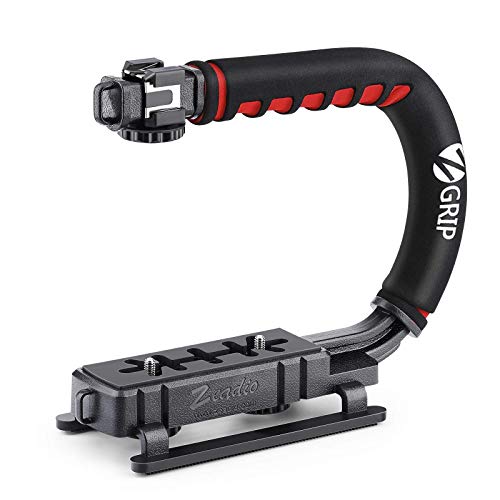
Sometimes, simplicity is key, and the Zeadio Video Action Stabilizing Handle Grip delivers just that. This isn’t an electronic gimbal, but a highly effective, low-cost solution for achieving smoother, low-angle shots. It’s perfect for action sports, family events, or any situation where a stable, comfortable grip can make all the difference. Its wide compatibility means it’ll work with almost any camera or camcorder you own.
- Key Features:
- Ideal for moving low-angle filming
- Wide Compatibility with national standard 1/4-20 thread interface
- Enhances stability for extreme sports situations
- Lightweight and Comfortable with cushioned NBR padded handle
- Pros:
- Extremely affordable and accessible.
- Great for achieving unique low-angle perspectives.
- Provides a much more stable grip than handheld shooting.
- Simple to use with no batteries or complex setups.
- Cons:
- Not an electronic gimbal; does not offer active stabilization for shake.
- Primarily for static or smooth moving shots, not rapid action.
- User Impressions: Customers love the Zeadio handle for its straightforward design and significant improvement in stability over handholding, especially for low shots. It’s often recommended as an excellent budget-friendly accessory for beginners or those not ready for an electronic gimbal.
- See it on Amazon here
3. DJI Osmo Mobile 6, 3-Axis Phone Gimbal

For smartphone videographers, the DJI Osmo Mobile 6 is arguably the best gimbal for video camera in your pocket. This phone gimbal is a marvel of portability and smart features. From its lightning-fast unfold-and-shoot mechanism to the advanced ActiveTrack 6.0 for flawless subject tracking, it makes pro-level smartphone videography incredibly easy. The built-in extension rod and intuitive controls push creative boundaries for anyone.
- Key Features:
- Stay on Point with ActiveTrack 6.0 for superior tracking
- Remote Control With Apple Watch (via DJI Mimo app)
- Silky Smooth Shots with 3-Axis Stabilization
- Quick power-on and shoot as soon as you unfold
- Lightweight, Compact (305g), and Extendable built-in rod
- ShotGuides feature for easy pro-level sequences
- Side Wheel for precise focus and zoom control
- New Parents and Kids Mode for autonomous shooting
- Pros:
- Outstanding 3-axis stabilization for buttery smooth phone footage.
- Intelligent features like ActiveTrack and ShotGuides simplify complex shots.
- Extremely portable and quick to deploy.
- Extendable rod adds versatility for selfies and unique angles.
- Cons:
- Exclusively for smartphones, not compatible with larger cameras.
- DJI Mimo app removed from Google Play, requiring manual download for Android users.
- User Impressions: Users are consistently blown away by the Osmo Mobile 6’s stabilization and smart features. The quick setup and ActiveTrack are frequently cited as highlights, making it a favorite for vloggers, travelers, and parents wanting to capture steady memories.
- See it on Amazon here
4. 3-Shoe DSLR/Mirrorless/Action Camera Camcorder Phone Handle
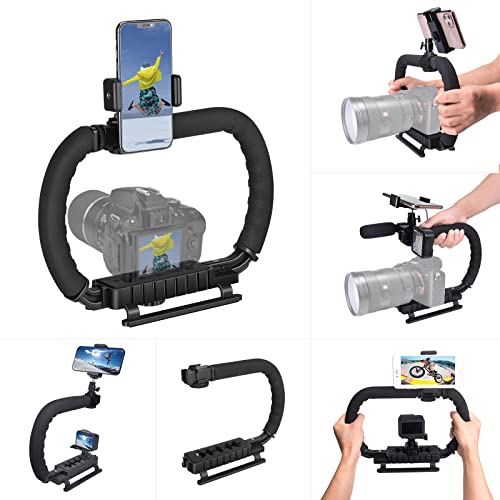
This versatile 3-shoe handle offers a sturdy, ergonomic grip for a variety of camera types, from DSLRs to action cameras and even phones. Like the Zeadio, it’s a passive stabilizer, focusing on providing a comfortable, two-handed grip for improved shot stability and low-angle filming. Its standout feature is the multiple cold shoe mounts, allowing you to easily attach essential accessories like microphones and LED lights, turning your setup into a portable filmmaking rig.
- Key Features:
- High-Quality ABS material, lightweight yet durable
- Ergonomic Design with detachable C-TYPE low-position-shooting stabilizer
- Mobile phone monitor stand with detachable ball head clip
- 3-shoe Extension Kit for external devices (mic, fill light)
- Wide compatibility with GoPro Hero, DSLR, mirrorless, and action cameras
- Pros:
- Excellent for building a compact video rig with multiple accessories.
- Ergonomic design significantly improves handling and reduces fatigue.
- Very wide compatibility with different camera types.
- Affordable solution for enhanced grip and accessory mounting.
- Cons:
- Provides physical stability, not electronic active stabilization.
- Can be a bit bulky once accessories are attached.
- User Impressions: Reviewers appreciate this handle for its versatility and the ability to add accessories, making it a popular choice for budget-conscious creators building a mobile studio. They note the comfortable grip and the convenience of the phone monitor stand.
- See it on Amazon here
5. hohem iSteady X3 SE Plus Gimbal Stabilizer for iPhone, Android

The hohem iSteady X3 SE Plus is a fantastic budget-friendly option for smartphone users looking for advanced features. Its detachable remote controller sets it apart, offering unparalleled flexibility for solo shooting and creative angles. Coupled with Hohem’s iSteady 8.0 anti-shake system and an impressive 11-hour battery life, this foldable gimbal is a reliable companion for all your smartphone videography adventures.
- Key Features:
- Detachable Remote Controller for remote shooting up to 32 feet
- Advanced iSteady 8.0 Technology for ultra-smooth footage
- Built-in 8-inch Extendable Rod for diverse angles
- Compact and Foldable design, weighing only 0.85 lbs
- Unlock Creativity with the Hohem Joy App (AI tracking, gesture control)
- 11-Hour Long Battery Life and quick charging
- Beginner-Friendly Stabilizer with One-Hand Operation
- Pros:
- The detachable remote offers great creative freedom, especially for solo vloggers.
- Excellent stabilization performance for its price point.
- Impressive battery life for extended shooting sessions.
- Very portable and user-friendly, ideal for beginners.
- Cons:
- Exclusively for smartphones.
- The extension rod should be retracted after use to prevent deformation.
- User Impressions: Users frequently commend the iSteady X3 SE Plus for its remote control functionality and solid stabilization at an affordable price. The long battery life is a recurring positive, making it a great travel companion for smartphone content creators.
- See it on Amazon here
6. Gimbal stabilizer for Smartphone,3-Axis Phone Gimbal

This 3-axis phone gimbal offers professional-grade stabilization in a compact, travel-friendly package. What makes it stand out is its emphasis on user-friendliness through the “Gimbal Pro” app, offering one-tap templates like Inception and Dolly Zoom to add cinematic flair with minimal effort. Combined with AI smart tracking and gesture control, it’s designed to make high-quality smartphone video accessible to everyone.
- Key Features:
- SMOOTH 3-AXIS GIMBAL STABILIZER for cinematic shots
- EASY TO USE GIMBAL AND APP with one-tap templates (Moment Mode)
- AI SMART TRACKING AND GESTURE CONTROL for hands-free operation
- FAST CHARGING WHILE IN USE (80min full charge)
- FOLDABLE AND PORTABLE, weighing only 0.78 lbs
- Pros:
- Offers excellent 3-axis stabilization for smartphones.
- Intuitive app with creative templates simplifies professional effects.
- AI tracking and gesture control enhance ease of use.
- Very fast charging and compact, foldable design for portability.
- Cons:
- Limited to smartphone use.
- Generic branding might mean less established support than major brands.
- User Impressions: Customers appreciate how easily this gimbal turns shaky phone footage into smooth, professional-looking videos. The smart tracking and app-driven features are highlighted as particularly helpful for vloggers and beginners wanting cinematic results.
- See it on Amazon here
7. Zhiyun Crane M2S Camera Gimbal Stabilizer Handheld 3-Axis

The Zhiyun Crane M2S strikes an impressive balance between portability and power, making it an ideal best gimbal for video camera users who need more than a phone gimbal but less bulk than a full-sized DSLR stabilizer. It’s incredibly lightweight yet capable of handling lightweight mirrorless cameras, action cams, and phones. The integrated fill light is a brilliant addition, offering adjustable brightness and color filters for enhanced creative control in various lighting conditions.
- Key Features:
- Small size (549g) with strong power for various cameras
- Ergonomic design with built-in 0.66-inch display screen
- Integrated fill light with Lumen Amplifier technology (1000 lumens, 5 levels, 4 color filters)
- Next-level Quick Release plate with V-shape design and dual safety locks
- Pros:
- Remarkably light for a multi-camera gimbal.
- Integrated fill light is a unique and highly useful feature.
- Advanced quick-release system for fast setup.
- Offers versatility for small mirrorless, action cameras, and phones.
- Cons:
- NOT compatible with heavy cameras or lenses – explicitly designed for lightweight setups.
- Proper balancing is crucial for optimal performance.
- User Impressions: Users frequently praise the Crane M2S for its excellent stabilization and the handy built-in fill light, calling it a versatile tool for hybrid shooters. Its portability for small mirrorless cameras is a significant advantage, though some note the importance of careful balancing.
- See it on Amazon here
Factors to Consider When Choosing Your Best Gimbal
Finding the best gimbal for video camera use isn’t just about picking the most expensive one. It’s about finding the right fit for your gear and your shooting style. Here are a few key things to keep in mind:
- Camera Compatibility & Payload Capacity: This is crucial! Ensure the gimbal can safely and effectively hold your camera and lens setup. Check the maximum payload capacity.
- Axis Stabilization: Most modern gimbals offer 3-axis stabilization, which is ideal for smooth motion across all directions.
- Portability & Weight: If you’re often on the go, a lightweight, foldable gimbal is a huge plus.
- Battery Life: Longer battery life means more shooting time without interruptions.
- Features: Do you need AI tracking, a built-in fill light, an extension rod, or advanced app controls? Prioritize features that match your content creation style.
- Ease of Use: For beginners, a simple setup and intuitive controls are essential.
- Budget: Gimbals vary widely in price. Determine what you’re willing to spend for the features you need.
Conclusion
Investing in the best gimbal for video camera can truly transform your video quality, giving your footage that polished, professional look. Whether you’re capturing cinematic scenes with a mirrorless camera or vlogging on the go with your smartphone, there’s a perfect stabilizer out there for you. We hope this guide has helped you narrow down your choices and empowered you to make an informed decision. Happy shooting!
FAQ Section
Q1: What is a gimbal and why do I need one for my video camera?
A1: A gimbal is a motorized device that uses sensors and motors to keep your camera perfectly level and stable, even when you’re moving. You need one to eliminate shaky footage, producing smooth, professional-looking videos, especially when walking, running, or shooting action scenes.
Q2: What’s the difference between a 2-axis and 3-axis gimbal?
A2: A 2-axis gimbal stabilizes on two axes (usually tilt and roll), while a 3-axis gimbal stabilizes on all three axes (tilt, roll, and pan). A 3-axis gimbal offers superior stabilization, eliminating shake from all directions, and is generally recommended for video cameras.
Q3: Can I use a smartphone gimbal with my DSLR or mirrorless camera?
A3: Generally, no. Smartphone gimbals are designed for the weight and form factor of phones. DSLR and mirrorless cameras are much heavier and require gimbals with higher payload capacities and different mounting systems, like the DJI RS 3 Mini or Zhiyun Crane M2S.
Q4: How important is payload capacity when choosing a gimbal?
A4: Payload capacity is extremely important. It refers to the maximum weight your gimbal can support and stabilize effectively. Exceeding the payload capacity will result in poor stabilization, motor strain, and potentially damage to the gimbal or your camera. Always check your camera and lens’s combined weight before purchasing.
Q5: Are gimbals difficult to set up or use for beginners?
A5: Modern gimbals, especially those designed for smartphones, are increasingly user-friendly with intuitive apps and quick setup processes. Gimbals for heavier cameras might require a bit more practice for balancing, but many come with tutorials and guides to help beginners get started.
Q6: How long does a gimbal’s battery typically last?
A6: Battery life varies significantly between models, typically ranging from 6 to 15 hours on a single charge. Factors like motor load, usage patterns, and features (like a built-in fill light) can affect actual battery duration. Always check the manufacturer’s specifications.
Q7: Can gimbals track subjects automatically?
A7: Many advanced gimbals, especially for smartphones (like the DJI Osmo Mobile 6 or hohem iSteady X3 SE Plus), feature intelligent tracking modes (e.g., AI tracking, ActiveTrack). These allow the gimbal to automatically follow a designated subject, keeping it in the frame without manual adjustment.

