
So, you’ve got your trusty Panasonic Lumix G85, a fantastic mirrorless camera known for its robust build and excellent in-body image stabilization. But let’s be real: while that 5-axis Dual I.S. is great, it can only take you so far when you’re looking for truly buttery-smooth, cinematic video. Whether you’re a seasoned videographer or just starting your journey into more professional-looking footage, a dedicated camera stabilizer is often the missing piece of the puzzle.
When it comes to capturing dynamic, shake-free video, a gimbal is an absolute game-changer. It transforms choppy handheld footage into seamlessly flowing shots, making your work look incredibly polished. For your Panasonic G85, finding the best gimbal for Panasonic G85 means looking for one that offers the right balance of payload capacity, portability, and features without breaking the bank.
In this guide, we’ll pinpoint the top gimbal that pairs perfectly with your G85. We’ll also dive into some other highly beneficial accessories that, while not gimbals themselves, are crucial for enhancing your Panasonic G85 setup and making your videography experience smoother and more professional. Let’s get your shots looking their absolute best!
Why the Panasonic G85 Needs a Gimbal
The Panasonic Lumix G85 is a powerhouse, especially for its price point. Its 16MP Micro Four Thirds sensor, 4K video capabilities, and fantastic in-body image stabilization make it a favorite for many content creators. However, even with its impressive internal stabilization, a 3-axis gimbal provides an entirely different level of smoothness, especially for complex movements like tracking shots, dollies, or even just walking and talking. It isolates the camera from your body movements, ensuring a perfectly level horizon and eliminating jarring shakes, truly elevating your video production quality.
The Ultimate Gimbal for Your G85
When searching for the best gimbal for Panasonic G85, you want something that’s powerful enough to handle your camera and a lens, yet compact enough for everyday use.
DJI RS 3 Mini, 3-Axis Gimbal Stabilizer for Cameras

The DJI RS 3 Mini is an incredibly compelling option for Panasonic G85 users looking for a professional-grade gimbal stabilizer in a portable package. What makes it stand out is its remarkable balance of lightweight design and robust payload capacity. Don’t let the “Mini” in its name fool you; this compact marvel can easily handle your G85 setup, ensuring you get incredibly smooth footage without the bulk of larger rigs. It’s designed for creators on the go, making it perfect for run-and-gun shooting, travel vlogging, or any scenario where portability is key.
Key Features:
– 795g (1.75lbs) Lightweight and Portable
– Wide-Ranging Compatibility with up to 2 kg (4.4 lbs) load capacity
– Bluetooth Shutter Control for seamless camera operation
– 3rd-Gen RS Stabilization Algorithm for pro-level stability
– Native Vertical Shooting for social media content creation
– 1.4″ Full-Color Touchscreen with intuitive UI design
– Requires DJI Ronin app for activation and full functionality
Pros:
– Exceptionally lightweight, reducing arm fatigue during long shoots.
– Impressive payload capacity for its size, fitting the G85 and various lenses.
– Advanced stabilization algorithm delivers incredibly smooth footage.
– Bluetooth control simplifies camera connection and operation.
– Native vertical shooting is a huge plus for social media creators.
– Touchscreen makes settings adjustments quick and easy.
Cons:
– Requires app activation, which can be an extra step initially.
– Some users might prefer a larger grip for very heavy setups, though it’s perfect for the G85.
User Impressions:
Users consistently praise the RS 3 Mini for its portability and excellent stabilization. Many G85 owners find it an ideal match, appreciating how quickly they can set it up and start shooting. The native vertical shooting is frequently highlighted as a game-changer for content creation, and the Bluetooth shutter control is a much-loved convenience. It truly delivers on its promise of professional results in a compact form factor.
Essential Accessories to Enhance Your G85 Gimbal Setup
While the DJI RS 3 Mini is the star of the show for stabilization, optimizing your Panasonic G85 for filmmaking goes beyond just the gimbal. The following accessories are not gimbals themselves, but they are incredibly useful tools that can protect your camera, improve handling, or enable remote operation, making your overall workflow much smoother, especially when working with a gimbal.
NICEYRIG Cage for Panasonic Lumix G95 G85, Form-Fitting…

A camera cage, like this one from NICEYRIG, is an indispensable accessory for serious videographers using the Panasonic G85. While it doesn’t stabilize your camera, it acts as a protective armor and a versatile mounting platform. If you plan on adding external monitors, microphones, lights, or even a top handle for low-angle shots while your G85 is on a gimbal, this cage provides all the necessary attachment points, transforming your camera into a full-fledged video rig.
Key Features:
– Form-fitting design specifically for Panasonic Lumix G95 G85
– Constructed from sturdy aluminum alloy for protection
– Features ARRI and 1/4” locating points on top NATO rail
– Built-in cold shoe mount
– Provides rich rig possibilities with threaded holes on both sides
– Equipped with NATO rail on the left for quick-release accessories
– Anti-twist design with rubber pads and a front metal sheet
– Integrated screwdriver for quick camera attachment
Pros:
– Excellent protection for your camera body.
– Vastly expands mounting options for accessories, critical for video production.
– Allows for quick transitions between handheld and gimbal setups if accessories need to be moved.
– Robust build quality ensures durability.
– Integrated screwdriver is a thoughtful convenience.
Cons:
– Adds a small amount of bulk and weight to the camera.
– May require removing for very compact travel setups.
User Impressions:
G85 users love this cage for its perfect fit and the sheer number of mounting points it provides. It’s often cited as essential for anyone building out a serious video rig, offering peace of mind regarding camera protection and the flexibility to add all necessary peripherals without stressing the camera body itself.
Panasonic LUMIX G85 4K Digital Camera, 12-60mm Power O.I.S….

Alright, you already own this one! But let’s quickly appreciate the Panasonic LUMIX G85 itself. Understanding your camera’s strengths helps you leverage a gimbal effectively. The G85 is renowned for its excellent 4K video capabilities and its 5-axis Dual Image Stabilization, which works in tandem with optical image stabilization in lenses. While a gimbal takes stabilization to the next level, the G85’s built-in features provide a solid foundation, especially when shooting static shots or in situations where a gimbal isn’t practical. Its flip-out LCD and live viewfinder are also super helpful for monitoring your shots, whether on or off a stabilizer.
Key Features:
– 16 megapixel Micro Four Thirds sensor with no low pass filter
– Mirrorless Interchangeable Lens Camera with 12-60mm lens kit
– Class-Leading 5-axis Dual Image Stabilization (in-body + lens)
– Integrated eye-level OLED live viewfinder (2360K dots)
– Rear touch-enabled 3-inch LCD Display (1040K dots) that flips out
– 4K QFHD video recording (3840 x 2160)
– Lumix 4K Photo and 4K Post Focus features
Pros:
– Excellent in-body stabilization for handheld shooting.
– Crisp 4K video quality.
– Compact and lightweight mirrorless design.
– Articulating touchscreen is great for vlogging and odd-angle shots.
– Robust build quality with splash/dust resistance.
Cons:
– Micro Four Thirds sensor performs less well in extreme low light compared to larger sensors.
– 16MP might be limiting for some still photographers.
User Impressions:
The G85 is a beloved camera for hybrid shooters. Users consistently praise its video capabilities, reliable stabilization, and user-friendly design. It’s often recommended as a top choice for aspiring filmmakers due to its feature set and affordable price point, making it an ideal candidate for pairing with a high-quality gimbal.
Kiwifotos DMW-RSL1 Remote Control Shutter Release Cord for…

A wired remote control like the Kiwifotos DMW-RSL1 is a simple yet powerful tool, especially when your Panasonic G85 is mounted on a gimbal or a tripod. The core benefit here is eliminating camera shake. When you press the shutter button directly on the camera, you introduce tiny vibrations. With a remote, you can trigger the autofocus and shutter without ever touching the camera body, ensuring your stills are perfectly sharp and your video starts smoothly, free from any accidental bumps. This is particularly useful for long exposures or time-lapses (if your gimbal supports those modes).
Key Features:
– Controls autofocus and shutter triggering
– Captures images without shaking the camera
– Ideal for bulb exposures, super telephoto shots, and macro photography
– Handy for taking pictures of subjects that are difficult to approach
– Includes a 2.3 ft (70cm) camera connection cable + 4.3 ft (130cm) extension cable
– Wide compatibility with various Panasonic cameras, including the G85
Pros:
– Prevents camera shake for sharper photos and smoother video starts.
– Long cable offers flexibility for remote operation.
– Simple, plug-and-play functionality.
– Very affordable and reliable.
Cons:
– It’s wired, which can sometimes be less convenient than a wireless solution.
– Primarily for stills, less functionality for complex video control.
User Impressions:
Customers find this remote reliable and effective for its purpose. It’s often lauded as an essential accessory for tripod work and for situations where precise, shake-free shutter release is paramount. For gimbal users, it ensures a clean start to recordings.
JJC Camera Hand Grip Strap for Canon EOS R8 R10…

While a gimbal is fantastic for specific smooth movements, there will be times when you’re shooting handheld without it. That’s where a comfortable hand grip strap comes in. The JJC Camera Hand Grip Strap isn’t for stabilizing your camera on a gimbal, but rather for providing a secure and ergonomic grip when your Panasonic G85 is not on the gimbal. It helps prevent accidental drops and reduces hand fatigue during extended shooting sessions, especially if you’re frequently moving between handheld and stabilized shots.
Key Features:
– Universal compatibility for most DSLR/mirrorless cameras, including the G85
– Made of premium microfiber PU leather for comfort and durability
– Padded hand cushion for support and reduced fatigue
– Adjustable length for a customizable fit
– Features a 1/4″-20 mount for tripod attachment without removal
– Includes a strap eyelet for attaching a neck strap
Pros:
– Significantly improves camera handling and security.
– Reduces hand fatigue during long shooting periods.
– Universal design fits a wide range of cameras.
– The 1/4″-20 tripod socket is a clever addition, allowing tripod use without removal.
Cons:
– Doesn’t directly contribute to video stabilization.
– Some users might prefer a traditional neck strap.
User Impressions:
Users appreciate the added security and comfort this hand strap provides. It’s highly rated for long photo walks or events where a camera needs to be readily available but a full rig isn’t needed. Many find it a much more secure alternative to simply holding the camera by the body.
JJC Wireless Remote Control for Panasonic Lumix G9 II G85…
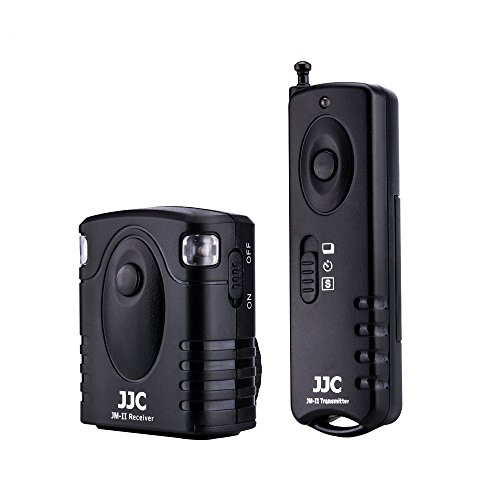
Stepping up from the wired remote, a wireless remote control like this JJC model offers even greater freedom and flexibility, particularly valuable when your Panasonic G85 is mounted on a gimbal. Imagine your gimbal on a tripod or extended pole, capturing a high-angle shot; a wireless remote allows you to trigger the shutter or start/stop recording from a distance without disturbing the setup. It uses radio frequency, so line-of-sight isn’t always necessary, making it incredibly versatile for self-shooting or creative camera placements.
Key Features:
– 16 possible radio channels for interference-free operation
– Operates on Radio Frequency 433 MHz
– Up to 30 meters (approx. 98 feet) range
– Can trigger cameras wirelessly or wired
– Supports 5 wireless shutter modes: single shot, unlimited continuous shots, bulb shot, 3 continuous shots, and 5 seconds delay shot
– Wide compatibility with Panasonic cameras, including the G85
– Replaces Panasonic DMW-RS1/DMW-RSL1 Remote
Pros:
– Wireless operation provides ultimate freedom and distance.
– Multiple shutter modes enhance creative possibilities.
– Radio frequency ensures reliable connection without line-of-sight.
– Can trigger multiple receivers with one transmitter.
Cons:
– Doesn’t control video start/stop (important to note for video users).
– Requires batteries for both transmitter and receiver.
User Impressions:
Photographers and videographers alike praise this remote for its solid range and reliable wireless connection. It’s a favorite for self-portraits, wildlife photography, or any scenario where interacting directly with the camera would cause disturbance. While it doesn’t offer full video control, its photo-centric features are highly valued.
PHOLSY for Panasonic Camera Remote Control P6 Shutter…

The PHOLSY P6 remote control takes wireless remote functionality to the next level, specifically for advanced techniques like time-lapse and HDR. This is where it becomes particularly useful for a G85 user. While not a gimbal itself, using your G85 on a stable platform (like a tripod or a locked-off gimbal) with this intervalometer allows you to create stunning time-lapse videos of sunsets, star trails, or blooming flowers, all without ever touching the camera. Its comprehensive timer settings and backlit LCD make it a powerful tool for intricate shoots.
Key Features:
– Supports TIMER CONTROL and 5 SHUTTER MODES (S, C, B, 2S, TIMER)
– Timer intervalometer for time-lapse recording
– Timing settings accurate to 0.1 second
– 5 settings for TIMER CONTROL: Delay, Interval, Long (exposure), N (number of frames), BKLN (Auto bracketing)
– 2.4GHz wireless transmission with 60+ meters range and anti-interference
– LCD display for easy setup and visual reference, with illumination for low light
– Wide compatibility with Panasonic cameras, including the G85
– Replaces Panasonic DMW-RSL1 and DMW-RS2GK
– Cost-effective; only requires changing the shutter release cable for different cameras
Pros:
– Advanced intervalometer features for time-lapse and HDR.
– Excellent wireless range and anti-interference.
– Clear, illuminated LCD display makes settings easy in any light.
– Extremely versatile for various shooting scenarios.
– Wired and wireless operation options.
Cons:
– More complex than a basic remote, might have a learning curve for new users.
– Requires multiple AAA batteries (not included).
User Impressions:
Users are consistently impressed by the PHOLSY P6’s feature set and reliability. It’s highly recommended for those serious about time-lapse, long exposures, and HDR, offering precise control that far exceeds basic remotes. The backlit display and long wireless range are frequently highlighted as major advantages.
Factors to Consider When Choosing a Gimbal (and Accessories) for Your G85
Choosing the right gear for your Panasonic G85 involves more than just picking a popular model. Here are a few key considerations:
- Payload Capacity: This is paramount for a gimbal. Ensure the gimbal can comfortably handle the weight of your G85 plus your heaviest lens and any small accessories (like a microphone). The DJI RS 3 Mini’s 4.4 lbs capacity is generally more than enough for most G85 setups.
- Portability & Weight: If you’re a run-and-gun shooter or travel frequently, a lightweight and compact gimbal is essential. Remember, you’ll be holding it for extended periods.
- Battery Life: Good battery life means fewer interruptions during shooting. Check the estimated runtime and consider if extra batteries are easily available.
- Ease of Use & Balancing: A gimbal that’s quick and easy to balance will save you precious time on set. Look for user-friendly interfaces and intuitive controls. The DJI RS 3 Mini excels here with its quick-release plate and touchscreen.
- Features: Do you need native vertical shooting? Advanced tracking modes? App control? Consider what features are important for your specific workflow.
- Compatibility (for accessories): For cages, remotes, and grips, ensure they are specifically designed for or compatible with the Panasonic G85 to guarantee a perfect fit and full functionality.
- Build Quality: You want durable gear that can withstand the rigors of filmmaking. Aluminum alloy for cages and robust plastics for gimbals are good signs.
Conclusion
For Panasonic G85 owners looking to elevate their video production, the DJI RS 3 Mini stands out as the clear choice for the best gimbal for Panasonic G85. Its compact size, impressive payload, and advanced stabilization make it an ideal partner for capturing super smooth, cinematic footage.
Beyond the gimbal, remember that a complete filmmaking setup involves a suite of tools. Accessories like the NICEYRIG Cage, various remote controls, and even a comfortable hand grip strap can significantly enhance your shooting experience, offering protection, versatility, and precise control over your G85. By combining the power of your Panasonic G85 with the right gimbal and complementary accessories, you’ll be well on your way to creating stunning, professional-quality videos. Happy shooting!
FAQ Section
Q1: Do I really need a gimbal for my Panasonic G85 if it has in-body image stabilization (IBIS)?
A1: While the Panasonic G85’s 5-axis Dual I.S. is excellent for handheld stills and general video, a 3-axis gimbal provides a superior level of smoothness, especially for dynamic movements like walking, running, or complex tracking shots. It isolates the camera from your body’s movements, eliminating horizontal, vertical, and rotational shake that IBIS alone cannot fully compensate for. For truly cinematic, professional-looking video, a gimbal is highly recommended.
Q2: What is “payload capacity” and why is it important for a gimbal?
A2: Payload capacity refers to the maximum weight a gimbal can effectively stabilize. It’s crucial because your gimbal needs to be able to support the total weight of your camera body (like the Panasonic G85), the heaviest lens you plan to use, and any small accessories attached to the camera (like a small microphone or a cage). If your setup exceeds the gimbal’s payload capacity, it won’t be able to stabilize properly, leading to shaky footage or motor strain.
Q3: Can I use any lens with my Panasonic G85 on a gimbal?
A3: Generally, yes, as long as the combined weight of your G85 and the lens stays within the gimbal’s payload capacity. However, very long or heavy lenses can sometimes make balancing more challenging or push the limits of the gimbal’s motors. Compact, lightweight prime lenses or standard zoom lenses (like the kit 12-60mm) are typically easiest to balance.
Q4: How do I balance my Panasonic G85 on a gimbal?
A4: Balancing a gimbal involves adjusting the camera’s position on all three axes (tilt, roll, and pan) so that it remains still and level when the motors are off. Most modern gimbals, like the DJI RS 3 Mini, have quick-release plates and adjustable arms to facilitate this. It’s a critical step that ensures smooth operation and prevents motor overload. Refer to your gimbal’s specific manual for detailed balancing instructions, as the process varies slightly by model.
Q5: Are the remote controls listed actually gimbals?
A5: No, the remote controls (Kiwifotos, JJC Wireless, PHOLSY) are not gimbals. They are accessories designed to trigger your camera’s shutter or control other functions remotely. This helps to eliminate camera shake when you press the shutter button directly and allows for more creative shots, especially when your camera is mounted on a tripod or a gimbal in a difficult-to-reach position.
Q6: What is a camera cage, and why would I need one for my G85 with a gimbal?
A6: A camera cage is a form-fitting metal frame that wraps around your camera, like the NICEYRIG cage for the G85. It serves two main purposes: protection for your camera body and providing multiple mounting points (threaded holes, cold shoe mounts) for accessories like external monitors, microphones, LED lights, or top handles. While not directly for stabilization, a cage is invaluable when building a comprehensive video rig around your G85, especially if you plan to use multiple accessories on or off your gimbal.
Q7: Can I use my Panasonic G85’s internal image stabilization while it’s on a gimbal?
A7: Yes, you can. It’s generally recommended to keep the G85’s in-body image stabilization (IBIS) enabled, as it can often work in conjunction with the gimbal’s stabilization to provide even smoother results. However, in some rare cases, particularly with very fast movements or certain lenses, there might be a very slight “jello” effect or over-correction. If you notice this, you can try disabling the camera’s IBIS to see if it improves, but typically, they work well together.

