
The Panasonic Lumix G85 (or G80/G81, depending on your region) is a phenomenal mirrorless camera, especially for video creators on a budget. Its in-body image stabilization (IBIS) is great, but for truly cinematic, buttery-smooth footage, you’ll want to pair it with a dedicated gimbal. If you’re currently asking “what’s the best gimbal for G85?”, you’re in the right place!
While choosing the perfect gimbal is key, a complete professional setup often includes crucial accessories that enhance your workflow. This article will guide you on what to look for in a gimbal for your G85 and highlight a critical accessory that can significantly upgrade your shooting experience.
What Makes the Best Gimbal for G85?
When searching for the best gimbal for G85, there are a few key factors you absolutely need to consider to ensure you get stable, professional-looking footage:
- Payload Capacity: This is probably the most important factor. Your G85, with a lens attached (and maybe a small mic or monitor), needs to fall within the gimbal’s supported weight range. Always factor in your heaviest lens setup.
- Size and Portability: Do you need something compact for travel, or are you okay with a larger rig for maximum stability?
- Battery Life: Longer battery life means less worrying about charging during a shoot. Look for gimbals that offer at least 8-12 hours.
- Gimbal Modes & Features: Pan Follow, Tilt Follow, All-Lock, POV, Sport Mode, Inception Mode (360° roll) – more modes offer greater creative flexibility. Features like active tracking, quick-release plates, and intuitive app control are also big pluses.
- Build Quality: You want a durable gimbal that can withstand the rigors of frequent use.
- Ease of Balancing: A good gimbal should be relatively easy to balance, even for beginners.
- Connectivity: Does it offer good app control and potentially control over camera functions?
While there are many excellent gimbals on the market, the ideal one for your G85 will strike the right balance between these features and your specific shooting needs. Now, let’s talk about an accessory that makes a significant difference for serious video work with your G85, especially when combined with a gimbal setup.
Essential Accessory Spotlight: EVO Gimbals ReFlex Ultra Thin HDMI Cable (Micro HDMI to HDMI)
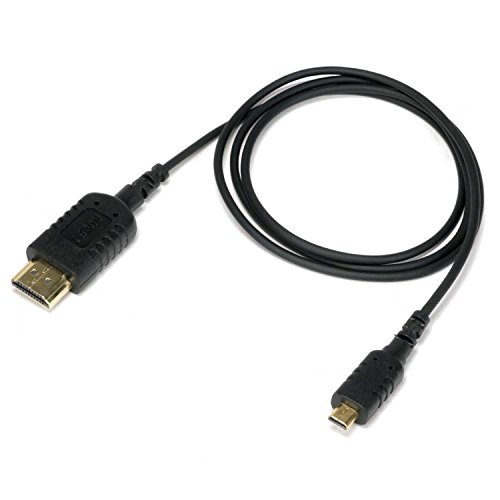
When you’re out shooting with your G85, especially on a gimbal, viewing your footage clearly on the camera’s small screen can be a real pain. An external monitor solves this, but connecting it gracefully to a compact camera like the G85 on a gimbal rig can be tricky. That’s where the EVO Gimbals ReFlex Ultra Thin HDMI Cable comes in. This isn’t a gimbal itself, but it’s an absolute game-changer for anyone trying to build a tidy, efficient G85 camera rig. Its super-slim and flexible design is perfect for routing around tight spaces and delicate motors on a gimbal, making sure your setup stays balanced and doesn’t get tangled. If you’re aiming for professional monitoring with your G85, this cable is a must-have to keep your rig clean and functional.
Key Features:
– Micro HDMI to HDMI: Designed for connecting digital cameras, camcorders, tablets, or other micro HDMI devices (like your G85) to field monitors or displays.
– Ultra Thin 2.5mm diameter cable built from high-grade silicone with proprietary flexible strands for superior strength and flexibility.
– Specifically designed for gimbal, camera stabilizer, and camera rig applications where flexibility and compact cable routing are essential.
– Supports 4K@60Hz Video Output via HDMI V2.0, ensuring high-quality visuals on your external monitor.
– Supports Ultra HD 4K@60Hz, Full HD 1080P, 3D, Ethernet, ARC Audio Return Channel, and HDR.
– Length: 36 inches (920mm), offering enough reach without excessive slack.
– IN THE BOX: 1 x EVO Gimbals ReFlex HDMI Cable (micro HDMI to HDMI).
Pros:
– Incredibly thin and flexible, ideal for tight gimbal setups and preventing snags.
– High-quality 4K@60Hz support ensures excellent video transmission.
– Durable silicone build designed for frequent bending and movement.
– Perfect length (36 inches) for most camera rig configurations.
Cons:
– Being ultra-thin, it might feel a bit delicate, requiring careful handling.
– Specific to micro HDMI to HDMI, so ensure compatibility with your monitor/device.
User Impressions:
Users frequently praise this cable for its exceptional flexibility and slim profile, which are crucial for maintaining balance and preventing cable interference on camera gimbals and rigs. Many highlight how it solves common cable management issues, allowing for a much cleaner and more professional setup. Filmmakers appreciate the reliable 4K video transmission without signal loss, even with its slender design, making external monitoring a breeze.
Tips for Using Your G85 with a Gimbal
Once you’ve found the best gimbal for G85 and sorted out your accessories like the HDMI cable, here are some tips to get the most out of your setup:
- Balance is King: Take your time to perfectly balance your G85 on the gimbal. An unbalanced gimbal drains batteries faster and puts undue stress on the motors, leading to shaky footage.
- Practice Your Moves: Don’t just point and shoot. Practice walking smoothly, transitioning between shots, and executing complex movements.
- Utilize Gimbal Modes: Experiment with different modes. Pan Follow is great for following subjects horizontally, while Lock Mode is perfect for steady establishing shots.
- Know Your Lens: Wider lenses often hide minor jitters better, but even telephoto lenses can be used effectively with proper gimbal technique.
- External Monitor: Using an external monitor (connected via a cable like the EVO Gimbals ReFlex) gives you a much better view of your shot, aiding in composition and focus.
FAQ Section
Q1: Why do I need a gimbal for my Panasonic G85 if it has IBIS?
A1: While the G85’s in-body image stabilization (IBIS) is excellent, it primarily handles minor shakes and vibrations. A dedicated 3-axis gimbal provides far superior stabilization, especially for dynamic movements like walking, running, or complex camera pans and tilts, resulting in buttery-smooth, cinematic footage that IBIS alone cannot achieve.
Q2: What’s the ideal payload capacity I should look for in a gimbal for the G85?
A2: The G85 body weighs around 505g (1.1 lbs). You need to add the weight of your heaviest lens, and any accessories like a microphone or small external monitor. A gimbal with a payload capacity of at least 1.5-2.5 kg (3.3-5.5 lbs) is usually a safe bet to accommodate various G85 lens setups and minor additions.
Q3: Can I control my G85 from the gimbal?
A3: Many modern gimbals offer camera control features (start/stop recording, zoom, focus) via a connected cable or Bluetooth. Check the gimbal’s compatibility list to ensure it supports the Panasonic G85 for these functions.
Q4: How important is an external monitor for G85 on a gimbal?
A4: Very important! The G85’s flip-out screen is good, but often too small to accurately judge focus, exposure, and composition while on a gimbal, especially in bright sunlight. An external monitor provides a larger, brighter display, greatly improving your ability to frame shots and ensure professional results.
Q5: What kind of battery life should I expect from a good gimbal?
A5: Most quality gimbals offer anywhere from 8 to 15 hours of battery life. For professional use, aiming for at least 10-12 hours is recommended so you don’t have to worry about running out of power during a long shoot.
Q6: Are compact gimbals good enough for the G85?
A6: Yes, many compact or “entry-level” mirrorless gimbals are perfectly capable of handling the G85. Just ensure their payload capacity meets your needs. Their smaller size also makes them more portable and less fatiguing for long shoots.
Q7: Why is a flexible HDMI cable important for a gimbal setup?
A7: A flexible and thin HDMI cable, like the EVO Gimbals ReFlex, is crucial because standard, stiff HDMI cables can interfere with the gimbal’s motors, throw off its balance, or even limit its range of motion. A flexible cable routes cleanly, maintaining the gimbal’s balance and preventing snags.
In your quest for the best gimbal for G85, remember that stability is only one piece of the puzzle. A well-thought-out setup, including essential accessories like an ultra-thin HDMI cable for external monitoring, can elevate your G85’s video capabilities to truly professional levels. Invest wisely, practice often, and happy shooting!

