
If you’re a proud owner of the Sony A7RII, you already know it’s a powerhouse for both stills and video. Its impressive image quality and low-light performance make it a go-to choice for filmmakers and content creators. But to truly unlock its cinematic potential and achieve those buttery-smooth shots, pairing it with the right gimbal is absolutely essential. Many users find the DJI Ronin-S to be an excellent companion, making it a strong contender for the title of best gimbal for A7RII.
However, simply mounting your A7RII on a gimbal isn’t the whole story. To ensure your creative flow isn’t interrupted by dead batteries or connectivity woes, you need a few crucial accessories. These aren’t gimbals themselves, but they’re the unsung heroes that optimize your setup, allowing your camera to run longer and integrate seamlessly with your gimbal’s capabilities. Let’s dive into some top power and connectivity solutions that will supercharge your Sony A7RII on any compatible stabilizer.
Why These Accessories Matter
When you’re shooting long takes or multiple scenes, your A7RII’s internal battery might not cut it, especially when powering a display or other peripherals. That’s where external power solutions come in, letting you draw power directly from your gimbal’s battery. Similarly, having a reliable way to monitor your footage via an external screen or recorder requires a high-quality, gimbal-friendly HDMI cable. These small additions make a massive difference to your filmmaking workflow and overall experience.
Let’s check out four essential accessories that can take your A7RII gimbal setup to the next level.
Eonvic NP-FW50 Dummy Battery to DJI Ronin-S Gimbal Power Cable

Tired of your Sony A7RII dying mid-shoot while mounted on your DJI Ronin-S? This Eonvic dummy battery cable is a game-changer. It cleverly draws power directly from your Ronin-S gimbal, effectively turning its long-lasting battery into an extended power source for your camera. This means significantly longer shooting times without the constant worry of swapping out NP-FW50 batteries, letting you focus entirely on getting that perfect shot. It’s a reliable solution designed to keep your creative momentum flowing.
Key Features:
– Power Supply Adapter Cable for DJI Ronin-S Gimbal Stabilizer to Power Sony A7/A7R/A7S/A7II/A7RII/A7SII/A6300/A6400/A6500 Mirrorless Camera.
– Input: 12V; Output: 7.2V.
– Cable length: 30cm (approx. 11.8 inches).
– Each cable undergoes testing to ensure no short circuits or potential breakdown problems before shipping.
Pros:
– Extends camera run-time significantly by using the gimbal’s battery.
– Reduces the need for frequent battery changes, improving workflow.
– Specifically designed for seamless compatibility with DJI Ronin-S and Sony NP-FW50 cameras.
– Tested for reliability and safety.
Cons:
– Adds another cable to your gimbal setup, requiring careful cable management.
– Specific to DJI Ronin-S; not universally compatible with all gimbals.
User Impressions: Customers often praise this cable for its reliability and its ability to drastically improve shooting longevity. Many highlight the convenience of not having to carry multiple camera batteries, relying instead on the gimbal’s robust power. It’s frequently noted as a “must-have” for Ronin-S and Sony mirrorless users.
Permanent Standard HDMI Female to Micro HDMI 90 Degree Cable

When you’re operating a gimbal, having a clean, flexible, and lightweight HDMI cable is critical for external monitoring or recording. This specialized HDMI cable excels in these areas, featuring a 90-degree angled Micro HDMI (D-2) connector and a super-soft, flat ribbon design. Weighing less than 5g, it won’t throw off your gimbal’s balance, and its flexibility makes cable management a breeze. It’s perfectly suited for those intricate gimbal movements, ensuring your video feed remains stable and accessible without adding bulk or strain.
Key Features:
– Angled Micro HDMI 90 degree (Micro HDMI D-2) to standard HDMI female extension cable.
– Flat soft ribbon HDMI cable, super soft and very light (less than 5g).
– Low profile flat slim thin male to female HDMI extension.
– Compatible with Panasonic, GoPro, Sony A7RII, A7SII, A9, A6500, A6300.
– Strong anti-interference capacity with gold-plated pins.
– Does not support 4K; requires switching to 1080P 30FPS.
Pros:
– Extremely lightweight and flexible, ideal for maintaining gimbal balance.
– 90-degree angle helps with cable routing and reduces strain on ports.
– Gold-plated pins ensure strong, reliable signal transmission.
– Excellent for FPV, drone, and handheld gimbal setups where weight and flexibility are crucial.
Cons:
– Does not support 4K resolution; limits external monitoring to 1080p 30FPS.
– Specific 90-degree orientation means checking your camera’s port direction is vital.
User Impressions: Users love how unobtrusive this cable is on their gimbal setups. Its lightweight and flexible nature is frequently highlighted as a major benefit for maintaining smooth operation and preventing snagging. The 90-degree angle is also highly praised for its utility in tight spaces on camera rigs.
Foto4easy Adapter Cable for DJI Ronin-S Gimbal to NP-FW50 Dummy Battery
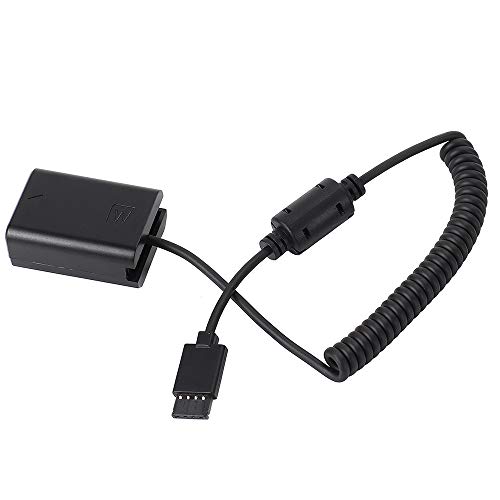
Just like the Eonvic option, this Foto4easy adapter cable provides a dependable external power solution for your Sony mirrorless camera when mounted on a DJI Ronin-S. It’s another excellent choice for extending your camera’s run-time, allowing you to focus on capturing cinematic shots without interruption. This cable stands out for its straightforward compatibility and robust design, delivering consistent power from the Ronin-S’s battery directly to your A7RII, keeping your filming sessions productive and efficient.
Key Features:
– Power Supply Adapter Cable for DJI Ronin S Gimbal Stabilizer to Power Sony Mirrorless Camera (A7, A7R, A7S, A7II, A7RII, A7SII, A6300, A6400, A6500).
– Input: 12V; Output: 7.2V.
– Cable length: 30cm (approx. 11.8 inches).
– Specifically suitable for the listed Sony mirrorless cameras and DJI Ronin-S stabilizer.
Pros:
– Extends camera battery life by drawing power from the gimbal.
– Simplifies power management during extended shoots.
– Strong compatibility with a wide range of popular Sony mirrorless cameras.
– Reliable power output for consistent camera performance.
Cons:
– Requires careful cable routing to avoid interfering with gimbal movement.
– Only compatible with DJI Ronin-S gimbals for power source.
User Impressions: Many users find this cable to be a solid, dependable choice for powering their Sony cameras on the Ronin-S. Its plug-and-play simplicity and consistent performance are often mentioned. It’s seen as a practical necessity for anyone looking to maximize their gimbal shooting time with the Sony A7RII.
DRRI Ronin-S Gimbal to NP-FW50 Dummy Battery for Sony A7 Series
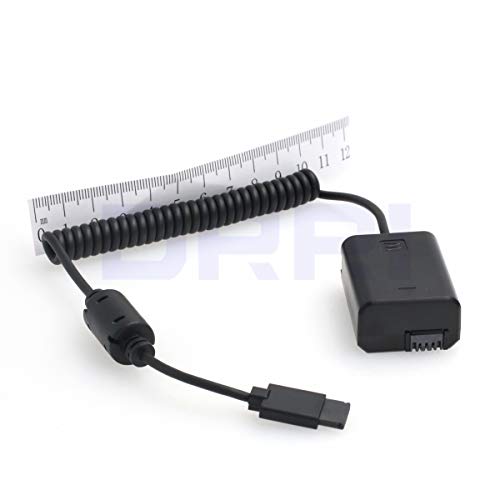
The DRRI dummy battery cable offers another top-tier solution for powering your Sony A7 series camera, including the A7RII, directly from your DJI Ronin-S gimbal. What sets this apart is its focus on high-quality components and meticulous fabrication, ensuring a stable and safe power supply. This means you get peace of mind knowing your valuable camera is receiving precisely regulated power, stepping down from the gimbal’s 12V output to the camera’s required 7.2V. It’s built for durability and consistent performance, making it a trustworthy addition to your professional filmmaking kit.
Key Features:
– Input: 12V; Output: 7.2V.
– Output power: Steps down 12V to 7.4V, 1A.
– Suitable for Sony Alpha a7, a7 II, a7R, a7R II, a7S, a7S II cameras (NP-FW50 battery type).
– Allows the Sony Alpha series DSLR to get power from the Ronin-S 12V accessory port.
– Cables fabricated with the highest quality components and are 100% continuity tested.
Pros:
– High-quality components and rigorous testing promise reliability and longevity.
– Ensures stable and correctly regulated power for the camera.
– Extends camera operational time significantly using gimbal power.
– A straightforward and effective solution for preventing camera power loss.
Cons:
– Like other dummy batteries, it adds a cable that needs proper management on the gimbal.
– Designed specifically for compatibility with the DJI Ronin-S.
User Impressions: Reviewers often praise the DRRI cable for its build quality and dependable power delivery. Users appreciate the peace of mind that comes from knowing the cable is well-made and rigorously tested, minimizing any concerns about power fluctuations or potential damage to their camera. It’s a popular choice for those prioritizing durability and consistent power.
Final Thoughts on Optimizing Your A7RII Gimbal Setup
While finding the best gimbal for A7RII is your first big step, remember that these small, yet mighty, accessories are what truly optimize your setup. Dummy batteries are critical for extending your shooting time, allowing you to capture more footage without interruption. A well-designed HDMI cable ensures you can monitor your shots clearly and maintain a clean rig. Investing in these essential power and connectivity solutions means less downtime, smoother workflows, and ultimately, better cinematic results from your Sony A7RII. Happy shooting!
FAQ Section: Enhancing Your Sony A7RII Gimbal Experience
Q1: Why do I need a dummy battery for my Sony A7RII on a gimbal?
A1: The Sony A7RII’s internal battery might not last long enough for extended video shoots, especially when powering an external monitor or other accessories. A dummy battery cable allows your camera to draw power directly from your gimbal’s more powerful battery (like the DJI Ronin-S), significantly extending your shooting time and preventing interruptions.
Q2: What’s the main benefit of using an angled HDMI cable on a gimbal?
A2: An angled HDMI cable, especially one that’s flat and lightweight, offers several benefits on a gimbal. The 90-degree angle helps in routing the cable neatly, preventing it from snagging or interfering with the gimbal’s motors. Its lightweight and flexible design also helps maintain the gimbal’s balance and reduces strain on the camera’s HDMI port, ensuring smooth operation and reliable video monitoring.
Q3: Is the Sony A7RII a good camera for video with a gimbal?
A3: Absolutely! The Sony A7RII is an excellent camera for video when paired with a gimbal. Its full-frame sensor delivers stunning image quality, excellent low-light performance, and 4K video capabilities. When stabilized on a gimbal, it can produce incredibly smooth, cinematic footage, making it a favorite among independent filmmakers and content creators.
Q4: How important is cable management when using accessories on a gimbal?
A4: Cable management is crucial for a smooth gimbal experience. Loose or tangled cables can obstruct the gimbal’s motors, cause vibrations, or even damage ports. Proper routing and securing of cables (e.g., using small cable ties or the gimbal’s built-in cable clips) ensure unhindered movement, maintaining balance, and protecting your gear.
Q5: Can I power my A7RII from any gimbal using a dummy battery?
A5: Not all gimbals offer a dedicated power output port for cameras. The dummy battery cables reviewed above are specifically designed to draw 12V power from the DJI Ronin-S accessory port. Always check your gimbal’s specifications and the dummy battery’s compatibility before purchasing.
Q6: What resolution should I use if my HDMI cable doesn’t support 4K?
A6: If your HDMI cable (like the one reviewed) is limited to 1080p 30FPS, you’ll need to set your camera’s HDMI output resolution to 1080p (Full HD) at 30 frames per second or lower. This ensures a stable and compatible signal for your external monitor or recorder, even if your camera is recording in 4K internally.
Q7: Beyond power and HDMI, what other essential accessories should I consider for my A7RII gimbal setup?
A7: Besides power and HDMI solutions, consider a sturdy quick-release plate for easy mounting, counterweights (if needed for perfect balance with heavier lenses), and perhaps a remote control for your gimbal. An external monitor can also greatly enhance your ability to frame and pull focus accurately.

