
When you’re trying to capture buttery-smooth footage with your camera and gimbal, every piece of your setup matters. And often, one of the most overlooked components is the humble HDMI cable. A flimsy, stiff, or poorly designed cable can snag, add unnecessary weight, or even limit your camera’s potential, turning your perfect shot into a frustrating mess. That’s why choosing the best HDMI cable for gimbal setups is crucial.
You need a cable that’s not just reliable but also flexible, lightweight, and capable of handling high-resolution video signals without a hitch. Forget those bulky cables that come with your TV; for camera gimbals and professional video rigs, you need something purpose-built.
In this guide, we’ll dive into the top 5 HDMI cables designed specifically for gimbal use, helping you make an informed decision to elevate your videography game. Let’s find the ideal cable to keep your camera stable and your footage pristine!
Why a Specialized HDMI Cable for Gimbals?
Traditional HDMI cables are often too thick, rigid, and heavy for the delicate balance and intricate movements of a camera gimbal. A specialized flexible HDMI cable offers several key advantages:
- Flexibility: Allows the gimbal to move freely without resistance or snags.
- Lightweight: Reduces the overall payload on your gimbal motors, improving battery life and performance.
- Durability: Designed to withstand repeated bending and movement.
- Signal Integrity: Ensures a stable, high-quality video feed to your external monitor or video transmitter.
Our Top Picks for the Best HDMI Cable for Gimbal Setups
Here are our top contenders, reviewed to help you pick the perfect match for your rig:
1. EVO Gimbals Ultra Thin HDMI Cable, Reflex Ultra Thin HDMI
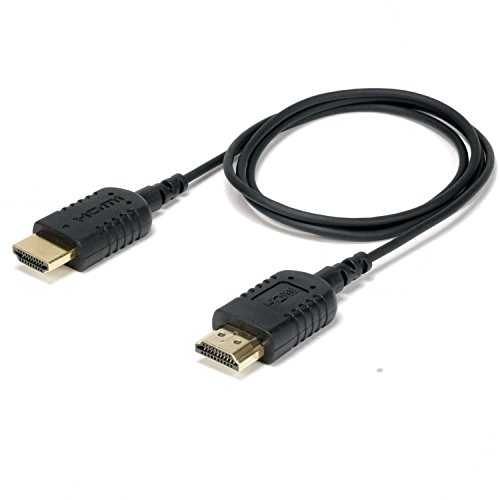
The EVO Gimbals ReFlex Ultra Thin HDMI cable is an absolute game-changer for anyone serious about lightweight camera setups. Its standout feature is its incredibly thin 2.5mm diameter and high-grade silicone construction, making it exceptionally flexible and easy to route through tight spaces on your gimbal or camera cage. If you’ve ever struggled with a stiff cable throwing off your gimbal’s balance, this one is designed to solve that headache, ensuring your camera rig remains agile and responsive.
Key Features:
– Ultra-thin 2.5mm diameter cable
– Built from high-grade silicone with proprietary flexible strands
– Designed for gimbal, camera stabilizer, and camera rig applications
– Supports 4K@60Hz Video Output via HDMI V2.0
– Supports Ultra HD 4K, Full HD 1080P, 3D, Ethernet, ARC, HDR
– Length: 36 inches (920mm)
– HDMI Type A to HDMI Type A (Male to Male)
Pros:
– Unmatched flexibility and thinness for easy routing
– Durable silicone construction prevents kinking
– Excellent 4K@60Hz support for high-quality monitoring
– Specifically engineered for demanding gimbal environments
– Generous 36-inch length provides ample slack
Cons:
– May be longer than needed for very compact setups
– Standard HDMI Type A on both ends might not fit all camera types (e.g., Micro or Mini HDMI ports)
User Impressions:
Users consistently praise this cable for its incredible flexibility and how it eliminates cable snags that can ruin a shot. Many highlight its lightweight nature as a significant advantage for balancing gimbals. It’s often cited as a go-to for professional videographers who need reliability and ease of use on set.
2. HangTon HDMI 2.1 HDMI 4K 120fps 8K 60fps Cable

When it comes to future-proofing your camera rig, the HangTon HDMI 2.1 cable stands out with its impressive 8K@60fps and 4K@120Hz support. This isn’t just a cable; it’s a high-bandwidth powerhouse perfect for the latest cinema cameras and high-refresh-rate field monitors. The smart coiled design with right-angled to left-angled L-shape connectors ensures a tidy setup, preventing cable clutter and reducing strain on your camera and monitor ports, which is vital for maintaining the balance of your gimbal.
Key Features:
– HDMI 2.1 standard supporting 8K@60fps and 4K@120Hz
– Compatible with a wide range of DSLR cameras (BMPCC, Sony Alpha, Canon Cinema, Panasonic Lumix) and monitors (Atomos, SmallHD, Blackmagic)
– Standard full-size HDMI 2.1 Type A connectors (right-angled to left-angled)
– 3-layer aluminum foil braid shielding for EMI/RFI protection
– Gold-plated, corrosion-resistant connectors
– Ultra-durable, flexible, and soft cable with red braided sheath
– Coiled length 30cm (12 inches), extends to 60cm (24 inches)
Pros:
– Future-proof with HDMI 2.1 (8K/4K@120Hz) capabilities
– Wide compatibility with popular camera and monitor brands
– Angled connectors and coiled design for neat, strain-free setups
– Excellent shielding for stable, lossless signal transmission
– Durable and flexible construction
Cons:
– Coiled design might not suit all preferences or extremely compact rigs
– May be overkill if your setup doesn’t require 8K or 4K@120Hz
User Impressions:
Filmmakers rave about the HangTon cable’s robust build and its ability to handle high data rates without issues. The angled connectors are a big hit for keeping rigs clean, and the coiled nature is appreciated for managing cable slack, especially on larger gimbals like the DJI Ronin RS2. Its broad compatibility makes it a favorite among diverse camera users.
3. SMALLRIG D to A HDMI Cable Ultra Thin HDMI Cable
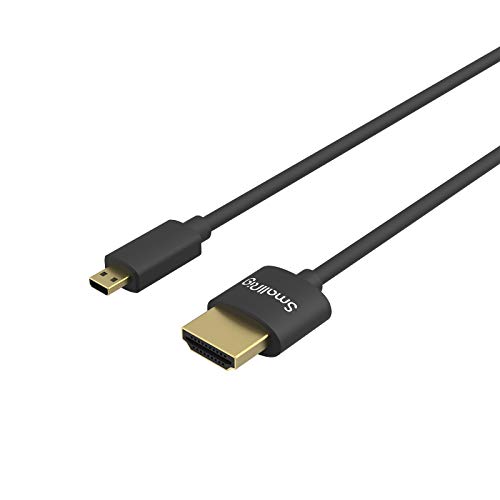
SmallRig is a trusted name in camera accessories, and their D to A HDMI cable lives up to that reputation. This ultra-thin (3.6mm diameter) and flexible cable is specifically designed for camera rigs, ensuring it won’t impede your gimbal’s movements or add unnecessary bulk. What makes it a standout is its combination of a Micro HDMI (Type D) end for cameras and a Standard HDMI (Type A) end for monitors, covering a common connection type for many popular mirrorless cameras. Plus, it comes with a handy cable tie to keep your setup tidy!
Key Features:
– Micro HDMI (Type D) to Standard HDMI (Type A) connectivity
– Ultra-thin (3.6mm diameter) and flexible design (55cm/1.8ft length)
– Supports Ultra HD 4K@60Hz and 2K@165Hz
– Compatible with 3D, Ethernet, and Audio Return Channel (ARC), HDR
– Ideal for gimbal, camera stabilizer, and rig applications
– Includes a cable tie for management
Pros:
– Renowned SmallRig quality and reliability
– Perfect Micro HDMI to Standard HDMI connection for many cameras
– Very thin and flexible, ideal for tight spaces and gimbals
– Supports high-resolution 4K@60Hz video output
– Cable tie included for better cable management
Cons:
– 55cm (1.8ft) length might be too short for some setups, or too long for others
– Only suitable for devices with Micro HDMI output
User Impressions:
Customers frequently praise this SmallRig cable for its perfect balance of flexibility and durability. Its thin profile is often highlighted as a major benefit for gimbal operators, preventing snags and maintaining balance. The included cable tie is a small but appreciated bonus, reflecting SmallRig’s attention to detail.
4. FOINNEX 4K HDMI to Micro HDMI Cable, Thin Micro HDMI

The FOINNEX 4K HDMI to Micro HDMI cable is a fantastic plug-and-play solution that offers universal compatibility with a plethora of popular cameras. Its standout feature is its robust, gold-plated interface that ensures a stable signal link and a great fit, even with frequent use. If you need a reliable, thin, and soft cable that works with most Micro HDMI-equipped cameras (like many GoPros, Sony Alphas, and Canon models), this one is hard to beat for its simplicity and performance.
Key Features:
– Plug and Play functionality for easy setup
– Micro HDMI to Standard HDMI (bi-directional signal transmission)
– Universal compatibility with GoPro Hero, Sony A6000 series/A7, Canon G7X/M50, Raspberry Pi4, and more
– Sturdy and durable gold-plated interface
– Ultra-fine, soft, lightweight, and portable
– Supports resolution up to 4K FHD 60fps
– 30 days refund, 24 months warranty
Pros:
– Wide-ranging compatibility with popular cameras
– Easy plug-and-play operation
– Durable gold-plated connectors for stable signal
– Lightweight and soft, reducing strain on camera ports
– Excellent 4K@60Hz support
Cons:
– Not compatible with Micro USB or Mini HDMI ports (double-check your camera)
– “Ultra-fine” might not be as thin as some specialized gimbal cables, but still highly flexible.
User Impressions:
Many users commend the FOINNEX cable for its excellent compatibility and dependable performance. Its sturdy build, especially the gold-plated connectors, gives users confidence in its longevity. It’s often recommended for those who need a versatile and reliable Micro HDMI solution for both field monitors and larger displays.
5. Permanent 10CM Super Soft Ribbon HDMI Cable for Gimbal

For ultra-compact and lightweight gimbal setups, the Permanent 10CM Super Soft Ribbon HDMI Cable is in a league of its own. Its most striking feature is its incredibly short 10cm (approximately 4 inches) length and feather-light 5-gram weight, combined with a super soft, flat ribbon design. This cable is purpose-built to minimize cable slack, reduce drag, and virtually disappear into tiny rigs, making it perfect for FPV drones, small handheld gimbals, or situations where every gram and millimeter counts. It’s truly one of the most specialized and lightweight options available for a compact best HDMI cable for gimbal solution.
Key Features:
– Extremely short 10cm length
– Super soft, flat ribbon design
– Ultra-lightweight (only 5g)
– Low profile, slim, and flexible
– Mini HDMI Male (Type C) to Standard HDMI Male (Type A) straight connectors
– Both HDMI ends are removable
– Gold-plated pins for high quality connection
– Compatible with Canon 5D3/5D2, Panasonic GH3/GH2, Sony NEX series (models listed)
Pros:
– Ideal for extremely compact and lightweight setups
– Virtually eliminates cable tangles and snags due to short length
– Minimal impact on gimbal balance and payload
– Super flexible ribbon design
– Gold-plated pins for good signal quality
Cons:
– Does NOT support 4K resolution (only up to 1080p) – crucial limitation to note
– Very specific length, not versatile for all setups
– Only Mini HDMI to Standard HDMI (check your camera’s port)
User Impressions:
Users absolutely love this cable for specific, ultra-light applications where every gram matters, such as drone setups or tiny handheld gimbals. They highlight its super soft and flat design as perfect for close-quarters routing. However, the lack of 4K support is a significant trade-off that users must be aware of before purchasing.
Frequently Asked Questions (FAQ)
Q1: Why can’t I just use a regular HDMI cable with my gimbal?
A1: Regular HDMI cables are often too thick, stiff, and heavy for gimbals. They can create resistance, throw off the gimbal’s balance, drain battery faster due to increased motor strain, and are more prone to snagging or breaking during dynamic movements. Specialized gimbal HDMI cables are designed to be thin, flexible, and lightweight, preserving your gimbal’s performance.
Q2: What’s the difference between Micro HDMI, Mini HDMI, and Standard HDMI?
A2: These refer to the different physical sizes of HDMI connectors.
* Standard HDMI (Type A): The largest and most common size, found on TVs, monitors, and some full-sized cameras.
* Mini HDMI (Type C): A smaller version often found on DSLR and mirrorless cameras, camcorders, and tablets.
* Micro HDMI (Type D): The smallest HDMI connector, commonly used on very compact devices like GoPros, some mirrorless cameras, and tablets.
* Always check your camera’s port to ensure you get the correct cable type.
Q3: Does HDMI 2.0 vs. HDMI 2.1 matter for gimbal use?
A3: Yes, it can. HDMI 2.0 supports 4K resolution up to 60fps, which is sufficient for most current field monitors. HDMI 2.1 offers significantly higher bandwidth, supporting 4K at 120fps or even 8K at 60fps. If you have a high-end cinema camera or a monitor that supports these higher frame rates and resolutions, an HDMI 2.1 cable is future-proof and ensures you get the full potential from your gear. For standard 4K@60Hz monitoring, HDMI 2.0 is usually fine.
Q4: How important is cable flexibility for gimbals?
A4: Extremely important! A flexible cable minimizes resistance on your gimbal’s motors, allowing for smoother movements and better stabilization. Stiff cables can cause micro-jitters, throw off balance, and even lead to motor overload errors. The more flexible the cable, the less it will interfere with your gimbal’s operation.
Q5: What’s the ideal length for a gimbal HDMI cable?
A5: There’s no single “ideal” length, as it depends on your specific setup. Generally, you want the shortest possible cable that still allows for full range of motion without being pulled taut. This minimizes weight and tangles. Cables ranging from 10cm to 60cm (4 to 24 inches) are common. Longer cables (e.g., 90cm+) are typically for setups where the monitor is further away, like on a light stand or director’s monitor.
Q6: Can a poor-quality HDMI cable affect my video quality or signal?
A6: Absolutely. A cheap or poorly shielded HDMI cable can lead to signal dropouts, flickering, color inaccuracies, or even a complete loss of signal, especially over longer distances or in environments with electromagnetic interference. For critical monitoring, a high-quality cable with proper shielding is essential for stable and clear video transmission.
Q7: How do I know which HDMI port my camera has?
A7: Check your camera’s user manual or the specifications online. Most manufacturers clearly state whether their camera has a Standard, Mini, or Micro HDMI output. Visually, Mini HDMI ports are slightly larger than Micro HDMI ports. It’s always best to verify before purchasing to ensure compatibility.
Final Thoughts
Choosing the best HDMI cable for gimbal setups might seem like a small detail, but it can significantly impact the quality of your stabilized footage and your overall shooting experience. Whether you need an ultra-thin ribbon cable for a minimalist rig, a future-proof HDMI 2.1 coiled cable, or a versatile Micro to Standard option, there’s a specialized solution out there.
Consider your camera’s HDMI port type, your monitor’s input, the required resolution and frame rate, and, most importantly, the need for flexibility and lightweight design. Invest in a quality cable, and you’ll be one step closer to capturing perfectly smooth, professional-grade videos every time. Happy shooting!

