Ever dreamt of capturing buttery-smooth videos with your smartphone, making your everyday shots look like they belong in a Hollywood film? If you’re into mobile videography, vlogging, or just want to up your content creation game, a phone gimbal is an absolute must-have. These clever devices stabilize your phone, eliminate shaky footage, and often come packed with smart features like AI tracking and extended battery life.
But with so many options out there, choosing the right one can feel a bit like finding a needle in a haystack. Two big players often pop up in discussions: the Hohem iSteady M7 and the Insta360 Flow Pro 2. Both are fantastic, but they cater to slightly different needs and preferences. So, if you’re wondering which smartphone stabilizer reigns supreme for your specific workflow, you’ve come to the right place!
We’re diving deep into the Hohem iSteady M7 vs Insta360 Flow Pro 2 showdown, plus we’re checking out some other top contenders to help you make an informed decision. Let’s get your creative juices flowing with some serious stabilization!
Our Top 5 Smartphone Gimbal Picks
Here are our detailed reviews of the best phone gimbals on the market right now.
Insta360 Flow 2 Pro (AI Tracker Bundle): The Ultimate Smart Gimbal

If cutting-edge AI tracking and seamless integration are at the top of your list, the Insta360 Flow 2 Pro (AI Tracker Bundle) might just be your perfect match. This isn’t just a gimbal; it’s an all-in-one content creation powerhouse. What truly sets this model apart is its dedicated AI Tracker, which offers unparalleled precision and versatility, even working with over 200 iOS apps thanks to Apple DockKit support. Whether you’re live streaming, on a video call, or filming dynamic action, this gimbal ensures you’re always in frame, perfectly stable.
Key Features:
– Versatile Tracking in 200+ iOS Apps with Apple DockKit* support
– Dedicated AI Tracker for precise, platform-independent subject tracking
– Active Zoom Tracking up to 15x, perfect for sports or distant subjects
– Multi-Person Tracking to keep everyone in the shot
– Easy Setup & 3-axis stabilization for silky smooth footage
– 360° Infinite Pan Tracking for creative, continuous shots
– All-in-One Content Creation Tool: built-in tripod, selfie stick, selfie mirror, teleprompter, power bank
– 10-hour battery life for extended shooting sessions
– Creative Shots with Free Tilt Mode for wider motion range
– AI-Powered Editing tools in the Insta360 app (FlashCut)
Pros:
– Industry-leading AI tracking with dedicated module
– Unrivaled iOS app compatibility via DockKit
– Highly versatile with integrated tripod, selfie stick, and power bank
– Excellent stabilization for professional-looking video
– Active zoom and multi-person tracking are game-changers
– Built-in spotlight for low-light conditions
Cons:
– Higher price point due to the advanced features and AI Tracker
– Some premium features optimized for newer iPhone models
User Impressions: Users rave about the Flow 2 Pro’s “magical” AI tracking and how incredibly easy it is to use right out of the box. Many find it revolutionizes their vlogging and live streaming, praising its stability and the convenience of the all-in-one design.
Insta360 Flow 2 Pro (Standard Bundle): Cinematic Shots Made Easy

For those who crave cinematic quality without needing the dedicated external AI Tracker module, the Insta360 Flow 2 Pro (Standard Bundle) is an excellent choice. It retains all the core stabilization and smart features of its AI Tracker-equipped sibling, but with a focus on delivering stunning visual fidelity. This version is particularly notable for its compatibility with Dolby Vision and Apple ProRes, allowing you to capture video with vibrant colors, sharp contrast, and incredible detail, giving you maximum flexibility in post-production. It’s the ideal smartphone gimbal for serious filmmakers and content creators.
Key Features:
– Versatile Tracking in 200+ iOS Apps with Apple DockKit* support
– Active Zoom Tracking up to 15x for dynamic shooting
– Multi-Person Tracking for group shots
– Easy Setup & 3-axis stabilization for effortlessly smooth video
– 360° Infinite Pan Tracking for creative freedom
– All-in-One Content Creation Tool: built-in tripod, selfie stick, selfie mirror, teleprompter, power bank
– 10-hour battery life for extended filming
– Creative Shots with Free Tilt Mode
– Cinematic Brilliance with Dolby Vision and Apple ProRes compatibility
– AI-Powered Editing tools in the Insta360 app (FlashCut)
Pros:
– Exceptional video quality with Dolby Vision and ProRes support
– Strong 3-axis stabilization for professional results
– Integrated tools (tripod, selfie stick, power bank) are highly convenient
– Great battery life for all-day shooting
– Intuitive and user-friendly interface
Cons:
– Lacks the physical AI Tracker module (though still has AI editing)
– Still a premium price, but slightly less than the AI Tracker bundle
User Impressions: Reviewers love the “professional” look their videos achieve with this gimbal, particularly highlighting the seamless stabilization and the convenience of its foldable design. Many appreciate the robust app features that make editing a breeze.
hohem iSteady X3 SE Plus Gimbal Stabilizer: Budget-Friendly & Feature-Packed

If you’re just dipping your toes into the world of gimbals or need a reliable, portable option that won’t break the bank, the hohem iSteady X3 SE Plus is a fantastic contender. This foldable smartphone stabilizer packs surprising punch for its price point. Its standout feature is the detachable remote controller, giving you the freedom to control your shots from up to 32 feet away – perfect for solo vloggers or group shots. Plus, with a built-in 8-inch extendable selfie stick, it offers versatile shooting angles from low to high.
Key Features:
– Detachable Remote Controller for remote shooting up to 32 feet
– Advanced iSteady 8.0 Technology for ultra-smooth stabilization
– Built-in 8-inch Extendable Rod (selfie stick)
– Compact and Foldable design, weighing only 0.85 lbs
– Compatible with most smartphones (payload up to 0.66 lbs)
– Hohem Joy App for AI tracking (software-based) and gesture control
– 11-Hour Long Battery Life, fully charged in 2 hours
– Beginner-Friendly Stabilizer with easy one-hand operation
– Seamless switching between landscape and portrait modes
Pros:
– Very affordable and great value for money
– Ultra-portable and lightweight
– Detachable remote offers great flexibility for solo creators
– Integrated extension pole is highly convenient
– Excellent battery life
– Easy to use, even for beginners
Cons:
– AI tracking is app-dependent (software-based), not a dedicated on-device tracker
– Lower payload capacity compared to some premium gimbals
– Extension rod can deform if left stretched for too long (as per manufacturer)
User Impressions: Customers often praise this gimbal for its incredible value, ease of use, and the freedom provided by the remote control. It’s frequently recommended as a “perfect starter gimbal” for those new to mobile videography.
Hohem iSteady M7 Gimbal Stabilizer for Smartphone: Advanced AI Tracking & Pro Features

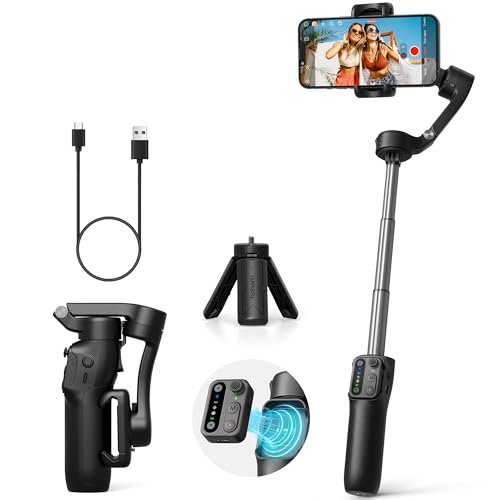
Stepping up the game from the X3 SE, the Hohem iSteady M7 is a formidable competitor to the Insta360 Flow Pro 2, especially when it comes to on-device AI tracking. This gimbal boasts an upgraded On-Device AI that can track any subject – be it people, pets, or objects – directly with your native phone camera and across all live streaming and video apps. The detachable touchscreen remote is another game-changer, allowing you to select tracking targets with a simple tap or drag, and control the gimbal from up to 10 meters away. It’s a professional-grade smartphone stabilizer designed for serious content creators.
Key Features:
– Upgraded On-Device AI: Tracks any subject with native cam and all apps
– Detachable Touchscreen Remote for easy target selection and control
– Upgraded 500g Payload with three expansion ports for accessories
– 360 Lighting Colors with integrated RGB and CCT fill light, remote controllable
– Built-in Extension Pole for high and low-angle shots
– New safety locks design for the AI tracker
– Magnetic phone clamp for quick setup
Pros:
– On-device AI tracking is highly versatile and app-independent
– Detachable touchscreen remote offers intuitive and powerful control
– High payload capacity and multiple expansion ports for pro setups
– Integrated, remote-controllable fill light is a huge bonus
– Built-in extension pole for diverse shooting angles
– Supports native camera and popular streaming apps
Cons:
– Potentially a steeper learning curve for absolute beginners compared to simpler models
– Price point is higher than entry-level gimbals
User Impressions: Users are particularly impressed with the M7’s intelligent tracking that “just works” with any app, and the convenience of the touchscreen remote. The added fill light and expansion options are frequently highlighted as reasons to choose this model for professional mobile filming.
Insta360 Flow 2 Pro AI Tracker: Enhance Your Flow Experience

This isn’t a standalone gimbal, but an essential accessory that truly unlocks the full potential of your Insta360 Flow 2 Pro (Standard Bundle). The Insta360 Flow 2 Pro AI Tracker is a dedicated module that magnetically attaches to your phone clamp, providing advanced, app-independent AI-driven tracking. If you already own the standard Flow 2 Pro or are considering it, adding this AI Tracker boosts its capabilities significantly, allowing for more precise tracking in complex environments, better mobile shots, and the freedom to track video calls and livestreams without being tied to the Insta360 app. It even features a built-in spotlight and gesture control for ultimate convenience.
Key Features:
– App/Phone independent AI tracking for enhanced precision
– Accurately identifies and locks onto subjects in complex environments
– Built-in spotlight with three adjustable brightness levels and color temperatures
– Supports Gesture Control for starting/stopping AI tracking
– Magnetic attachment for seamless integration with Flow 2 Pro
Pros:
– Significantly enhances the tracking capabilities of the Insta360 Flow 2 Pro
– Allows for tracking in any app (video calls, live streams, etc.)
– Built-in spotlight is very useful for low-light conditions
– Gesture control adds convenience
– Easy to attach and use
Cons:
– Requires the Insta360 Flow 2 Pro gimbal (not a standalone product)
– An additional cost to the standard Flow 2 Pro bundle
User Impressions: Those who’ve added the AI Tracker to their Flow 2 Pro universally praise its ability to make tracking “flawless and hands-free.” It’s often cited as the upgrade that transforms the Flow 2 Pro into an unbeatable content creation tool.
Hohem iSteady M7 vs Insta360 Flow Pro 2: The Ultimate Showdown
When it comes down to the hohem iSteady M7 vs Insta360 Flow Pro 2, both are exceptional smartphone stabilizers, but they approach high-end features like AI tracking and control from slightly different angles. Your choice will likely hinge on your specific priorities.
AI Tracking:
* Insta360 Flow Pro 2 (with AI Tracker Bundle or separate AI Tracker): Leverages Apple DockKit for deep iOS integration and has a dedicated AI tracking module. This means incredibly precise tracking that’s highly reliable and works across numerous apps.
* Hohem iSteady M7: Boasts “On-Device AI” that works directly with your phone’s native camera and all other apps without being limited to a specific app. This is a huge advantage for live streamers or those who frequently use various video apps.
Controls & Convenience:
* Insta360 Flow Pro 2: Features a unique foldable design that integrates a tripod, selfie stick, and power bank. Its app is powerful, and the core controls are intuitive.
* Hohem iSteady M7: Stands out with its detachable touchscreen remote. This allows for incredibly intuitive target selection (just tap on the screen) and control from a distance. It also has a built-in extension pole and an integrated fill light.
Expandability & Pro Features:
* Insta360 Flow Pro 2: Known for its cinematic capabilities, including Dolby Vision and Apple ProRes support in the standard bundle, making it a favorite for serious video editors.
* Hohem iSteady M7: Offers an upgraded 500g payload capacity and three expansion ports, allowing you to attach professional accessories like external microphones and additional lights, making it highly versatile for more complex setups.
Portability:
Both gimbals are foldable and highly portable. The Insta360 Flow Pro 2’s all-in-one design (with integrated tripod/selfie stick) is incredibly convenient. The Hohem iSteady M7 also features a built-in extension pole for similar flexibility.
Which to Choose?
* Go for Insta360 Flow Pro 2 if: You’re primarily an iPhone user who values deep iOS integration (DockKit), cinematic video quality (Dolby Vision/ProRes), and an all-in-one integrated design. If you need the best possible app-independent tracking, opt for the AI Tracker Bundle.
* Go for Hohem iSteady M7 if: You need highly versatile on-device AI tracking that works seamlessly with any app (including native camera), love the idea of a detachable touchscreen remote for precision control, require higher payload capacity for accessories, and want an integrated, remote-controllable fill light.
Ultimately, both gimbals will drastically improve your mobile videography. The “best” one truly depends on your specific filming needs and how you prefer to control your device.
Conclusion
Choosing the right smartphone gimbal is a game-changer for anyone serious about mobile content creation. Whether you’re a seasoned vlogger, an aspiring filmmaker, or simply want to capture better family memories, there’s a perfect stabilizer out there for you.
When comparing the hohem iSteady M7 vs Insta360 Flow Pro 2, it’s clear both are at the top of their game. The Insta360 Flow Pro 2 shines with its deep iOS integration and all-in-one convenience, especially when paired with its dedicated AI Tracker. On the other hand, the Hohem iSteady M7 impresses with its truly universal on-device AI tracking, powerful detachable touchscreen remote, and robust expandability.
If you’re on a tighter budget but still want great features and impressive stability, the hohem iSteady X3 SE Plus is an excellent entry point into the world of gimbals. Whichever you choose, getting a quality smartphone stabilizer will elevate your videos from shaky home movies to smooth, professional-looking productions. Happy shooting!
Frequently Asked Questions
Q1: What’s the main difference between 3-axis and 1-axis gimbals?
A1: A 3-axis gimbal stabilizes across three axes (pan, tilt, and roll), providing buttery-smooth footage regardless of your movement. A 1-axis gimbal only stabilizes on one axis (usually roll), offering less comprehensive stabilization but often being more compact and cheaper. For professional-looking video, a 3-axis gimbal is highly recommended.
Q2: Is AI tracking really necessary for a phone gimbal?
A2: While not strictly “necessary,” AI tracking is a game-changer for many users. It allows the gimbal to automatically follow a subject (person, pet, object) without you needing to manually control the camera, freeing you up to focus on your performance or the shot itself. It’s particularly useful for solo creators, live streamers, and dynamic action shots.
Q3: Can these gimbals work with any smartphone?
A3: Most modern gimbals, including those reviewed, are designed to work with a wide range of smartphones, both iPhones and Android devices. However, you should always check the gimbal’s payload capacity and phone clamp dimensions to ensure compatibility with your specific phone, especially if you use a bulky case or external lenses. Some features, like Apple DockKit, might be iOS-specific.
Q4: How important is battery life for a phone gimbal?
A4: Very important! A longer battery life means you can film for extended periods without interruption, which is crucial for full-day shoots, events, or travel vlogging. Gimbals with 8-11 hours of battery life, like those reviewed, are generally considered excellent. Some even double as power banks for your phone.
Q5: What is Apple DockKit, and why is it important for an iPhone gimbal?
A5: Apple DockKit is a framework from Apple that allows accessories like gimbals to directly communicate with the iPhone’s camera system. This enables deeper integration and allows for advanced features like precise subject tracking within 3rd-party apps (not just the gimbal’s dedicated app) and access to more camera functionalities, offering a seamless and powerful user experience.
Q6: What is the Hohem Joy app, and do I need to use it?
A6: The Hohem Joy app is the companion application for Hohem gimbals. While basic stabilization often works without it, the app unlocks advanced features like AI tracking (for models like the X3 SE Plus), gesture control, creative shooting modes (e.g., inception mode, time-lapse), and firmware updates. It’s highly recommended to use the app to get the most out of your Hohem gimbal.
Q7: Which gimbal is best for vlogging?
A7: For vlogging, you’ll want a gimbal that’s portable, easy to set up, has good battery life, and features strong AI tracking. Both the Insta360 Flow Pro 2 (especially with the AI Tracker) and the Hohem iSteady M7 are excellent choices due to their advanced tracking and integrated features (like built-in tripods/selfie sticks). The Hohem iSteady X3 SE Plus is also a great budget-friendly option for beginners, thanks to its remote control and extendable rod.