
So, you’ve got a Samsung S20, and you’re ready to shoot some amazing videos, right? Your S20’s camera is seriously impressive, boasting fantastic resolution and features. But if you’ve ever tried to capture smooth, cinematic footage while moving, you know that even the best phone can struggle with shaky hands. That’s where a good gimbal comes into play!
A gimbal is like your personal steady cam, helping you achieve buttery-smooth video footage that looks professional, not amateur. It elevates your mobile videography from shaky home videos to polished, share-worthy content. For anyone serious about vlogging, travel videos, or just capturing life’s moments without the jiggles, finding the best gimbal for Samsung S20 is a game-changer.
But it’s not just about the gimbal itself. To truly unlock your S20’s video potential, you also need the right accessories that complement your setup. In this guide, we’ll dive into some top gimbals perfect for your Samsung S20, along with other essential accessories that will complete your mobile filmmaking kit. Let’s get filming!
Our Top Picks & Essential Accessories
Here are our selections, covering both gimbals and crucial accessories to enhance your Samsung S20 videography experience.
FeiyuTech Gimbal Stabilizer for Smartphone, 3-Axis Gyro

The FeiyuTech Gimbal Stabilizer is a fantastic choice for Samsung S20 users looking for professional-grade stabilization in a portable package. What makes it stand out is its balance of compactness and powerful features. It folds down incredibly small, making it a true travel companion, yet it doesn’t compromise on stability or control. With intuitive controls and multiple creative modes accessible via the app, it’s built to help you capture stunning, shake-free footage effortlessly. It’s truly a strong contender for the best gimbal for Samsung S20 users who are always on the go.
Key Features:
– All-Day Battery Life – With a larger 1300mAh internal battery, enjoy extended shooting sessions without interruptions.
– Compact and Portable – Folding down to just over 6 inches and weighing only 315 g (11.1 oz), it’s designed for travel and on-the-go creators.
– Versatile Compatibility – Supports smartphones up to 88 mm (3.5 inch) wide and 260 g (9.2 oz) in weight, accommodating most popular models (including Samsung S20).
– Enhanced Control – Updated joystick and multifunction knob allow precise control over pan, tilt, focus, and zoom.
– Multiple Follow Modes – Choose from pan and tilt follow, pan follow, FPV mode, and lock mode to suit various shooting scenarios.
– Scenario Modes – Access additional creative functions like light trail, double exposure, dolly zoom, and time-lapse modes via the Feiyu ON app.
– Wireless Connectivity – Seamlessly control your smartphone’s camera parameters via Bluetooth, compatible with both iOS and Android devices.
Pros:
– Extremely portable and lightweight, ideal for travel.
– Excellent battery life for prolonged shooting.
– Intuitive controls and a feature-rich companion app.
– Versatile shooting modes for creative freedom.
Cons:
– May require some practice to master all the advanced features.
– App functionality can sometimes vary slightly between iOS and Android.
User Impressions:
Users love how easy this gimbal is to carry around and its solid build quality. Many highlight the impressive battery life and the smooth, stable footage it helps them capture. While some mention a learning curve for advanced features, the general consensus is that it offers great value for its price and portability.
Spigen Liquid Air Armor Designed for Samsung Galaxy S20…
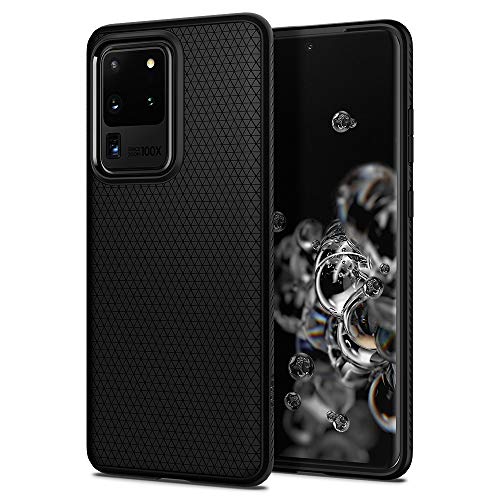
While not a gimbal itself, a protective case like the Spigen Liquid Air Armor is an absolutely essential accessory when you’re using your Samsung S20 for mobile videography. Why? Because accidents happen! When you’re mounting your phone on a gimbal, moving around, or shooting outdoors, a slim yet rugged case offers crucial peace of mind. This particular Spigen case maintains your S20’s sleek profile while providing military-grade drop protection, ensuring your phone stays safe while you focus on getting that perfect shot.
Key Features:
– Slim, form-fitted and lightweight design.
– Form-fitted to maintain a slim profile and pocket-friendly.
– Anti-slip matte surface gives fingerprint-resistance and comfort in every grip.
– Mil-Grade protection and Air Cushion Technology for anti-shock protection.
– Galaxy S20 Ultra Case Compatible with Samsung Galaxy S20 Ultra (Note: Ensure correct S20 model compatibility).
Pros:
– Excellent protection without adding significant bulk.
– Comfortable to hold with an anti-slip texture.
– Maintains the S20’s aesthetics.
– Essential for protecting your device during active filming.
Cons:
– Not a gimbal, so doesn’t offer stabilization directly.
– Ensure you select the correct S20 model variant (S20, S20+, S20 Ultra).
User Impressions:
Customers consistently praise Spigen cases for their perfect fit, durable protection, and minimalist design. Users appreciate that it doesn’t make the phone feel bulky, yet provides reliable everyday drop protection. It’s a go-to for many who want to keep their S20 safe.
3-Axis Gimbal for iPhone15 14 13 Pro Max XS X…

This 3-axis gimbal is another excellent contender for anyone seeking the best gimbal for Samsung S20. Despite its title mentioning iPhones, its compatibility explicitly includes the Samsung Galaxy S20, making it a versatile choice. Its standout feature is its intelligent tracking algorithm, which is perfect for solo vloggers or content creators. Imagine shooting a tutorial or cooking video and having the gimbal automatically keep you in frame – no more worrying about stepping out of shot! Plus, its palm-sized, foldable design means it truly can go anywhere with you.
Key Features:
– Never post shaky video again – The aluminum alloy arm and powerful motor further improve the stability of Capture π. You can even shoot stable videos with this gimbal stabilizer for smartphone while running.
– Ideal for Vlogging – This phone gimbal has fully upgraded the tracking algorithm to intelligent feature recognizes adults, children, pets and object. So you no longer worry about out of the screen when shooting Vlog. At the same time, it supports live stream tracking, perfect for Instagram, TikTok, YouTube, Amazon Live etc.
– Easy to Balance – The smartphone stabilizer simplifies the difficulty of leveling adjustment. Just align the phone clip approximately at the middle of the phone to complete the leveling.
– Palm-Sized Phone Gimbal – You can fold your phone gimbal and putting it in your pocket and take it anywhere. The weight of the phone stabilizer is only 0.7lb, while the Payload up to 0.66lb. The recommend phone width is 2.64 – 3.62inch. Ideal for iPhone 13/12/11 Pro Max, for Samsung Galaxy S21/S20, etc.
– Releases the Full Potential via “Capture2” App – With just a few clicks of the button, this phone stabilizer for video recording can realize FPV Mode, PhoneGo Mode, Inception Mode. With “Capture2” App, it releases the full potential. You can easy to achieve Panorama, Dolly Zoom, Time-Lapse, Gesture Control, etc.
– More Stable Cinematic Mode – when shooting with the original camera, You can use the stabilizer to control the phone to start/stop shooting, Suitable for iPhone 13 series cinematic mode. Meanwhile, it has a long battery life of 12 hours, No need to worry about battery issues during filming making.
Pros:
– Advanced intelligent tracking (for subjects and live streaming).
– Extremely portable and lightweight, folds into a compact size.
– Simplifies phone balancing for quick setup.
– Long 12-hour battery life.
– Feature-rich app with creative modes like Inception and Dolly Zoom.
Cons:
– Its name might misleadingly suggest only iPhone compatibility (but it clearly states S20 compatibility).
– Some advanced features rely heavily on the companion app.
User Impressions:
Reviewers praise its effectiveness in eliminating shaky footage, even during active movement. The intelligent tracking feature is a particular highlight for vloggers, making solo shooting much easier. Its portability and ease of setup also receive consistent positive feedback, cementing its status as a solid phone gimbal option.
SZRMCC USB C to USB-C PD100W 20Gbps Fast Charging High…

When you’re out shooting amazing footage with your Samsung S20 and its new gimbal, the last thing you want is for your battery to die! That’s where a high-quality charging and data transfer cable becomes an indispensable accessory. This SZRMCC USB-C to USB-C cable isn’t just for charging; it supports rapid data transfer up to 20Gbps and 4K@60Hz video output. This means you can quickly offload your large video files to a laptop or power your S20 and even some gimbals (if they support USB-C PD) at blazing speeds. It’s a coiled design too, which helps keep your setup tidy and tangle-free.
Key Features:
– USB C to Type C high-speed Data Transfer Coiled cable for monitor, is compatible with Samsung Galaxy S10 S20 S20+ S20 S23 Ultra, Galaxy Tab S8/S9, iPhone 15/15 Plus/15 Pro/15 Pro Max 16 Pro, MacBook Pro 2020/2019/2018, MacBook Air 2018-2020 (M2/M1), iPad Pro 2022/2021/2020, iPad Pro11″/12.9, Microsoft Surface Laptop 3/Surface Book 3/Surface Book 2/Surface Pro 8, Google Pixelbook/Pixel Slate, D-JI Osmo Pocket Handheld 3, D-JI RS 3 GIMBAL, GoPro Hero 5/11/12 Black or some camera such as Sony FX3.
– USB C charger cable, support 4K@60Hz resolution, 100W charging capability, speedy 20Gbps High Speed Fast Charge and Data Transfer: it also is Fast video charge cable power your large monitor Monitor devices to extended screen.
– Cable Length: 50cm/19″, Stretch max length is about 1m/3.2ft.
– Fast Charging Cord Portable and Flexible, type c coiled design save the use space, Delicately crafted with TPU materials, aluminum alloy connectors, durable and long-lasting.
– Quality Assurance: SZRMCC usb c monitor cable 24-hour professional after-sales service, each product strict quality inspection, if you are not satisfied with any problem, please contact us.
Pros:
– Ultra-fast 100W charging and 20Gbps data transfer.
– Coiled design for tangle-free use and portability.
– Supports 4K video output.
– Durable construction with quality materials.
– Wide compatibility with various USB-C devices, including the S20 and some gimbals.
Cons:
– Not a gimbal, so doesn’t stabilize footage.
– Coiled design might not be preferred by everyone for all uses.
User Impressions:
Users frequently praise this cable for its robust build and the reliable fast charging it provides across a range of devices. The coiled design is a hit for those who need a compact and tidy cable for travel or desktop use, making it a reliable pick for power and data needs.
Somzu USB C to USB C Cable 240W 3.3FT, 5A…

Just like the previous cable, this Somzu USB-C to USB-C cable is an invaluable accessory for anyone serious about mobile videography with their Samsung S20. What sets this one apart is its incredible 240W charging capability – making it future-proof for even hungrier devices and ensuring your S20 (and potentially your gimbal if it’s USB-C powered) gets juiced up in record time. At 3.3 feet, it offers a practical length for various charging scenarios, whether you’re at a power outlet or connected to a portable battery pack while filming on location. Don’t let a dead battery cut your filming session short!
Key Features:
– 240W charging capability (5A current).
– 3.3FT (approximately 1 meter) cable length.
– USB C to USB C interface.
Pros:
– Extremely high 240W charging support for rapid power delivery.
– Convenient 3.3-foot length for flexible use.
– Reversible USB-C connectors for easy plugging.
– Essential for keeping your Samsung S20 and other devices powered during long shoots.
Cons:
– Not a gimbal; it’s a charging accessory.
– Specific features beyond wattage and length are not detailed.
User Impressions:
While specific detailed impressions for this exact model are limited, cables with such high wattage ratings are generally well-received for their ability to fast-charge compatible devices quickly and reliably. Users appreciate sturdy build quality and consistent performance from well-made USB-C cables.
Key Factors to Consider When Buying a Gimbal for Your Samsung S20
Choosing the best gimbal for Samsung S20 involves more than just picking the first one you see. Here’s what you should keep in mind:
- Compatibility: Always double-check that the gimbal explicitly supports your Samsung S20’s dimensions and weight. Some gimbals have maximum payload limits.
- Axis Stabilization (2-axis vs. 3-axis): Most modern gimbals for smartphones are 3-axis, which offers superior stabilization against shake on all three axes (pan, tilt, and roll). 2-axis gimbals are less common and offer less comprehensive stabilization. For truly professional-looking smooth footage, 3-axis is the way to go.
- Portability & Design: If you’re planning to take your gimbal everywhere, look for a lightweight, foldable design. A compact size makes it easy to slip into a backpack.
- Battery Life: Longer battery life means more shooting time. Look for gimbals that offer at least 6-8 hours, with some going up to 12 hours or more.
- App Features & Connectivity: A good companion app can unlock many creative features like intelligent tracking, time-lapse, panorama, and gesture control. Ensure the app is user-friendly and connects seamlessly via Bluetooth.
- Build Quality & Ergonomics: A durable build ensures longevity, while an ergonomic grip makes it comfortable to hold for extended periods.
Conclusion
Your Samsung S20 is a powerful tool for capturing memories and creating content, but to truly elevate your videography, a gimbal is a must-have. Investing in the best gimbal for Samsung S20 means saying goodbye to shaky footage and hello to smooth, cinematic shots that will impress your audience. Whether you prioritize ultimate portability, intelligent tracking, or a robust app, there’s a fantastic gimbal out there for you. And don’t forget those essential accessories like a protective case and fast-charging cables to ensure your filming sessions are always seamless and uninterrupted. Happy shooting!
FAQ Section
Q1: Why do I need a gimbal for my Samsung S20 if it has OIS (Optical Image Stabilization)?
A1: While your Samsung S20’s OIS is excellent for still photos and minor video shakes, a gimbal provides much more powerful mechanical stabilization. It uses motors to counteract larger movements like walking, running, or panning, delivering buttery-smooth, cinematic footage that OIS alone can’t achieve. It truly takes your video quality to the next level.
Q2: Are phone gimbals hard to use?
A2: Modern phone gimbals are designed to be quite user-friendly. Most require a simple balancing process (often simplified with guides or auto-balance features) and connect via Bluetooth to a companion app. While mastering all the advanced features might take a little practice, you can usually start shooting smooth video very quickly.
Q3: Can I use my Samsung S20 with a case on the gimbal?
A3: It depends on the gimbal and the case. Many gimbals have specific weight and width limits for phones. A very bulky or heavy case might exceed these limits, affecting the gimbal’s balancing or motor performance. Slim, lightweight cases like the Spigen Liquid Air Armor are often compatible, but it’s always best to check the gimbal’s specifications or test it out.
Q4: What’s the difference between 2-axis and 3-axis gimbals?
A4: A 2-axis gimbal stabilizes on two axes (usually pan and tilt), meaning it can smooth out horizontal and vertical movements. A 3-axis gimbal adds stabilization on the third axis (roll), which prevents unwanted side-to-side rotation and keeps your horizon perfectly level, even if your hand twists. For the smoothest, most professional-looking video, a 3-axis gimbal is highly recommended.
Q5: How important is the companion app for a phone gimbal?
A5: Very important! The companion app often unlocks the gimbal’s full potential. It can provide advanced shooting modes (like intelligent tracking, time-lapse, hyperlapse, inception mode, dolly zoom), allow fine-tuning of settings, and sometimes even control your phone’s camera features like zoom and focus directly from the gimbal buttons.
Q6: What other accessories are good to have with a gimbal for my Samsung S20?
A6: Besides a protective case and fast-charging cables, consider a portable power bank for extended shoots, a small tripod (many gimbals come with a mini tripod that screws into the bottom), an external microphone for improved audio, and perhaps a small LED light for better illumination in low-light conditions.
Q7: Will using a gimbal drain my Samsung S20’s battery faster?
A7: Yes, to some extent. While the gimbal has its own battery, the continuous connection via Bluetooth and the use of the companion app can lead to slightly increased battery drain on your S20. This is why having a power bank or a fast-charging cable on hand is a great idea for longer filming sessions.

