
Are you tired of shaky, unprofessional-looking videos shot on your iPhone or GoPro? Whether you’re a budding vlogger, an adventure enthusiast, or just someone who loves capturing life’s moments, a good gimbal can be an absolute game-changer. These clever devices provide the smooth, cinematic footage that makes your videos pop, transforming everyday clips into masterpieces.
In this guide, we’re diving deep into some of the top contenders to help you find the best gimbal for iPhone and GoPro that suits your needs. We’ll explore what makes each one special, breaking down their features, pros, cons, and what real users are saying. Get ready to say goodbye to wobbly shots and hello to Hollywood-level stability!
1. DJI Osmo Mobile SE, 3-Axis Phone Gimbal

The DJI Osmo Mobile SE stands out as an incredibly user-friendly and highly portable phone gimbal designed to make cinematic shooting accessible to everyone. Its magnetic quick-release design means you can snap your phone in and out in seconds, ensuring you never miss a fleeting moment. Coupled with DJI’s renowned ActiveTrack 6.0 technology, this gimbal keeps your subject perfectly centered, even if they’re moving fast, making it ideal for tracking energetic kids, pets, or even yourself for solo vlogging.
-
Key Features:
- Portable, Foldable, and Magnetically Quick-Release design for easy setup and transport.
- ActiveTrack 6.0 for enhanced subject tracking that “sticks like glue.”
- Remote Control with Apple Watch for hands-free operation and viewing.
- Effortless Editing with DJI Mimo’s ShotGuides and LightCut app templates.
- 3-axis stabilization with a next-gen control algorithm for buttery smooth footage.
- Seamless switching between Landscape and Portrait modes.
- New Status Panel to quickly check battery, indicator, and gimbal mode.
- Stain-resistant, non-slip texture with ergonomic grip.
-
Pros:
- Extremely portable and easy to carry.
- Magnetic clamp is incredibly convenient for quick mounting.
- ActiveTrack 6.0 is highly effective and reliable.
- DJI ecosystem (Mimo app, ShotGuides) enhances the shooting and editing experience.
- Excellent stabilization for smooth video quality.
- Apple Watch control is a unique and useful feature.
-
Cons:
- No built-in extension rod.
- Primarily designed for smartphones, not direct GoPro mounting without an adapter (sold separately).
- App functionality can sometimes be limited on older phone models.
-
User Impressions: Users consistently praise the Osmo Mobile SE for its ease of use and impressive stabilization capabilities right out of the box. Many highlight the magnetic clamp as a major time-saver, and the tracking features are often called “magical.” While some wish for an integrated tripod or extension, most agree it’s a fantastic entry-level to mid-range option for elevating phone videography.
2. DJI Osmo Mobile 7P Gimbal Stabilizer for iPhone, Android

The DJI Osmo Mobile 7P takes mobile videography up a notch with its innovative Multifunctional Module, integrating intelligent tracking, DJI Mic 2/Mini reception, and lighting features all into one sleek unit. This flagship smartphone gimbal builds on DJI’s legacy of stabilization, offering robust 3-axis stabilization that ensures your creative bursts translate into stunning, cinema-quality masterpieces with remarkable ease. It’s the go-to choice for serious content creators looking for an all-in-one solution.
-
Key Features:
- Multifunctional Module for intelligent tracking, mic reception (DJI Mic 2/Mini), and lighting.
- Robust 3-axis gimbal stabilization for lossless, cinematic video.
- ShotGuides and One-Tap Edit in DJI Mimo app for professional results from day one.
- Quick setup: unfolds to power on, magnetic mount, auto-launch Mimo app.
- Built-in extension rod and tripod for wide selfies and steady vlogs.
- Up to 10 hours max operating time; Multifunctional Module powers phone when acting as mic receiver.
- Dual-Lens Enhanced Tracking for smarter, steadier tracking, even with fast action.
- Includes phone gimbal, Multifunctional Module, Magnetic Phone Clamp.
-
Pros:
- Integrated mic receiver and light (via Multifunctional Module) reduce the need for extra gear.
- Exceptional 3-axis stabilization for incredibly smooth footage.
- Built-in extension rod and tripod are highly convenient.
- Dual-lens tracking offers superior subject lock-on.
- Long battery life supports extended shooting sessions.
- Quick and easy setup for instant filming.
-
Cons:
- Higher price point due to advanced features and module.
- DJI Mimo app requires direct download from DJI website for Android users (not on Google Play).
- Still primarily a phone gimbal, requiring adapters for GoPro.
-
User Impressions: Reviewers rave about the convenience of the integrated module and the stability the 7P provides. The built-in extension rod is a frequently praised feature for its versatility. Users also appreciate the intelligent tracking’s accuracy. While the price is a consideration, most feel the comprehensive feature set justifies the investment for professional-level mobile content creation.
3. hohem iSteady X3 SE Gimbal Stabilizer for iPhone, Phone

The hohem iSteady X3 SE is an impressive and affordable phone gimbal that packs a punch with its advanced iSteady 8.0 technology, ensuring ultra-smooth footage even during dynamic activities like jogging or jumping. What truly sets it apart is the detachable magnetic remote controller, offering unparalleled freedom to capture selfies and videos from a distance – perfect for group shots or solo travel vlogging. Its lightweight, foldable design makes it a true pocket-sized companion for adventurers and everyday content creators alike.
-
Key Features:
- Detachable Magnetic Remote Controller for wireless control up to 32.81 feet away.
- Advanced iSteady 8.0 Technology with upgraded 3-axis stabilization.
- Portable and Foldable Design, weighing only 0.79 lbs.
- Hohem Joy App integration for AI tracking, gesture control, and creative templates.
- 11-Hour Long Battery Life on a 2-hour charge.
- Beginner-Friendly Stabilizer designed for ease of use.
- High Payload Capacity (0.66 lbs) for a wide range of smartphones.
- Quick Horizontal and Vertical Screen Switching.
-
Pros:
- Remote control is a fantastic feature for versatility.
- Excellent stabilization for its price point.
- Extremely lightweight and compact for travel.
- Long battery life for extended shoots.
- Very budget-friendly and great for beginners.
- Supports heavier phones thanks to good payload capacity.
-
Cons:
- Tracking features via the app might not be as robust as DJI’s top-tier.
- Build quality, while good, might feel less premium than higher-end models.
- GoPro compatibility requires an additional mount.
-
User Impressions: Users frequently highlight the iSteady X3 SE’s portability and the convenience of the detachable remote. Many are surprised by the quality of stabilization for such an affordable device, making it a favorite for beginners and casual users. The long battery life also receives high marks, allowing for worry-free, day-long filming.
4. AOCHUAN Gimbal Stabilizer for Smartphone, iPhone Gimbal

The AOCHUAN Smart XE gimbal offers a comprehensive solution for smartphone videography, boasting wide compatibility with almost all iPhones and Android phones under 7 inches. This best gimbal for iPhone and GoPro users (with an adapter) leverages its Smart 8.0 Anti-Shake technology to deliver professional-grade stability, eliminating shaky footage in any scenario. Its standout feature is the Smart Tracking 6.0 system, which offers multiple tracking modes – including face, body, object, and third-party live tracking – ensuring your subject stays in focus with just a tap.
-
Key Features:
- Wide Compatibility with iPhones and Android phones (50-90mm width, up to 0.62 lbs).
- Smart 8.0 Anti-Shake technology for professional-level stabilization.
- Professional focus wheel and zoom slider for real-time adjustments.
- Smart Tracking 6.0 with face, body, object, and third-party live tracking.
- Gesture Control function for effortless shot capture.
- Fast charging (3.5 hours) and Long Battery Life (>10 hours).
- Portable and Foldable design (0.77 lbs) for easy transport.
- Includes tripod and USB-C charging cable.
-
Pros:
- Extensive compatibility with various phone models.
- Advanced tracking modes offer great versatility for different shooting scenarios.
- Dedicated focus wheel and zoom slider provide precise control.
- Excellent battery life for prolonged use.
- Compact and lightweight when folded.
- Good value for the features offered.
-
Cons:
- Phone case removal is often recommended for optimal performance.
- App experience might be less refined compared to market leaders.
- GoPro usage requires a separate mounting plate.
-
User Impressions: Users appreciate the AOCHUAN gimbal for its robust anti-shake performance and versatile tracking options. The physical zoom and focus controls are a significant plus for those who want more manual control over their shots. The long battery life also makes it a reliable choice for extended filming sessions, though some mention needing to remove their phone case for a better fit.
5. 2in1 Ergonomic Portable Action Camera+Smartphone SYN Hand Grip
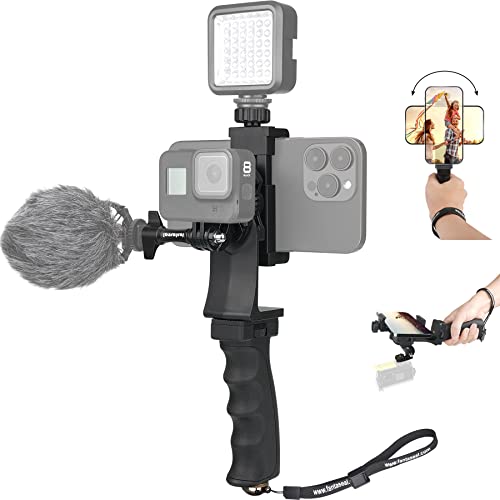
While not a motorized gimbal in the traditional sense, the 2in1 Ergonomic Portable Action Camera+Smartphone SYN Hand Grip is an excellent manual stabilization solution for those seeking enhanced control and accessory mounting options for their iPhone, GoPro, or other action cameras. Made of high-strength ABS, this ergonomic grip effectively reduces hand vibration, dramatically improving footage quality. It transforms your smartphone into a versatile monitor and remote for your action camera via WiFi, providing a comprehensive, compact video solution for vloggers, travelers, and content creators who prefer a robust, all-in-one mounting rig.
-
Key Features:
- Made of high-strength ABS material with ergonomic design for reduced hand vibration.
- Super phone clip holder with 360-degree rotation (portrait/landscape) and secure lock knob (50-100mm width).
- Allows smartphone to act as a monitor/remote for action cameras via WiFi APP.
- Extra built-in shoe mounting slot for video lights and hot shoe joint for microphones (accessories not included).
- Detachable and Versatile Hand Grip, compatible with most GoPro models, DJI Osmo Action, SJCAM, Sony Sports Camera, iPhones, Samsung, Huawei, LED Video Lights, Microphones, and even some DSLR cameras.
-
Pros:
- Excellent manual stabilization and comfortable ergonomic grip.
- Highly versatile, supporting both smartphones and a wide range of action cameras directly.
- Smartphone can be used as a monitor/remote for action cameras.
- Multiple mounting points for accessories like lights and mics.
- Durable and eye-catching design.
- More affordable than motorized gimbals.
-
Cons:
- Does not offer electronic 3-axis stabilization like the other products.
- Requires a steady hand for the smoothest results.
- Might not be suitable for extremely dynamic or professional-grade shots without practice.
-
User Impressions: Users commend this hand grip for its robust build, comfortable design, and incredible versatility. Many find it an essential tool for vlogging and casual shooting, especially when they need to attach external microphones or lights. The ability to use a smartphone as an action camera monitor is a frequently praised feature. While it doesn’t replace a motorized gimbal for buttery smooth motion, it’s highly valued for its practical stability and accessory support.
Frequently Asked Questions (FAQ)
Q1: What is a gimbal, and why do I need one for my iPhone or GoPro?
A1: A gimbal is a device that uses motors and sensors to keep your camera (phone or GoPro) stable, even when you’re moving. It counteracts unwanted shakes and jitters, resulting in incredibly smooth, professional-looking video footage. You need one to elevate your mobile filmmaking, reduce motion blur, and create cinematic shots that truly stand out.
Q2: Can I use a phone gimbal with my GoPro?
A2: Most dedicated phone gimbals are designed specifically for the size and weight of smartphones. To use them with a GoPro, you’ll typically need a special adapter or mounting plate that converts the GoPro’s mounting system to fit the phone clamp. Product #5, the SYN Hand Grip, is directly compatible with both without extra adapters.
Q3: What’s the difference between a 2-axis and a 3-axis gimbal?
A3: A 2-axis gimbal stabilizes on two axes (usually tilt and roll), while a 3-axis gimbal adds stabilization on the third axis (pan). This means a 3-axis gimbal provides superior, more comprehensive stabilization, compensating for movement in all directions and offering the smoothest, most professional results. All the motorized gimbals reviewed here are 3-axis.
Q4: How important is battery life for a gimbal?
A4: Battery life is crucial, especially for content creators and travelers. A longer battery life (like 8-10+ hours) means you can shoot all day without worrying about recharging, which is essential for capturing events, long vlogs, or extensive travel footage.
Q5: What are LSI keywords, and how do they relate to “best gimbal for iPhone and GoPro”?
A5: LSI (Latent Semantic Indexing) keywords are conceptually related terms that help search engines understand the full context of your content. For “best gimbal for iPhone and GoPro,” LSI keywords would include “smartphone stabilizer,” “action camera video,” “mobile filmmaking,” “smooth footage,” “vlogging gear,” “portable stabilizer,” “3-axis gimbal,” and “magnetic phone clamp.” Using them naturally improves the article’s topical relevance and SEO strength.
Q6: Do I need to remove my phone case when using a gimbal?
A6: Often, yes. While some gimbals can accommodate slim cases, thicker or bulkier phone cases can interfere with the gimbal’s balance and motor performance. It’s generally recommended to remove your phone case for optimal stability and performance. Always check the gimbal’s compatibility guidelines.
Q7: Are the apps for gimbals important?
A7: Absolutely! Most modern gimbals rely heavily on their companion apps (like DJI Mimo or Hohem Joy) to unlock features such as intelligent tracking, gesture control, time-lapse, panorama, creative shooting modes, and even editing tools. A good app enhances the user experience and expands the gimbal’s capabilities significantly.

