
So, you’ve got your hands on the incredible Sony A7 IV, a camera renowned for its superb image quality and impressive video capabilities. But let’s face it, even with the best in-body stabilization, handheld footage can still look a bit wobbly or unprofessional. That’s where a good gimbal comes into play! A high-quality gimbal can transform your shaky video into buttery-smooth, cinematic masterpieces, making your content truly stand out.
Choosing the best gimbal for Sony A7 IV isn’t just about picking the first one you see. It’s about finding the right balance of payload capacity, features, portability, and ease of use to match your specific shooting style. Whether you’re a vlogger, a wedding videographer, or an indie filmmaker, having the right stabilization tool (and accompanying accessories!) can make all the difference.
In this guide, we’ll dive into some top-notch options, including dedicated gimbals and essential accessories that complement your Sony A7 IV setup, ensuring you get the most stable and professional-looking footage possible. Let’s find your perfect match!
1. DJI RS 3 Mini, 3-Axis Gimbal Stabilizer for Cameras

If you’re looking for a compact powerhouse to stabilize your Sony A7 IV, the DJI RS 3 Mini is an absolute game-changer. What makes this gimbal truly stand out is its incredible portability without sacrificing professional-grade stabilization. It’s specifically designed for mirrorless cameras like your A7 IV, offering a lightweight solution that’s easy to carry around all day, making it an ideal companion for travel vlogging, run-and-gun shooting, or just keeping a low profile. You won’t believe the smooth footage you can capture with such a small device!
-
Key Features:
- Weighs only 795g (1.75lbs), making it ultra-lightweight and portable.
- Strong motors with a load capacity of up to 2 kg (4.4 lbs), compatible with many camera and lens combos.
- Bluetooth Shutter Control for seamless photo and video control directly from the gimbal.
- 3rd-Gen RS Stabilization Algorithm delivers pro-level stability for various shots.
- Native Vertical Shooting feature for easily creating social media content.
- 1.4″ Full-Color Touchscreen with an intuitive UI for quick access to settings.
- Requires DJI Ronin app for activation and full functionality.
-
Pros:
- Extremely lightweight and compact, perfect for travel.
- Excellent stabilization performance for its size.
- Easy to set up and balance.
- Native vertical shooting is a huge plus for content creators.
- Intuitive touchscreen interface.
-
Cons:
- Limited payload compared to larger gimbals (though sufficient for A7 IV with many lenses).
- Requires app for full functionality and activation.
User Impressions: Users rave about the RS 3 Mini’s balance of size and performance, often commenting on how effortlessly it handles the A7 IV, making it a joy to shoot with for extended periods. The quick setup and responsive controls are frequently praised, proving it’s a top contender when searching for the best gimbal for Sony A7 IV for lightweight setups.
2. AODELAN Wireless Shooting Grip Tripod with Remote Control
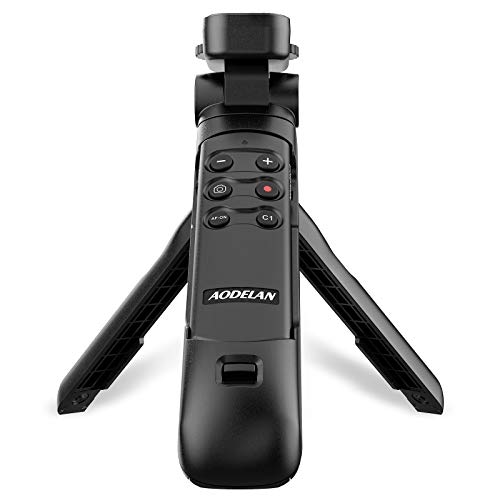
While not a motorized gimbal in the traditional sense, the AODELAN Wireless Shooting Grip Tripod is an incredibly versatile accessory that offers significant stability and convenience for your Sony A7 IV, especially if you’re into vlogging, live streaming, or just need a reliable handheld grip that doubles as a tabletop tripod. Its standout feature is the integrated, detachable wireless remote control, which gives you complete command over your camera’s shooting functions without touching the camera itself – perfect for solo creators!
-
Key Features:
- Functions as both a wireless shooting grip and a tabletop tripod (holds up to 1 kg / 2.2 lb).
- Lightweight and easy to carry, ideal for mobile shooting.
- Detachable remote control supports still images, video, focus, and zoom functions.
- Operating range of the remote is up to 10m/32.8ft.
- Tripod base equipped with a non-slip pad for stable support.
- Compatible with a wide range of Sony cameras, including A7 III, A7R III, A7R IV, A9, A9 II, ZV-1, ZV-E10 II, and more.
-
Pros:
- Highly portable and multi-functional.
- Remote control vastly improves self-shooting and vlogging experience.
- Stable tabletop tripod functionality.
- Excellent for casual vlogging and stable handheld shots without the bulk of a full gimbal.
-
Cons:
- Not a motorized gimbal; provides passive stability, not active stabilization against motion.
- Limited weight capacity compared to full gimbals.
User Impressions: Reviewers love the AODELAN grip for its convenience and the freedom provided by the remote control. It’s often highlighted as a “must-have” for vloggers and content creators who need a compact, reliable way to improve handheld stability and control their A7 IV remotely without investing in a complex gimbal setup.
3. HangTon Ronin S Gimbal to NP-FZ100 Dummy Battery for Sony

Okay, this isn’t a gimbal itself, but if you own a Sony A7 IV and plan on using a DJI Ronin S (or similar) gimbal for extended periods, the HangTon Ronin S Gimbal to NP-FZ100 Dummy Battery is an absolute game-changer. The biggest headache with gimbals is often battery life, specifically your camera’s battery when it’s constantly on. This dummy battery allows you to power your Sony A7 IV directly from your Ronin S gimbal, meaning you can shoot for much longer without swapping camera batteries, keeping your workflow smooth and uninterrupted. It’s a fantastic accessory for those serious about their gimbal game.
-
Key Features:
- NP-FZ100 dummy battery power adaptor for numerous Sony Alpha cameras, including A7 IV, A7 III, A7R IV, A1, FX3, FX30, A6600, etc.
- Connects directly to the Ronin S gimbal’s 12V power output.
- Regulates voltage to 7.2V-8.4V, safe for your DSLR camera.
- Replaces the need for Sony NP-FZ100 battery swaps.
- Cable length of 35-100cm for flexible setup.
- Designed for long-time shooting, eliminating battery concerns.
-
Pros:
- Extends camera battery life significantly when on a gimbal.
- Eliminates the need for constant battery swaps, saving time and hassle.
- Provides a continuous power supply for long takes or events.
- Safe and reliable power conversion.
-
Cons:
- Only useful if you own a compatible gimbal with a power output.
- Adds another cable to your setup.
User Impressions: This dummy battery is a lifesaver for professional videographers and hobbyists alike who frequently use their A7 IV on gimbals. Users praise its effectiveness in enabling prolonged shoots without interruption, calling it an essential accessory for any serious gimbal user.
4. FeiyuTech SCORP-C Gimbal Stabilizer for Cameras DSLR and Mirrorless

The FeiyuTech SCORP-C is another formidable contender for the best gimbal for Sony A7 IV, offering robust compatibility and innovative design features that set it apart. Its standout characteristic is the integrated hanging handle, which allows for incredibly flexible shooting angles, from upright to underslung, giving you full control over your lens. The ergonomic design and the ability to set it down anywhere without a tripod make it incredibly user-friendly and efficient on set.
-
Key Features:
- Wide compatibility with mainstream mirrorless and DSLR cameras, including Sony α7Ⅳ/a9/a9II/a7R4/a7R3/a7M3/a7M2, Panasonic, Canon, Nikon, and Fujifilm.
- Integrated hanging handle for versatile shooting angles (upright, underslung).
- Tilted handle for comfortable ergonomic grip.
- Built-in folding aileron bracket allows the gimbal to stand on its own without a tripod.
- Considerate design for easier installation and leveling: three-axis motor lock, five-way center of gravity adjustment, center of gravity memory slider, Arca Quick Release Plate.
- Powerful Key for easy mode switching and unlocking professional features.
- Complex shots easily achieved: AB Trajectory Memory, Flash Mode (three-axis fast follow), Panoramic Photography, Time-lapse, Space Mode, Vertical-shooting.
- 2500mah Efficient Battery with 10-13 hour runtime and 18W fast charging.
-
Pros:
- Excellent compatibility with the Sony A7 IV and various lenses.
- Innovative integrated handle design for flexible shooting.
- Self-standing capability is a huge convenience.
- User-friendly leveling and balancing system.
- Feature-rich with advanced shooting modes.
- Long battery life with fast charging.
-
Cons:
- Might be slightly larger or heavier than “mini” gimbals.
- The number of features can have a learning curve for beginners.
User Impressions: Users are impressed by the SCORP-C’s build quality, the thoughtful design for ease of use, and its powerful stabilization capabilities. Many highlight the versatility provided by the integrated handle and the long-lasting battery as key benefits for professional work with their Sony A7 IV.
5. SmallRig A7 IV Cage with Top Handle and HDMI Cable Clamp

Just like the dummy battery, the SmallRig A7 IV Cage isn’t a gimbal, but it’s an indispensable accessory if you’re serious about protecting your Sony A7 IV and expanding its versatility for video production, especially when using gimbals or external monitors. Its standout feature is the “two-point locking” system combined with an all-around protective design, ensuring your A7 IV is securely mounted and shielded from bumps and scratches. This cage transforms your camera into a professional rig, providing numerous mounting points for external accessories like microphones, monitors, and lights, all of which are crucial for a complete video setup.
-
Key Features:
- Compatible with Sony Alpha 7R V / Alpha 7 IV / Alpha 7 S III cameras.
- Two-point locking system (1/4″-20 screw + side locking plates) prevents twisting.
- All-round protection with aviation aluminum and built-in protective pads.
- Maintains access to camera controls, hot shoe, and features.
- Multiple mounting points: integrated shoe mount, 1/4″-20 threads, 3/8″-16 ARRI locating holes, built-in NATO rail, strap slots.
- Ergonomic top handle for comfortable carrying and low-angle shots.
- Includes an HDMI cable clamp to prevent deflection and ensure stable signal transmission.
- Magnetic flat-head screwdriver & Allen wrench stored on the bottom.
- Power Backup Solution available with compatible SmallRig NP-FZ100 battery sets.
-
Pros:
- Excellent protection for your Sony A7 IV.
- Transforms your camera into a robust video rig.
- Numerous mounting options for accessories.
- Secure two-point locking prevents camera rotation.
- Top handle is great for low-angle shooting and transport.
- HDMI cable clamp is crucial for reliable external monitoring.
-
Cons:
- Adds some bulk and weight to the camera.
- Requires removal of camera strap eyelet for side locking plate.
- Cable clamp might interfere with synchroterminal interface on A7R V.
User Impressions: Users universally praise the SmallRig cage for its sturdy build, perfect fit, and the sheer number of mounting options it provides. It’s seen as an essential foundation for building a professional video rig around the A7 IV, greatly enhancing its functionality and protecting a valuable investment, especially for those frequently mounting it to a gimbal or tripod.
Wrapping Up Your Smooth Setup
Choosing the best gimbal for Sony A7 IV (and the right accessories!) is a vital step in elevating your video production. Whether you opt for the ultra-portable DJI RS 3 Mini, the versatile FeiyuTech SCORP-C, or enhance your setup with the AODELAN grip, HangTon dummy battery, and SmallRig cage, each piece plays a crucial role in achieving that coveted cinematic look.
Consider your shooting style, budget, and the kind of content you create. A full gimbal provides unmatched active stabilization for dynamic shots, while accessories like grips and cages offer essential support, protection, and extended functionality. No matter your choice, investing in these tools will undoubtedly help you unlock the full video potential of your amazing Sony A7 IV. Happy shooting!
FAQ Section
Q1: Why do I need a gimbal for my Sony A7 IV if it has in-body stabilization?
A1: While the Sony A7 IV’s in-body image stabilization (IBIS) is excellent for minor shakes and stills, a motorized gimbal offers superior, active 3-axis stabilization. This is crucial for eliminating noticeable jitters during complex movements like walking, running, or panning, delivering that truly smooth, cinematic footage that IBIS alone cannot achieve.
Q2: What should I consider when choosing a gimbal for the Sony A7 IV?
A2: Key factors include payload capacity (ensuring it can handle your camera and heaviest lens), portability (how easy it is to transport), battery life, ease of balancing, available shooting modes (e.g., follow modes, inception mode), and compatibility with your camera’s controls.
Q3: Can I use the Sony A7 IV’s autofocus with a gimbal?
A3: Yes, most modern gimbals allow the Sony A7 IV’s excellent autofocus system to function while mounted. Some gimbals even offer Bluetooth shutter control or cable connections to start/stop recording and control focus directly from the gimbal handles, enhancing your workflow.
Q4: Are the non-gimbal products reviewed (grip, dummy battery, cage) really necessary?
A4: While not gimbals themselves, these accessories significantly enhance the Sony A7 IV’s video capabilities and professional setup. The AODELAN grip offers passive stability and remote control for vlogging, the HangTon dummy battery ensures extended power for gimbal use, and the SmallRig cage provides essential protection and mounting points for other crucial video accessories, making them highly valuable additions for serious videographers.
Q5: How do I balance my Sony A7 IV on a gimbal?
A5: Balancing involves adjusting the camera’s position on each of the gimbal’s three axes (tilt, roll, and pan) so that it remains level and still when the motors are off. Most gimbals come with quick-release plates and adjustable arms to make this process easier. Proper balancing is crucial for optimal performance and to prevent motor strain.
Q6: What are LSI keywords and why are they important for this article?
A6: LSI (Latent Semantic Indexing) keywords are words and phrases that are semantically related to your main topic, even if they aren’t direct synonyms. For “best gimbal for Sony A7 IV,” LSI keywords would include terms like “camera stabilization,” “smooth video,” “mirrorless camera setup,” “cinematic footage,” “vlogging gear,” and “camera accessories.” Using these naturally helps search engines understand the full context of your article, improving its relevance and ranking for a wider range of related queries.
Q7: Is it worth investing in a higher-end gimbal for the Sony A7 IV?
A7: If video quality and professional results are your priority, investing in a higher-end gimbal is often worthwhile. These gimbals typically offer more robust payloads, advanced stabilization algorithms, more sophisticated shooting modes, longer battery life, and better build quality, providing a more reliable and versatile tool for demanding video projects with your Sony A7 IV.

