
So, you’re a proud Fujifilm camera owner. You love the classic aesthetics, the incredible color science, and the fantastic image quality. But when it comes to video, especially dynamic shots or smooth pans, even the steadiest hands can’t beat a good gimbal. That’s where a high-quality camera stabilizer comes in, transforming shaky footage into buttery-smooth cinematic magic.
Finding the best gimbal for Fuji can feel like a quest, with so many options out there. Fujifilm cameras, like the popular X-T4, X-H2S, or X-S10, are renowned for their compact size yet powerful video capabilities. This means you need a gimbal that can handle their weight, offer seamless control, and truly complement your filmmaking style.
We’ve done the heavy lifting for you, diving deep into the world of gimbals to handpick five top contenders (and one essential accessory!) that are perfect for your Fuji setup. Let’s get your creative juices flowing and make your next video project look professional.
The Top Picks for Your Fujifilm Camera
Here’s our breakdown of the best gimbals and a crucial accessory to consider for your Fuji camera:
1. DJI RS 2 – The Professional Workhorse
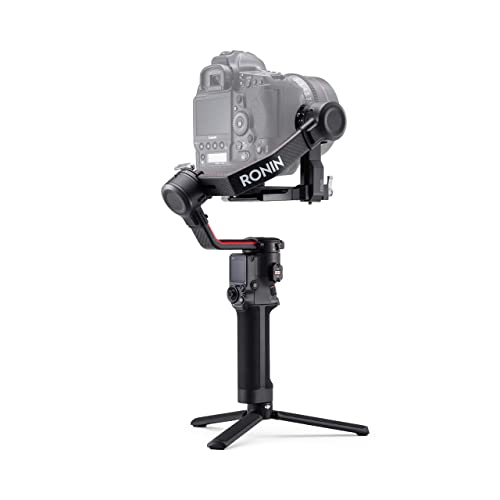
The DJI RS 2 is a true powerhouse, a professional-grade 3-axis gimbal stabilizer that’s incredibly popular among videographers. What makes it stand out is its exceptional blend of lightweight carbon fiber construction and impressive payload capacity. It’s designed to handle a wide range of mirrorless and DSLR cameras, including your favorite Fuji bodies, ensuring smooth, stable footage whether you’re running, tracking, or executing complex camera movements. This gimbal isn’t just about stabilization; it’s about empowering your creativity with robust features and intuitive control.
Key Features:
* 10lb Tested Payload – Industry-leading weight-to-payload ratio at 2.3 lbs.
* Carbon Fiber Construction – Monocoque carbon fiber axis arms for strength and lightness.
* 1.4” Full-Color Touchscreen – Integrated LCD for quick parameter adjustments and Ronin app features.
* Professional Mounting Options – Integrate with cars, jibs, or sliders for versatile shoots.
* Efficient Balancing – Dual-layer camera mounting plate (Manfrotto and Arca-Swiss compatible) with fine-tune knob.
* Wide Camera Compatibility – Supports Fujifilm X-H1, X-T2, X-T3, X-T4, X-T20, X-T30, X-E3, and many others.
Pros:
* Excellent build quality with carbon fiber.
* High payload capacity for various camera/lens combos.
* Intuitive touchscreen for easy control.
* Versatile mounting options for professional setups.
* Fast and efficient balancing system.
Cons:
* Can be overkill for very small, lightweight setups.
* Premium price point.
User Impressions: Users frequently praise the DJI RS 2 for its robust build, ease of balancing, and the incredibly smooth footage it produces. Many Fujifilm shooters find it an ideal match for their X-T series cameras, appreciating its ability to handle heavier lenses without breaking a sweat. The touchscreen is a big hit, simplifying operation on set.
2. ZHIYUN WEEBILL 2 Pro – Feature-Packed Innovation

The ZHIYUN WEEBILL 2 Pro steps onto the scene as a strong contender, offering a unique blend of powerful performance and innovative design. Its standout feature is the 2.88″ full-color flip-out touchscreen, which not only provides intuitive control but can also be used for monitoring with an image transmission system. This gimbal is packed with smart tech, including a powerful chip for dynamic stabilization, ensuring your Fuji footage is always silky smooth. Plus, its classic sling grip design makes low-angle shots a breeze, putting less strain on your arms during long shoots.
Key Features:
* Powerful Chip with Dynamic Stabilization – Infineon two-filter interruption vector-splitting sensor for precise, quick response.
* 2.88″ Full-Color Flip-out Touch Screen – Tap to adjust parameters, monitor footage with image transmission.
* Classic Design with Effort-saving Sling Grip – Ergonomic sling mode for low-angle shooting without extensions.
* Max 24W PD Fast-Charge – Minimizes charging time to 1.6 hours, up to 9 hours runtime, usable while charging.
* Wide Compatibility – Supports Fujifilm X-H1, X-T2, X-T3, X-T4, X-T30, X-E3, and many other popular cameras.
Pros:
* Innovative flip-out touchscreen.
* Excellent stabilization performance.
* Comfortable and versatile sling grip design.
* Fast charging and decent battery life.
* Good compatibility with various Fuji models.
Cons:
* Menu system on the touchscreen can have a slight learning curve.
* Payload capacity might be slightly less than the RS 2 for very heavy setups.
User Impressions: Fujifilm creators love the WEEBILL 2 Pro’s unique design and the convenience of its flip-out screen. They often highlight its fast setup, reliable stabilization, and the comfortable sling mode, which is particularly useful for run-and-gun filmmaking with their Fuji cameras.
3. DJI RS 2 Combo – The Complete Filmmaking Kit
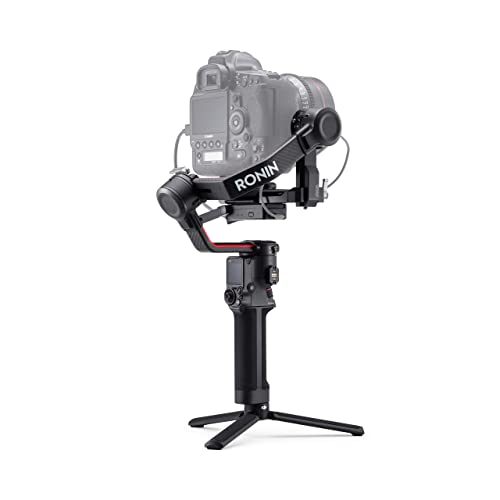
If you’re looking for the full package, the DJI RS 2 Combo is essentially the highly acclaimed DJI RS 2 gimbal, but bundled with essential accessories that elevate your filmmaking experience right out of the box. This combo typically includes the RavenEye Image Transmission System, a Focus Motor, and more, turning your best gimbal for Fuji into a comprehensive setup. It maintains all the core strengths of the standalone RS 2 – the carbon fiber build, impressive payload, and intuitive controls – but provides the extra tools you need for advanced tracking, remote monitoring, and precise focus pulling, making it a fantastic investment for serious videographers.
Key Features:
* 10lb Tested Payload – At 2.3 lbs, offers industry’s highest weight-to-payload ratio.
* Carbon Fiber Construction – Monocoque carbon fiber axis arms for incredible strength and lightness.
* 1.4” Full-Color Touchscreen – Integrated LCD for quick parameter adjustments and Ronin app features, including ActiveTrack 3.0.
* Professional Mounting Options – Integrate with cars, jibs, or sliders.
* Efficient Balancing – Dual-layer camera mounting plate (Manfrotto and Arca-Swiss) with fine-tune knob.
* Wide Camera Compatibility – Supports Fujifilm X-H1, X-T2, X-T3, X-T4, X-T20, X-T30, X-E3, and many others.
* Combo Specifics: Often includes RavenEye Image Transmission System, Focus Motor, phone holder, and carry case.
Pros:
* All the benefits of the DJI RS 2.
* Includes crucial accessories for professional workflows.
* Ready for advanced features like remote monitoring and focus.
* Excellent value for a comprehensive kit.
Cons:
* Higher initial cost due to the included accessories.
* Some users might not need all the bundled extras.
User Impressions: Users who opt for the Combo version rave about the immediate access to advanced features like the RavenEye system, which greatly enhances their ability to monitor and control their Fuji cameras remotely. They feel it’s a worthwhile investment for streamlining their production workflow.
4. DJI RS 2 – Compact Powerhouse Edition
This listing represents another opportunity to acquire the versatile DJI RS 2, recognized as a top contender for the best gimbal for Fuji cameras. Just like the other standalone RS 2 models, this unit embodies DJI’s commitment to high performance in a lightweight package. It’s built for those who prioritize a robust, reliable stabilization solution without the added bulk, offering the essential features for cinematic capture. Whether you’re upgrading from an older model or just starting your stabilization journey, this gimbal provides professional-grade stability that perfectly complements your Fujifilm camera’s video capabilities.
Key Features:
* 10lb Tested Payload – Boasts an industry-leading weight-to-payload ratio at just 2.3 lbs.
* Carbon Fiber Construction – Monocoque carbon fiber axis arms ensure both incredible strength and surprising lightness.
* 1.4” Full-Color Touchscreen – An integrated LCD allows for quick parameter adjustments and direct access to Ronin app features like ActiveTrack 3.0.
* Professional Mounting Options – Designed for integration with various rigs, including cars, jibs, or sliders.
* Efficient Balancing – Features a dual-layer camera mounting plate (compatible with Manfrotto and Arca-Swiss) and a fine-tune balancing knob.
* Extensive Camera Compatibility – Supports a broad range of cameras, including popular Fujifilm models like the X-H1, X-T2, X-T3, X-T4, X-T20, X-T30, and X-E3.
Pros:
* Outstanding performance-to-weight ratio.
* Durable yet lightweight carbon fiber design.
* User-friendly touchscreen interface.
* Highly adaptable for various shooting scenarios.
* Quick and precise balancing.
Cons:
* May require additional accessories for advanced setups (unlike the Combo).
* Can feel large for extremely compact Fujifilm bodies like the X-E series.
User Impressions: Many Fujifilm videographers find this core RS 2 unit to be the perfect balance of power and portability. They frequently highlight how well it handles their larger Fuji lenses and cameras, delivering consistently smooth footage. Its straightforward setup and reliable performance make it a go-to choice for both enthusiasts and pros.
5. DJI USB Type C to Type C Right Angle Multi-Camera Control Cable

While not a gimbal itself, this DJI USB Type C to Type C Right Angle Multi-Camera Control Cable is an absolutely essential accessory if you want to fully utilize your gimbal with your Fujifilm camera. It allows seamless communication between your DJI RS series stabilizer and your Fuji camera, enabling vital functions like starting/stopping recording, triggering autofocus, and even controlling exposure settings directly from the gimbal. A reliable control cable is often overlooked but crucial for a smooth workflow and unlocking the full potential of your best gimbal for Fuji setup.
Key Features:
* Connect Gimbal Stabilizer to Camera – Enables control functions between DJI RS4 Pro, RS4, RS3 Pro, RS3, RS3 Mini, RSC2, RS2 and your camera.
* Wide Compatibility – Works with SONY, Canon, Nikon, Panasonic, Fuji, Olympus, Sigma, LEICA, Blackmagic Design cameras.
* Multi-Control Functions – Supports Shoot/Capture photo, Start/stop recording video, Trigger auto focus, Pull focus electronically, Aperture, Shutter, ISO, and Ronin Image Transmitter.
* Optimal Length and OD – 31cm (12 inch) length and 3.5mm OD, ideal for most gimbal and camera setups.
* Durable Material – Made from high-quality, durable PVC material.
Pros:
* Essential for remote camera control from the gimbal.
* Right-angle connector helps with cable management and clearance.
* Supports multiple control functions for a streamlined workflow.
* Durable construction for long-term use.
Cons:
* Specific to DJI gimbals and compatible Fuji camera models (check compatibility list).
* Easy to lose if not careful.
User Impressions: Users emphasize how critical this cable is for unlocking the advanced features of their DJI gimbals with their Fuji cameras. They appreciate the right-angle design, which keeps the setup tidy and prevents accidental disconnections, making their shooting experience much more efficient.
Frequently Asked Questions (FAQ)
Q1: What makes a gimbal good for Fujifilm cameras specifically?
A1: The best gimbal for Fuji cameras needs to accommodate their unique size and weight, which can vary from compact X-T30s to larger X-H2S bodies with heavy lenses. Look for gimbals with adequate payload capacity, intuitive controls, and robust build quality that can balance your specific Fuji camera and lens setup effectively. Compatibility with Fuji’s control protocols for features like record start/stop is also crucial.
Q2: Do I really need a gimbal for my Fuji camera for video?
A2: While many newer Fujifilm cameras have excellent in-body image stabilization (IBIS), a gimbal takes video stabilization to a whole new level. It virtually eliminates camera shake from walking, running, or complex movements, providing that smooth, cinematic look that’s hard to achieve otherwise. If you’re serious about videography, a gimbal is a game-changer.
Q3: What is “payload capacity” and why is it important for a gimbal?
A3: Payload capacity refers to the maximum weight a gimbal can effectively stabilize. It’s crucial because your camera (including battery, memory card) and lens combination must fall within this weight limit. If your setup is too heavy, the gimbal won’t be able to balance or stabilize properly, leading to shaky footage and potentially damaging the motors. Always check your camera’s weight (with your heaviest lens) against the gimbal’s specifications.
Q4: How do I balance my Fujifilm camera on a gimbal?
A4: Balancing involves adjusting the camera’s position on the gimbal’s axes (tilt, roll, pan) until it remains still when held in any position, without motor power. Most gimbals come with quick-release plates and fine-tuning knobs to make this process easier. It takes a little practice, but proper balancing is key to optimal performance, power efficiency, and preventing motor strain.
Q5: Can I use a gimbal for still photography with my Fuji camera?
A5: While gimbals are primarily for video, they can be useful for still photography in specific situations. For example, you can use a gimbal to achieve extremely stable long exposures in low light, create smooth motion timelapses, or get unique, precise camera movements for composite shots. However, for most still photography, a tripod or monopod is typically more practical.
Q6: What’s the difference between a standalone gimbal and a “combo” kit?
A6: A standalone gimbal usually includes the core stabilizer unit and basic accessories like a tripod grip and charging cable. A “combo” kit, like the DJI RS 2 Combo, includes the core gimbal plus additional valuable accessories such as image transmission systems (like RavenEye), follow focus motors, phone holders, and a dedicated carrying case. These extras enhance functionality and convenience for more professional or complex setups.
Q7: Are there gimbals made specifically for Fujifilm cameras?
A7: While no major gimbal manufacturer produces gimbals exclusively for Fujifilm, many gimbals are designed with wide compatibility that includes Fujifilm’s popular mirrorless cameras. Brands like DJI and Zhiyun ensure their gimbals work seamlessly with various Fuji models, often providing control cables and app support tailored for common Fuji functionalities. Always double-check the manufacturer’s compatibility list for your specific Fuji camera model.

