So, you’re a proud owner of the Canon EOS M50, right? It’s a fantastic little mirrorless camera, incredibly popular with vloggers and content creators thanks to its flip-out screen, compact size, and impressive video capabilities. But let’s be real, even with its in-body digital stabilization, handheld footage can still look a bit shaky, especially if you’re moving around. That’s where a good gimbal comes in!
A gimbal isn’t just a fancy accessory; it’s a game-changer. It transforms your wobbly video into buttery-smooth, cinematic shots, making your content look incredibly professional. Whether you’re vlogging, shooting short films, or just capturing family memories, a stable camera makes all the difference.
But with so many options out there, how do you pick the best gimbal for Canon EOS M50? Don’t sweat it! We’ve done the legwork for you. We’re breaking down five top contenders that pair beautifully with your M50, helping you choose the perfect camera stabilizer to elevate your video game. Let’s dive in!
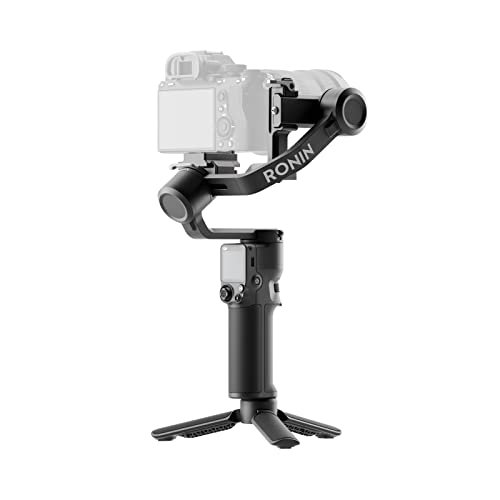
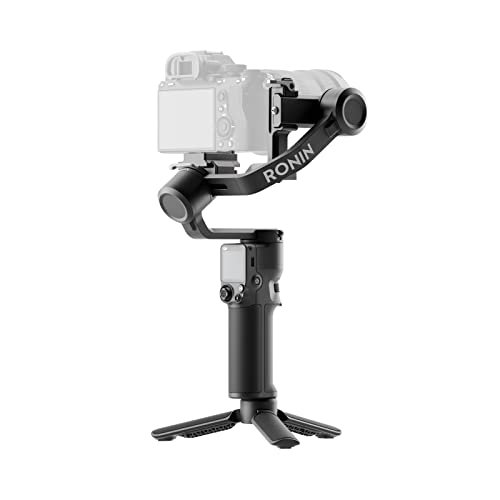
1. DJI RS 3 Mini

The DJI RS 3 Mini is a true marvel for its size, offering professional-grade stabilization in an incredibly portable package. If you’re looking for a lightweight companion that won’t weigh you down during extended shoots or travel, this is easily one of the best gimbal for Canon EOS M50 options out there. Its ultra-compact design doesn’t compromise on power, effortlessly handling the M50 and even larger setups, making it a versatile choice for creators on the go. You’ll love how easily it folds down and fits into a small bag, ready for your next adventure.
-
Key Features:
- 795g (1.75lbs) Lightweight and Portable design
- Load capacity of up to 2 kg (4.4 lbs)
- Bluetooth Shutter Control for seamless camera operation
- 3rd-Gen RS Stabilization Algorithm for pro-level smoothness
- Native Vertical Shooting mode for social media content
- 1.4″ Full-Color Touchscreen with intuitive UI
- Requires DJI Ronin app for activation and full functionality
-
Pros:
- Extremely lightweight and travel-friendly
- Excellent stabilization performance for its class
- Native vertical shooting is a huge plus for social media
- Intuitive touchscreen makes settings easy to adjust
- Good payload capacity for the M50 and many other mirrorless setups
-
Cons:
- Full functionality requires the DJI Ronin app, which needs to be downloaded directly if you use Android due to Google Play removal.
- Activation process might be a minor hurdle for new users.
User Impressions: Users frequently praise the RS 3 Mini for its portability and powerful stabilization. Many M50 owners find it the perfect balance between size and performance, making it their go-to for vlogging and travel. The ease of setting up and switching to vertical mode is also a common highlight.
2. FeiyuTech SCORP-C [Official] Camera Stabilizer 3-Axis
![FeiyuTech SCORP-C [Official] Camera Stabilizer 3-Axis...](https://m.media-amazon.com/images/I/41cuk84JumL._SL500_.jpg)
The FeiyuTech SCORP-C is an impressive upgrade from previous FeiyuTech models, boasting an enhanced payload capacity and a smart integrated handle grip. This gimbal feels robust and capable, designed for serious content creators who might occasionally pair their M50 with heavier lenses or even move up to a larger mirrorless camera in the future. Its ergonomic design means less fatigue during long shoots, and the multi-functional knob ring puts precise control right at your fingertips, allowing for fluid camera and gimbal axis adjustments.
-
Key Features:
- Compatible with mainstream mirrorless and DSLR cameras
- Upgraded max payload to 5.51 lbs (compared to AK2000C)
- Integrated handle grip for better ergonomics and stability
- Multi-Functional Knob Ring for focus and axis control
- Broad compatibility list including many Sony, Canon, Nikon, and Panasonic models
-
Pros:
- High payload capacity future-proofs your setup
- Integrated handle design is comfortable and efficient
- Versatile knob control enhances shooting precision
- Solid build quality instills confidence
- Wide compatibility means it’s not just for the M50
-
Cons:
- Might be overkill in terms of payload for some M50 users, potentially making it heavier than strictly necessary.
- Users must carefully check the camera/lens compatibility list to ensure full functionality.
User Impressions: Owners appreciate the SCORP-C’s sturdy build and the comfort of the integrated handle. Its ability to handle a variety of camera setups, including the Canon EOS M50, is a big plus for those with multiple cameras or looking to upgrade. The control knob is frequently mentioned as a valuable feature for fine-tuning shots.
3. SZRMCC Type-C to Micro USB Control Cable (Essential Accessory)

Now, this isn’t a gimbal itself, but if you’re looking for the best gimbal for Canon EOS M50 and plan to use models like the DJI RS 3 Mini or Ronin-SC, this SZRMCC control cable is an absolute must-have accessory! The M50 uses a Micro-USB port for camera control, while many modern gimbals use Type-C. This cable bridges that gap, allowing your gimbal to start/stop recording, trigger photos (for some cameras), and control other functions directly from the gimbal handles. It’s a small component, but crucial for a seamless workflow.
-
Key Features:
- Type-C to Micro-USB Control Stop/Start Cable
- Compatible with DJI RS3 Mini Gimbal Stabilizer, Ronin-SC Gimbal, etc.
- Specifically supports Canon EOS M50, M50 II, and other cameras like Nikon Z50, Panasonic G9, Sony A6000 series
- Plug A: Right Angle USB C Type-C male connector
- Plug B: Right Angle Micro-USB male connector
- Cable Length: 30cm/12inch
- 24-hour professional after-sales service
-
Pros:
- Enables essential camera control directly from compatible gimbals for your M50
- Right-angle connectors help with cable management and prevent obstruction
- Good length for gimbal use without excess slack
- Affordable and vital accessory for certain gimbal setups
-
Cons:
- Only a control cable, not a stabilizer.
- Functionality depends on the specific gimbal’s support for camera control via this cable.
- Some camera models might have limited functions (e.g., video but no photo control).
User Impressions: Users who own gimbals like the DJI RS 3 Mini and an M50 find this cable indispensable. It solves the common compatibility issue between camera and gimbal ports, making remote control possible and significantly improving their shooting experience. The right-angle design is also a frequently appreciated detail.
4. ZHIYUN CINEPEER Weebill 3E [Official]
![ZHIYUN CINEPEER Weebill 3E[Official], 3-Axis Lightweight...](https://m.media-amazon.com/images/I/41+kdEh7b2L._SL500_.jpg)
The ZHIYUN CINEPEER Weebill 3E strikes an impressive balance between payload capacity and portability, making it a strong contender for your Canon EOS M50 setup. Weighing just 1.05 kg while supporting up to 3 kg, it’s designed to be a workhorse without being a burden. What truly sets it apart is its thoughtful ergonomic design, which includes features like native vertical shooting for instant social media content and an optional 2.5 Sling Mode (with additional accessories) that significantly reduces fatigue during long shoots, making it a great choice for creators who need to stay agile.
-
Key Features:
- 3 kg (6.6 lbs) Payload with a lightweight 1.05 kg body
- A4 paper-sized (12 × 8 × 3 in) portable design
- Native Vertical Shooting without extra accessories
- Optional 2.5 Sling Mode (requires separate purchase of sling grip/wrist rest)
- Bluetooth Shutter Control for wireless camera operation
- Impressive 16H Max Battery Life
- Supports 14W PD fast charging (2 hours 46 minutes for full charge)
- Comes with Panasonic control cable, other brands (including Canon) need separate purchase
-
Pros:
- High payload for a lightweight gimbal, supporting a wide range of cameras/lenses
- Exceptional battery life ensures all-day shooting
- Fast charging capability
- Native vertical shooting is highly convenient
- Ergonomic design helps reduce user fatigue
-
Cons:
- Sling grip and wrist rest for 2.5 Sling Mode are sold separately.
- Requires purchasing an additional control cable specifically for Canon cameras (not included).
User Impressions: Many users are highly impressed by the Weebill 3E’s robust payload capacity for its compact size. The long battery life is a recurring highlight, allowing for extended filming sessions. While some note the need to buy extra accessories like the Canon control cable or sling grip, they generally feel the core performance and design make it a worthwhile investment.
5. DJI RS 4 Mini

The DJI RS 4 Mini takes everything you love about compact DJI gimbals and kicks it up a notch with smart features designed for speed and efficiency. Its “Ready in 1s” auto axis locks mean you’re no longer fumbling with manual setup – just power on and shoot! This best gimbal for Canon EOS M50 contender also boasts Intelligent Tracking, keeping your subject perfectly framed, and Teflon Enhanced Balancing for incredibly smooth adjustments. If quick transitions, dynamic scenes, and mobile-friendly content are your priority, the RS 4 Mini is engineered to keep up with your creative pace.
-
Key Features:
- “Ready in 1 s” with Auto Axis Locks for rapid setup
- Intelligent Tracking Module for keeping subjects framed
- Teflon Enhanced Balancing for smoother adjustments
- Fast Vertical Switch in 10 seconds for mobile content
- Responsive Follow Mode for dynamic shots
- Supports up to 2kg/4.4lbs payload, handling mirrorless cameras and phones
- Starter kit includes gimbal, tripod, and essential accessories
- DJI Ronin app removed from Google Play; requires direct download from DJI website
-
Pros:
- Extremely fast setup time with auto locks
- Intelligent tracking enhances dynamic shooting
- Smooth balancing mechanism
- Rapid vertical switching is excellent for social media content
- Responsive follow mode offers excellent control
-
Cons:
- Like other DJI gimbals, the Ronin app needs to be downloaded directly from their website for Android users.
- Payload, while sufficient for the M50, is slightly less than some competitors, so check if you plan on heavier lenses.
User Impressions: Users rave about the DJI RS 4 Mini’s speed and intelligent features. The auto axis locks and quick vertical switch are particularly popular for saving time on set. Its compact size combined with the intelligent tracking capabilities makes it a favorite for solo content creators and vloggers who need reliable, fast performance.
Conclusion
Choosing the best gimbal for Canon EOS M50 really comes down to your specific shooting style and needs. If portability and ease of use are paramount, the DJI RS 3 Mini or RS 4 Mini are fantastic choices. For those who need a higher payload capacity and robust build, the FeiyuTech SCORP-C or ZHIYUN CINEPEER Weebill 3E could be your perfect match. And remember, for seamless camera control, don’t forget essential accessories like the SZRMCC control cable!
Whichever you choose, investing in a good gimbal will dramatically improve the quality of your Canon EOS M50 footage, giving you those smooth, professional-looking shots you’ve always wanted. Happy shooting!
FAQ Section
Q1: Why do I need a gimbal for my Canon EOS M50?
A1: While the Canon EOS M50 has decent in-body digital stabilization, a 3-axis gimbal provides superior, buttery-smooth stabilization by physically counteracting camera movements across tilt, pan, and roll axes. This eliminates shaky footage, making your videos look professional, especially when walking, running, or moving the camera dynamically.
Q2: What payload capacity do I need for my Canon EOS M50?
A2: The Canon EOS M50 is a lightweight mirrorless camera. With a typical kit lens (like the EF-M 15-45mm), its weight is usually under 1kg (around 0.8kg). Most gimbals designed for mirrorless cameras have a minimum payload capacity of 1-2kg, which is more than enough for the M50. If you plan to use heavier lenses or eventually upgrade to a larger camera body, consider gimbals with 2.5kg+ capacity for future-proofing.
Q3: Can I use any gimbal with my Canon EOS M50?
A3: Not necessarily. While most gimbals can physically hold the M50, ensuring full functionality (like controlling the camera from the gimbal handles) requires compatibility. You’ll need to check the gimbal manufacturer’s compatibility list for your specific Canon EOS M50 model (M50, M50 Mark II, etc.) to confirm which control cables or Bluetooth connections are supported.
Q4: What’s the difference between 3-axis and 2-axis gimbals?
A4: A 3-axis gimbal stabilizes movements on all three axes: pan (horizontal rotation), tilt (up and down), and roll (sideways rotation). This provides the most comprehensive and smooth stabilization. A 2-axis gimbal stabilizes only two axes, typically tilt and roll, leaving horizontal panning movements less stable. For professional-looking video with an M50, a 3-axis gimbal is highly recommended.
Q5: Are gimbals hard to learn and balance?
A5: Modern gimbals have become much easier to balance and operate. While there’s a slight learning curve involved in the initial balancing process (which ensures smooth operation and protects the motors), most gimbals offer quick-release plates and fine-tuning knobs to make it straightforward. Once balanced, using the gimbal is quite intuitive, and many come with intelligent tracking or responsive follow modes that simplify shooting.
Q6: What accessories are important for a gimbal when using it with the M50?
A6: Beyond the gimbal itself, key accessories include:
* Control Cables: Essential for connecting your M50 to the gimbal for remote control functions (like start/stop recording). Make sure it’s compatible (e.g., USB-C to Micro-USB for the M50).
* Extra Batteries/Power Bank: For extended shoots, especially if the gimbal doesn’t have exceptional battery life.
* Mini Tripod: Many gimbals come with one, useful for setting the gimbal down, balancing, or capturing static shots.
* Carry Case: To protect your investment, especially when traveling.
* Quick Release Plate: While most gimbals have them, having a spare can be useful.
Q7: Can a gimbal replace a tripod for stable shots?
A7: A gimbal excels at providing dynamic, stabilized movement. While you can often use a gimbal with a mini tripod attached to its base for static shots, it doesn’t entirely replace a traditional tripod. A tripod is better suited for precise framing, long exposures, time-lapses, or situations where the camera needs to be perfectly still and at a specific height for an extended period without active monitoring.