
Ever watched those pro-looking videos on social media and wondered how they get such steady, buttery-smooth shots? Chances are, they’re using a gimbal! If you’re tired of shaky, amateur-looking footage from your Android phone, investing in the best gimbal for Android smartphone is a game-changer.
A gimbal is essentially a device that uses motors and sensors to stabilize your phone, counteracting any unintentional movements from your hands. This means whether you’re walking, running, or even shooting from a moving vehicle, your video stays incredibly smooth, giving it that professional, cinematic feel.
Why You Need a Gimbal for Your Android Phone
Even the most advanced Android phones with optical image stabilization (OIS) can struggle with truly smooth video, especially when you’re moving around a lot. Here’s why a dedicated phone gimbal is a must-have:
- Eliminate Shaky Footage: This is the primary reason! Say goodbye to dizzying, unwatchable videos.
- Achieve Cinematic Shots: Smooth pans, tilts, and tracking shots become effortless, elevating your mobile videography.
- Enhance Vlogging & Content Creation: Keep yourself in focus and your videos stable, even when you’re on the go.
- Better Low-Light Performance: By stabilizing your phone, gimbals allow for longer exposure times without blur, improving quality in dim conditions.
- Unlock Creative Features: Many gimbals come with intelligent tracking, timelapse, panorama, and other fun modes through their companion apps.
Ready to take your Android videos to the next level? We’ve rounded up 5 top contenders for the best gimbal for Android smartphone that will help you capture stunning, professional-grade content with ease.
Product Reviews: Our Top 5 Picks
Here are our in-depth reviews of the top gimbals designed to pair perfectly with your Android device.
1. DJI Osmo Mobile 7P Gimbal Stabilizer for iPhone, Android…

The DJI Osmo Mobile 7P is a premium contender that truly stands out with its innovative Multifunctional Module. This compact unit isn’t just a powerful 3-axis gimbal for Android; it cleverly integrates intelligent tracking, wireless mic reception (for DJI Mic 2/Mini), and even lighting features. It’s designed to transform your smartphone into a versatile content creation powerhouse, making it incredibly easy to snap spectacular, cinema-quality shots with lossless stability. Just unfold it, snap your phone on with its magnetic design, and the DJI Mimo app (downloaded directly from DJI for Android) automatically pops up, getting you filming instantly.
-
Key Features:
- Multifunctional Module with intelligent tracking, DJI Mic 2/Mini reception, and lighting features.
- Robust 3-axis gimbal stabilization for super smooth footage.
- ShotGuides and One-Tap Edit via DJI Mimo app for easy pro-level editing.
- Quick magnetic setup for instant filming.
- Built-in extension rod and tripod for versatile shooting.
- Up to 10 hours of operating time, with extra power for phone when module acts as mic receiver.
- Dual-Lens Enhanced Tracking for smarter, steadier subject tracking.
- Includes phone gimbal, Multifunctional Module, Magnetic Phone Clamp.
-
Pros:
- Exceptional 3-axis stabilization.
- Innovative Multifunctional Module offers advanced capabilities.
- Dual-lens tracking is highly accurate and keeps subjects in sharp focus.
- Built-in extension rod and tripod add great versatility.
- Long battery life and ability to power phone.
- User-friendly quick setup with magnetic clamp.
-
Cons:
- DJI Mimo app must be downloaded directly from DJI website for Android users (not on Google Play).
- Higher price point compared to simpler gimbals.
-
User Impressions: Users rave about the Osmo Mobile 7P’s superior stabilization and the intelligent tracking, calling it a professional tool for mobile videography. The multifunctional module is a big hit for content creators needing an all-in-one solution. While the app download process for Android is a minor inconvenience, the overall performance and feature set consistently impress.
2. Gimbal stabilizer for Smartphone, 3-Axis Phone Gimbal for… (L7C Pro)

The L7C Pro brings professional-grade stability to your Android phone with its smooth 3-axis stabilization. It’s designed to transform your shaky recordings into polished, cinematic footage, perfect for vloggers, influencers, and anyone looking to level up their mobile videos. What makes this gimbal truly stand out is its user-friendly approach, combining effective stabilization with an intuitive app that offers creative “Moment Mode” templates like Inception and Dolly Zoom. It also boasts AI smart tracking and gesture control, letting you effortlessly keep subjects in focus and control shots hands-free.
-
Key Features:
- Smooth 3-axis gimbal stabilization for professional-grade footage.
- Easy-to-use Gimbal Pro app with one-tap templates (Inception, Dolly Zoom, Motion Timelapse, Panoramas).
- AI Smart Tracking for continuous subject focus.
- Gesture Control for hands-free photo and video capture.
- Fast charging (80min for full charge) and ability to charge while in use.
- Foldable and portable design (weighs only 0.78 lbs).
- Ergonomic handle for comfortable extended use.
-
Pros:
- Excellent 3-axis stabilization.
- App’s creative templates simplify complex shots.
- Effective AI tracking and convenient gesture control.
- Very quick charging ensures minimal downtime.
- Highly portable and lightweight, ideal for travel.
-
Cons:
- App features might be less polished than market leaders.
- Specific app name “JCROBOT Gimbal Pro” might be less recognized.
-
User Impressions: Customers frequently praise the L7C Pro for its ability to deliver smooth footage, even with active movement. The AI tracking and gesture controls are highlighted as highly convenient features, especially for solo content creators. Its fast charging capability is also a big plus for those on the go.
3. AOCHUAN Gimbal Stabilizer for Smartphone, iPhone Gimbal… (Smart XE)

The AOCHUAN Smart XE gimbal stabilizer is engineered for wide compatibility and professional anti-shake performance, ensuring your Android phone captures incredibly stable photos and videos in any scene. Its standout feature is the combination of advanced Smart 8.0 Anti-Shake technology with a professional focus wheel and zoom slider, giving you precise manual control over your shots. With multiple smart tracking modes (face, body, object, and third-party live tracking) and intuitive gesture control, this gimbal makes capturing creative content effortless and highly responsive to your needs.
-
Key Features:
- Wide compatibility for all iPhone and Android phones under 7 inches.
- Smart 8.0 Anti-Shake technology for professional stability.
- Professional focus wheel and zoom slider for real-time adjustments.
- Smart Tracking 6.0 with face, body, object, and third-party live tracking.
- Gesture control for effortless shooting.
- Fast charging and long 10+ hour battery life (2600mAh battery).
- Portable and foldable design (0.77 pounds, 0.55 pounds payload).
- APP features like Hitchcock, Inception, slow motion, time lapse, panorama.
-
Pros:
- Exceptional anti-shake performance for stable footage.
- The focus wheel and zoom slider offer precise manual control for cinematic effects.
- Versatile tracking modes cater to diverse shooting scenarios.
- Impressive battery life for extended outdoor shooting.
- Very wide compatibility with most smartphones.
-
Cons:
- Recommend checking app compatibility by downloading “AOCHUAN” app beforehand.
- May require removing phone case for optimal fit.
-
User Impressions: Users appreciate the AOCHUAN Smart XE for its robust anti-shake capabilities and the extensive compatibility with various Android phones. The manual focus and zoom controls are a big hit for those who want more creative command, and the reliable tracking features make it a strong choice for dynamic content creation.
4. DJI Osmo Mobile 6 Gimbal Stabilizer for Smartphones, 3-Axis…

The DJI Osmo Mobile 6 is another fantastic option from DJI, known for its superb stabilization and intelligent features, making it one of the best gimbal for Android smartphone options for ease of use. This compact, foldable 3-axis phone gimbal powers on as soon as you unfold it, getting you ready to shoot in seconds. Its standout features include the highly effective ActiveTrack 6.0, which sticks to your subjects like glue, and the ability to control it remotely via an Apple Watch (for iPhone users). Even for Android users, its silky-smooth stabilization and smart ShotGuides make capturing professional-looking videos incredibly simple, allowing you to focus on your story, not your shaky hands.
-
Key Features:
- Stay on Point with ActiveTrack 6.0 for enhanced subject tracking.
- Silky Smooth Shots with robust 3-axis stabilization.
- Quick setup: powers on as soon as you unfold it.
- Lightweight (305g), compact, and extendable with a built-in rod.
- ShotGuides offers scene-based shooting suggestions for beginners.
- Side Wheel for precise focus and zoom control for cinematic effects.
- New Parents and Kids Mode for autonomous shooting of family moments.
- Ergonomic grip with stain-resistant, non-slip texture.
-
Pros:
- Outstanding 3-axis stabilization for incredibly smooth footage.
- ActiveTrack 6.0 is highly accurate and reliable.
- Extremely quick to deploy and start shooting.
- Built-in extension rod adds great flexibility for selfies and unique angles.
- ShotGuides helps beginners create professional-looking videos easily.
- Side wheel provides excellent control over cinematic effects.
-
Cons:
- DJI Mimo app must be downloaded directly from DJI website for Android users (not on Google Play).
- Some remote control features (like Apple Watch) are Apple-specific.
-
User Impressions: The DJI Osmo Mobile 6 consistently receives high praise for its instant-on functionality and incredibly stable footage. Users especially love the ActiveTrack feature for keeping subjects perfectly framed. While the app download process for Android is noted, it’s generally seen as a small hurdle for the immense benefits this gimbal offers.
5. Smartphone Gimbal Stabilizer with Remote, Aluminum…
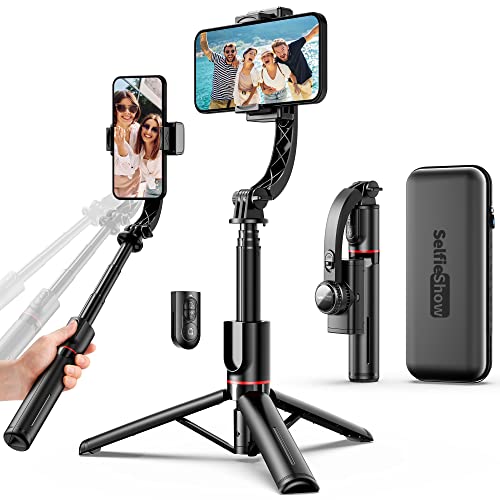
This smartphone gimbal stabilizer offers a unique approach to mobile video, focusing on simplicity and versatility without relying on complex apps. Its standout feature is its “APP-free” operation, coupled with a high-performance brushless motor that ensures smooth, stable footage directly out of the box. But it’s more than just a stabilizer; it’s an integrated compact selfie stick (extendable up to 2.8 feet) and a tripod, making it an all-in-one solution for various shooting needs. With a convenient standalone wireless control button, you can easily control your shooting and further reduce unwanted shakes.
-
Key Features:
- High Performance Automatic Anti Shake System with brushless motor (no APP required).
- 360° rotatable phone holder for horizontal or vertical shooting.
- Integrated compact selfie stick (up to 2.8 feet / 75 cm) and tripod.
- Standalone wireless control button for remote shooting.
- Foldable, portable, and lightweight design.
- 450 mAh Lithium rechargeable battery offers up to 2 hours of continuous use after 1.5-hour charge.
- Universally compatible with most iOS and Android smartphones (Wireless pairing).
-
Pros:
- Truly APP-free operation for straightforward use.
- Integrated selfie stick and tripod offer excellent versatility.
- Wireless remote control simplifies shooting.
- Extremely portable and lightweight due to its all-in-one design.
- Good for basic stabilization and as a versatile phone accessory.
-
Cons:
- Shorter battery life (2 hours) compared to dedicated gimbals.
- Lacks advanced features like AI tracking or cinematic templates found in app-driven gimbals.
- More of a stabilized selfie stick than a full-fledged gimbal in terms of advanced stabilization.
-
User Impressions: This gimbal is well-received by users looking for a simple, highly portable, and versatile tool. Its integrated selfie stick and tripod functionality are a major draw, and the fact that it doesn’t require an app for basic stabilization is a big plus for many who prefer hassle-free operation. It’s often recommended for casual users, travelers, and those who prioritize convenience.
Choosing the Best Gimbal for Your Android
When picking the best gimbal for Android smartphone, consider these factors:
- Stability (2-axis vs. 3-axis): 3-axis gimbals offer superior stabilization across all directions (pan, tilt, roll), resulting in the smoothest footage.
- Portability: Do you need something foldable and lightweight for travel?
- Battery Life: How long will you be shooting? Some offer 10+ hours, others just a couple.
- App Features: Do you want intelligent tracking, creative modes (timelapse, Dolly Zoom), or manual controls via an app? Be aware of specific app download requirements for Android.
- Built-in Extras: An extendable rod, tripod, or integrated remote can add significant value.
- Ease of Use: Some gimbals are ready to shoot instantly, while others require a bit more setup.
Consider your primary use case – whether it’s casual vlogging, professional content creation, or just better family videos – and choose the gimbal that aligns best with your needs and budget.
Frequently Asked Questions (FAQ)
Q1: What is a gimbal, and how does it work with my Android phone?
A gimbal is a device that uses motors and intelligent sensors to keep your Android phone stable and level, even when your hands are moving. It counteracts shakes and vibrations, ensuring your videos are smooth and professional-looking.
Q2: Why do I need a gimbal if my Android phone already has image stabilization?
While many Android phones have optical (OIS) or electronic (EIS) image stabilization, a dedicated gimbal offers superior, multi-axis stabilization that eliminates larger, more complex movements, like walking or running, providing a truly cinematic smoothness that built-in phone stabilization can’t match.
Q3: Are gimbals easy to use for beginners?
Yes, most modern gimbals for Android smartphones are designed with user-friendliness in mind. Many feature quick setup, intuitive controls, and companion apps with helpful tutorials or automated shooting modes (like ShotGuides or one-tap templates) to get beginners creating impressive videos right away.
Q4: What’s the difference between a 2-axis and a 3-axis gimbal?
A 2-axis gimbal stabilizes on two axes (usually tilt and roll), while a 3-axis gimbal stabilizes on three axes (pan, tilt, and roll). A 3-axis gimbal provides superior stabilization for all types of movement, resulting in the smoothest, most professional-looking footage possible. Most recommended phone gimbals today are 3-axis.
Q5: Can I use a gimbal without its companion app?
Some gimbals, like the “Smartphone Gimbal Stabilizer with Remote” reviewed above, can provide basic stabilization and remote control without an app. However, most advanced features like intelligent tracking, creative shooting modes (timelapse, panorama), and firmware updates usually require the manufacturer’s dedicated app.
Q6: How long does a smartphone gimbal’s battery typically last?
Battery life varies significantly between models. Some compact, simpler gimbals might offer 2-4 hours of continuous use, while more advanced models from brands like DJI or AOCHUAN can last 10 hours or more on a single charge, making them suitable for extended shooting sessions.
Q7: Do gimbals work with all Android phones, including larger models?
Most gimbals are designed to be widely compatible with a range of Android phone sizes and weights, often specifying a maximum width, length, or weight capacity. It’s always best to check the product specifications against your phone’s dimensions to ensure a proper fit, especially if you have a larger model or use a bulky phone case.

