
If you’re a proud owner of the Sony A7S II, you already know it’s a video powerhouse, capable of delivering stunning cinematic footage even in challenging low-light conditions. But to truly unlock its full potential, especially for dynamic, moving shots, a good gimbal is an absolute must-have. While finding the best gimbal for A7S II is a common quest, optimizing your entire camera-gimbal rig is where the real magic happens.
Often, it’s not just about the gimbal itself, but the clever accessories that turn a good setup into a great one. These often overlooked components can drastically improve your workflow, extend your shooting time, and give you greater control over your footage. Popular gimbals like the DJI Ronin-S are fantastic partners for the A7S II, but they often benefit from a few key additions.
Let’s dive into some essential accessories that can take your Sony A7S II gimbal setup to the next level, ensuring you’re always ready to capture that perfect shot without interruption.
Why Accessories Matter for Your A7S II Gimbal Rig
Imagine you’re in the middle of a crucial shoot. Your A7S II is mounted on your gimbal, perfectly balanced, but then… the camera battery dies. Or maybe you can’t properly monitor your shot because the built-in screen is obscured or too small. These are common frustrations that well-chosen accessories can eliminate. From extending battery life by powering your camera directly from the gimbal to ensuring a clear, large display for monitoring, these small additions make a big difference.
Eonvic NP-FW50 Dummy Battery to DJI Ronin-S Gimbal Power Adapter Cable

This neat little cable is a total game-changer for anyone using their Sony A7S II on a DJI Ronin-S. Forget constantly swapping out small camera batteries; this adapter allows your A7S II to draw power directly from the Ronin-S gimbal itself. That means significantly extended shooting times without the need to interrupt your flow. It’s designed to be plug-and-play, stepping down the gimbal’s 12V output to the 7.2V your camera needs, ensuring safe and continuous operation. It’s definitely one of those “why didn’t I think of that?” kind of accessories that makes using the best gimbal for A7S II a much smoother experience.
- Key Features:
- Power supply adapter cable for DJI Ronin-S to Sony mirrorless cameras (A7, A7R, A7S, A7II, A7RII, A7SII, A6300/A6400/A6500).
- Input: 12V, Output: 7.2V for safe camera operation.
- Cable length: 30cm, ideal for gimbal setups.
- Pre-tested for reliability and safety.
- Pros:
- Greatly extends camera battery life on the gimbal.
- Reduces the need for frequent battery changes.
- Simplifies power management for longer shoots.
- Robust and tested cable ensures safety.
- Cons:
- Specific to DJI Ronin-S and Sony NP-FW50 cameras.
- Adds one more cable to manage on your rig.
- User Impressions: Users frequently praise this cable for its reliability and the sheer convenience it offers. Many remark that it’s an indispensable tool for long shooting days, preventing missed shots due to dead batteries. It’s often described as a crucial component for making a best gimbal for A7S II setup truly efficient.
- See it on Amazon here
Permanent Standard HDMI Female to Micro HDMI 90 Degree Cable

When you’re trying to nail focus and framing on a gimbal, the camera’s built-in screen can be tricky to see. That’s where an external monitor comes in handy, and this super-flexible HDMI cable is perfect for connecting it. Its unique 90-degree micro HDMI end is a lifesaver, preventing awkward cable bends and snags that can throw off your gimbal’s balance. Being incredibly light and flat, it barely adds any weight to your rig, making it ideal for maintaining that perfect balance on your stabilizer. It’s also compatible with a range of Sony Alpha cameras, including your A7S II, making it a versatile addition to your kit.
- Key Features:
- Angled Micro HDMI (D-2) to standard HDMI female extension cable.
- Flat, soft ribbon design for flexibility and minimal bulk.
- Super light (less than 5g) to maintain gimbal balance.
- Compatible with Sony A7RII, A7SII, A9, A6500, A6300.
- Strong anti-interference capacity with gold-plated pins.
- Supports 1080P 30FPS (does not support 4K).
- Pros:
- Excellent for connecting external monitors without hindering gimbal movement.
- Lightweight and flexible design helps maintain gimbal balance.
- 90-degree connector is great for tight spaces and prevents cable damage.
- Versatile compatibility with several Sony mirrorless cameras.
- Cons:
- Does not support 4K video output, limiting high-resolution monitoring.
- Need to ensure the 90-degree orientation (D-2) matches your camera’s port.
- User Impressions: Filmmakers love how discreet and light this cable is, making it easy to integrate into a compact gimbal setup. The angled connector is a big hit, solving common cable management issues. Users frequently recommend it for anyone looking to use an external monitor with their best gimbal for A7S II or similar camera without adding bulk.
- See it on Amazon here
Foto4easy Adapter Cable for DJI Ronin-S Gimbal to NP-FW50 Dummy Battery
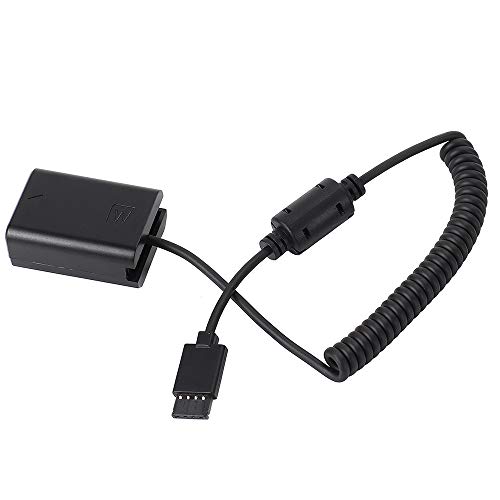
Very similar in function to the Eonvic cable, this Foto4easy adapter cable provides another reliable solution for powering your Sony A7S II directly from your DJI Ronin-S gimbal. It uses the same dummy battery concept, converting the gimbal’s power to the voltage your camera needs. This means you can keep shooting for much longer without worrying about your camera’s internal battery running dry. It’s a simple, effective solution that adds significant convenience to your video production workflow, letting you focus on getting the shot rather than swapping batteries. This accessory truly helps maximize the usage of any best gimbal for A7S II setup.
- Key Features:
- Power Supply Adapter Cable for DJI Ronin-S to Sony Mirrorless Cameras (A7, A7R, A7S, A7II, A7RII, A7SII, A6300/A6400/A6500).
- Input: 12V, Output: 7.2V.
- Cable length: 30cm.
- Specifically designed for DJI Ronin-S stabilizer and compatible Sony cameras.
- Pros:
- Extends camera runtime significantly by drawing power from the gimbal.
- Eliminates the need for multiple camera batteries.
- Plug-and-play simplicity.
- Reliable power conversion for safe camera operation.
- Cons:
- Only works with DJI Ronin-S.
- Cable length may not suit all unique rigging setups.
- User Impressions: Customers appreciate the straightforward functionality and peace of mind this cable provides. It’s often highlighted as a practical accessory that removes a major bottleneck (battery life) when using the A7S II for extended gimbal shots, making it a strong contender for anyone seeking to optimize their best gimbal for A7S II setup.
- See it on Amazon here
DRRI Ronin-S Gimbal to NP-FW50 Dummy Battery for Sony A7 Series
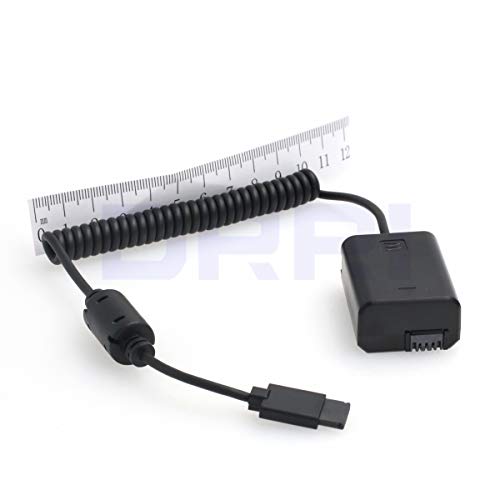
Rounding out our list of essential power solutions is the DRRI Ronin-S Gimbal to NP-FW50 Dummy Battery. This product offers the same invaluable function as the others: keeping your Sony A7S II (and other A7 series cameras) powered directly from your DJI Ronin-S. It’s designed to provide a steady 7.2V (from the 12V gimbal output) directly to your camera, ensuring consistent performance throughout your shoot. High-quality components and rigorous testing mean you can rely on this cable to keep your camera running smoothly, helping you capture those crucial stabilized shots with your best gimbal for A7S II.
- Key Features:
- Input: 12V, Output: 7.2V (steps down 12V to 7.4V, 1A).
- Suitable for Sony Alpha a7, a7 II, a7R, a7R II, a7S, a7S II cameras.
- Allows cameras to draw power from the Ronin-S 12V accessory port.
- Fabricated with high-quality components and 100% continuity tested.
- Pros:
- Provides stable, continuous power to your A7S II from the gimbal.
- Extends shooting time dramatically.
- Reduces overall rig weight by eliminating external battery packs for the camera.
- Ensures reliable performance with tested components.
- Cons:
- Specific to the DJI Ronin-S and Sony A7/A6000 series with NP-FW50 batteries.
- Another cable to manage on your gimbal rig.
- User Impressions: Users frequently praise the build quality and consistent power delivery of this cable. It’s seen as a vital accessory for professional and amateur videographers alike who need to maximize their uptime on set with their best gimbal for A7S II camera setups. The ability to avoid battery swaps is consistently highlighted as a major benefit.
- See it on Amazon here
Frequently Asked Questions (FAQ)
Q1: What is considered the best gimbal for A7S II generally?
A1: While there isn’t one single “best” gimbal for the A7S II, popular and highly-regarded options include the DJI Ronin-S, DJI Ronin-SC, Zhiyun Weebill S, and the FeiyuTech AK2000S. The ideal choice depends on factors like your budget, the weight of your lens setup, and desired features like portability and payload capacity. The A7S II’s relatively compact size makes it compatible with many mirrorless camera gimbals.
Q2: Why do I need a dummy battery for my A7S II on a gimbal?
A2: The Sony A7S II, while excellent, has a relatively small battery. Using a dummy battery cable allows you to power your camera directly from the gimbal’s battery, which is usually much larger. This means significantly extended shooting times without needing to stop and swap out camera batteries, which can be disruptive during a shoot.
Q3: How does an HDMI cable improve my A7S II gimbal workflow?
A3: An HDMI cable, especially a flexible and angled one, lets you connect an external monitor to your A7S II. This provides a larger, clearer view of your footage, making it easier to monitor focus, exposure, and framing accurately while operating the gimbal, particularly for complicated shots or when the camera’s screen is hard to see.
Q4: Are these specific accessories compatible with other Sony Alpha cameras?
A4: Yes, the dummy battery cables are typically compatible with any Sony camera that uses the NP-FW50 battery, such as the A7, A7R, A7II, A7RII, A6300, A6400, and A6500. The HDMI cable is also compatible with other Sony cameras like the A7RII, A9, A6500, and A6300 that feature a Micro HDMI port. Always double-check the product description for full compatibility.
Q5: What are the benefits of powering my A7S II directly from the gimbal?
A5: The main benefits include extended shooting time, reducing the need to carry multiple spare camera batteries, and simplifying power management by having one central power source for your camera and stabilization. It also helps in keeping your rig lighter and less cluttered compared to adding external battery packs for the camera.
Q6: Are there specific gimbal settings for the A7S II I should know about?
A6: When using your A7S II on a gimbal, it’s often recommended to turn off image stabilization (IBIS) on the camera if the gimbal provides its own stabilization, to avoid potential conflicts or “jello” effects. Also, ensure your camera’s power-saving modes are adjusted so it doesn’t automatically shut off during a long take. For HDMI output, check your camera settings to ensure it outputs a clean signal without on-screen display elements if you’re sending it to a monitor for critical viewing.

