
The Canon EOS M50 Mark II is a fantastic mirrorless camera, especially if you’re into vlogging, content creation, or just want to capture high-quality videos and photos. It’s compact, boasts great autofocus, and delivers crisp 4K footage. However, if you’ve ever tried shooting handheld video, you know that shaky footage can quickly ruin an otherwise perfect shot. That’s where a good gimbal comes in!
A gimbal is an absolute game-changer, transforming your wobbly clips into smooth, cinematic sequences. But what’s the best gimbal for Canon M50 Mark II? And what other accessories can truly elevate your filmmaking game? We’re diving deep into the top gimbals and essential gear that will help you unleash your M50 Mark II’s full potential, ensuring your content stands out from the crowd. Let’s get started!
The Best Gimbals for Your Canon M50 Mark II
Getting buttery-smooth footage with your Canon M50 Mark II requires a reliable gimbal. Here are our top picks that pair wonderfully with your camera.
DJI RS 3 Mini, 3-Axis Gimbal Stabilizer for Cameras

The DJI RS 3 Mini is an absolute marvel of engineering, delivering professional-grade stabilization in an incredibly compact and lightweight package. This makes it an ideal companion for your Canon M50 Mark II, especially for creators on the go. What truly makes it stand out is its ability to handle a decent payload despite its small size, meaning you can easily mount your M50 Mark II with various lenses, all while enjoying DJI’s renowned 3rd-Gen RS Stabilization Algorithm for super smooth shots, even in challenging conditions.
-
Key Features:
- 795g (1.75lbs) Lightweight and Portable for easy handling
- Wide-Ranging Compatibility with up to 2 kg (4.4 lbs) load capacity
- Bluetooth Shutter Control for seamless camera operation
- 3rd-Gen RS Stabilization Algorithm for pro-level image stability
- Native Vertical Shooting for quick social media content creation
- 1.4″ Full-Color Touchscreen with intuitive UI
- Requires DJI Ronin app for activation and full functionality
-
Pros:
- Extremely portable and travel-friendly
- Excellent stabilization performance
- Supports vertical shooting without extra accessories
- Intuitive touchscreen controls
- Good battery life for extended shoots
-
Cons:
- Might require a bit of practice to balance perfectly initially
- Load capacity, while good for its size, might limit some heavier lens options
User Impressions: Users rave about the RS 3 Mini’s portability and the quality of its stabilization. Many appreciate how easy it is to set up and use, even for beginners, and the native vertical shooting feature is a huge hit for social media creators. It truly punches above its weight.
ZHIYUN CINEPEER WEEBILL 3E 3-Axis Gimbal Stabilizer for

The ZHIYUN CINEPEER WEEBILL 3E brings professional video stabilization within reach for Canon M50 Mark II users, striking an impressive balance between portability and robust functionality. Weighing just 1.05 kg (A4-sized!), it’s a lightweight powerhouse, yet it can handle setups up to 3 kg (6.6 lbs) – more than enough for your M50 Mark II and even some larger lenses. Its standout feature is the native vertical shooting mode, which means less fumbling and more immediate content creation for platforms like TikTok or Instagram Reels.
-
Key Features:
- Native Vertical Shooting for efficient, time-saving content creation
- Bluetooth Shutter Control for wireless camera operation
- Built-in 2600mAh batteries with 14W fast charging
- Lightweight at 1.05 kg (A4-sized)
- 3kg (6.6 lbs) payload capacity
- Ergonomic handle design for reduced fatigue during long shoots
- Includes paper-based manuals for clear guidance
-
Pros:
- Excellent payload capacity for its size
- Effortless transition to vertical shooting
- Long battery life with fast charging
- Comfortable and ergonomic design for extended use
- Reduces the need for extra cables with Bluetooth control
-
Cons:
- Sling mode accessories (grip/wrist rest) are sold separately
- May have a slight learning curve for first-time gimbal users
User Impressions: Videographers praise the Weebill 3E for its solid build, impressive stabilization, and surprisingly comfortable grip for long shooting sessions. The native vertical shooting is a frequently highlighted convenience, making it a favorite for content creators.
Building Your Canon M50 Mark II Video Rig: Essential Accessories
While a great gimbal is paramount, a complete video setup for your Canon M50 Mark II often benefits from a few other key accessories. These items can significantly enhance your workflow, protect your camera, and improve audio and lighting, making your content truly professional.
SmallRig M50 /M50 II /M5 Cage (Upgraded), Aluminum Alloy
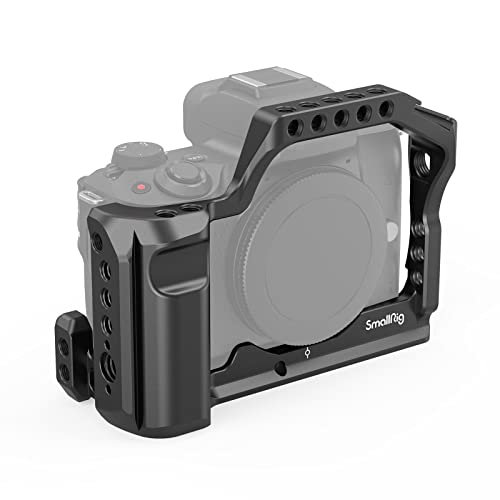
The SmallRig M50 /M50 II /M5 Cage is an absolute must-have for any serious Canon M50 Mark II videographer. It’s not just about protection; this custom-fit aluminum alloy cage transforms your camera into a robust filmmaking rig. What sets it apart is the abundance of versatile mounting points – cold shoes, 1/4″ and 3/8″ threaded holes, and ARRI locating holes – allowing you to attach external monitors, microphones, LED lights, and more, all without obstructing any buttons or battery access. Plus, its built-in Arca-Swiss plate makes quick transitions from handheld to tripod shooting a breeze.
-
Key Features:
- Customization & Anti-Scratch design with rubber cushion
- Versatile Mounting Points: cold shoe, 1/4″, 3/8″, NATO rails, ARRI locating holes
- Ergonomic & Durable: made of ultra-tough and lightweight aluminum alloy with comfortable grip
- All Buttons Unobstructed: full access to controls, hot shoe, HDMI/SDI slot, battery
- Quick Attach and Release with built-in Arca plate
-
Pros:
- Excellent camera protection
- Vastly expands mounting options for accessories
- Maintains full access to camera controls and battery
- Comfortable ergonomic grip
- Quick transition to Arca-Swiss compatible tripods
-
Cons:
- Adds a bit of bulk and weight to the camera
- Can be an initial investment for hobbyists
User Impressions: Users consistently praise SmallRig for its high-quality construction and thoughtful design. Many highlight how it truly opens up their M50 Mark II for professional video production, allowing for a fully kitted-out setup while still maintaining accessibility.
Hersmay For Canon M5 M50 II Cage with Top Handle

The Hersmay Camera Cage with Top Handle is an excellent choice for Canon M50 Mark II users looking to enhance their video production setup with added stability and mounting options. Its dedicated design for the M50 Mark II ensures a snug fit, while the array of 1/4″ and 3/8″ screw holes, ARRI localization, and a cold shoe mount provide ample space for all your essential accessories like microphones, LED lights, or an external monitor. The included top handle is a fantastic bonus, making low-angle shots and general handheld stability much easier and more comfortable.
-
Key Features:
- Specially designed for Canon EOS M5 M50 M50 Mark II cameras
- Multiple 1/4″ and 3/8″ screw holes, ARRI localization, and cold shoe mount
- Full access to all camera buttons, controls, battery, and SD card slot
- Non-slip pads and anti-sagging design at the bottom
- Top handle included for comfortable handheld shooting and accessory attachment
-
Pros:
- Provides robust protection for the camera body
- Offers numerous attachment points for accessories
- Full access to camera controls and battery compartment
- Top handle significantly improves handheld stability and comfort
- Anti-slip design protects the camera
-
Cons:
- Adds size and weight to the camera setup
- Might not be necessary for casual users who only shoot occasionally
User Impressions: Customers love the Hersmay cage for its solid build and the added versatility it brings to their M50 Mark II. The integrated top handle is a common highlight, making it easier to carry and shoot in various angles, proving great value for money.
FocusFoto Camera Cage Video Filmmaking Stabilizer Rig

The FocusFoto Camera Cage is another strong contender for Canon M50 Mark II users seeking to build a versatile and protected video rig. Crafted from aeronautical aluminum with CNC precision, it promises durability without excessive weight. Its clever design provides a plethora of 1/4″-20 & 3/8″-16 threaded holes, ARRI locating holes, and a built-in cold shoe mount, making it super easy to attach all your essential filmmaking accessories. What makes it particularly handy is the integrated Arca-style plate on the bottom, allowing for rapid transitions to compatible tripods, which is a huge time-saver on set.
-
Key Features:
- Made of aeronautical aluminum with CNC precision machining; robust, durable, light
- Numerous 1/4″-20 & 3/8″-16 threaded holes, ARRI locating hole, and cold shoe mount
- Anti-slip pads and anti-deflection design to protect the camera
- Built-in 1/4″-20 screw holes on the bottom for tripod attachment
- 38mm wide sliding international standard for Arca-style plate design for quick mounting
-
Pros:
- High-quality, durable construction
- Extensive mounting options for lights, mics, monitors
- Excellent camera protection and stability
- Quick-release Arca-style plate for fast setup changes
- Does not obstruct camera buttons or battery access
-
Cons:
- Similar to other cages, it adds to the overall footprint of your camera
- May require additional accessories to fully utilize its potential
User Impressions: Users appreciate the FocusFoto cage’s solid construction and the myriad of mounting points. The quick-release Arca-Swiss compatibility is a frequently praised feature, streamlining the workflow for many videographers using their M50 Mark II.
Altura Photo 49MM 0.43x Professional HD Wide Angle Lens

While not a gimbal itself, the Altura Photo 49MM 0.43x Professional HD Wide Angle Lens is an incredibly useful accessory for your Canon M50 Mark II, especially when paired with its kit lens (EF-M 15-45mm f/3.5-6.3 IS STM). This converter lens easily screws onto the front of your existing lens, instantly widening your field of view for breathtaking landscapes, cramped interior shots, or a more immersive vlogging experience. Its detachable macro lens also opens up opportunities for stunning close-up photography, adding immense versatility to your M50 Mark II setup.
-
Key Features:
- Easily screws onto 49mm lenses like the Canon EF-M 15-45mm f/3.5-6.3 IS STM
- Instantly expands field of view for wide-angle photography
- Features a detachable macro lens for high-resolution close-ups
- Compatible with a range of Canon mirrorless and other brand lenses
- NOTE: Verify your camera’s lens thread size (Ø49mm) before ordering
-
Pros:
- Expands your creative options for wide-angle and macro shots
- Cost-effective way to get wider perspectives without buying a new lens
- Easy to attach and remove
- Improves composition for vlogging and real estate
- Lightweight and portable
-
Cons:
- It’s a converter lens, so optical quality might not match dedicated prime wide-angle lenses
- Adds length to your existing lens
User Impressions: Photographers and videographers using the M50 Mark II commend this lens for its ease of use and the immediate impact it has on their wide-angle capabilities. The macro feature is often cited as a pleasant surprise, adding unexpected value.
AODELAN Wireless Shutter Release for Canon EOS M50,M50 Mark

The AODELAN Wireless Shutter Release is a small but mighty accessory for your Canon M50 Mark II, offering immense flexibility and the ability to capture sharper images and videos. What makes it stand out is its ability to eliminate camera shake caused by pressing the shutter button directly, which is crucial for crisp photos and stable video starts/stops. With a generous 32.8 feet shooting distance, it frees you from being tethered to your camera, enabling self-portraits, group shots, long exposures, or even safer wildlife photography from a distance.
-
Key Features:
- Wireless remote control compatible with Canon EOS M50, M50 Mark II, and other specified Canon models
- Reduces vibration for sharper images and video
- 32.8 feet (10 meters) shooting distance
- Allows for creative experimentation (self-portraits, long exposures, macro, wildlife)
- Enhances safety in challenging shooting environments
-
Pros:
- Eliminates camera shake for cleaner shots
- Offers creative freedom with remote operation
- Increased safety by maintaining distance from the camera
- Easy to use and set up
- Compact and highly portable
-
Cons:
- Requires batteries
- Can be misplaced easily due to its small size
User Impressions: Users frequently express how this wireless remote becomes an indispensable tool, especially for tripod-mounted shots, long exposures, and vlogging. They appreciate the freedom it provides and the improved image quality due to reduced camera shake.
Understanding Your Camera: Canon EOS M50 Mark II Bundles
While we’re talking about the best gimbal for Canon M50 Mark II and essential accessories, it’s also worth looking at the camera itself, especially in popular bundle configurations. These listings often represent the core product that all the other gear enhances.
Canon EOS M50 Mark II + EF-M 15-45mm is STM
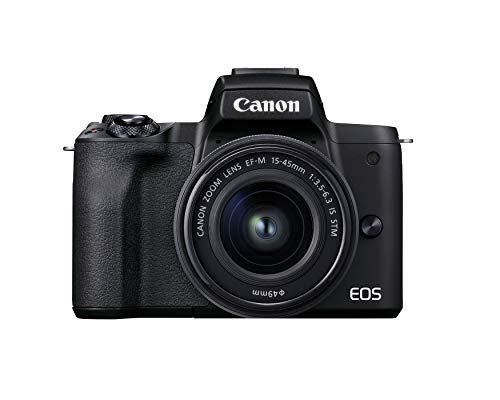
This listing represents the highly popular Canon EOS M50 Mark II camera bundled with its versatile EF-M 15-45mm f/3.5-6.3 IS STM kit lens. This camera is a favorite among vloggers and content creators for its excellent autofocus system (Dual Pixel CMOS AF with Eye Detection), a vari-angle touchscreen LCD perfect for self-shooting, and the ability to record 4K UHD video. The 24.1 MP APS-C CMOS sensor ensures great image quality, making it a superb foundation for your video projects that will benefit immensely from external stabilization like a gimbal.
-
Key Features:
- 24.1 megapixel (APS-C) CMOS sensor with ISO 100-25600 (H: 51200)
- DIGIC 8 image processor with Auto Lighting Optimizer
- Improved Dual Pixel CMOS AF and Eye Detection AF (still/movie servo AF support)
- 4K UHD 24p and HD 120p for slow motion
- Vari-angle touchscreen LCD convenient for vlogging and various composition
-
Pros:
- Excellent image and video quality for its class
- Reliable and fast autofocus, great for tracking subjects
- Fully articulating screen is perfect for vlogging
- Compact and lightweight mirrorless design
- User-friendly interface, ideal for beginners
-
Cons:
- 4K video is cropped
- No in-body image stabilization (IBS), making a gimbal even more essential
User Impressions: Users consistently praise the M50 Mark II for its user-friendliness, fantastic video capabilities (especially in 1080p), and reliable autofocus. Many appreciate it as a great entry point into mirrorless photography and videography.
Canon EOS M50 Mark II + EF-M 15-45mm is STM

Similar to the previous entry, this product listing details the core Canon EOS M50 Mark II camera body paired with the popular EF-M 15-45mm f/3.5-6.3 IS STM zoom lens. This combination is often considered the standard kit for those jumping into mirrorless cameras for vlogging and general photography. Its strengths lie in its balanced performance across stills and video, particularly with its responsive autofocus and flexible vari-angle screen. When looking for the best gimbal for Canon M50 Mark II, remember that this camera’s lightweight nature makes it compatible with a wide range of stabilizers, further enhancing its appeal as a portable video setup.
-
Key Features:
- 24.1 megapixel (APS-C) CMOS sensor with ISO 100-25600 (H: 51200)
- DIGIC 8 image processor with Auto Lighting Optimizer
- Improved Dual Pixel CMOS AF and Eye Detection AF (still/movie servo AF support)
- 4K UHD 24p and HD 120p for slow motion
- Vari-angle touchscreen LCD convenient for vlogging and various composition
- Lens type: Zoom, Video capture resolution: 2160p
-
Pros:
- Versatile kit lens for everyday shooting
- Excellent for vlogging and self-recording
- Strong low-light performance for its class
- Compact and portable for travel
- Wi-Fi and Bluetooth for easy sharing
-
Cons:
- Single SD card slot
- Battery life could be better for extended video shoots without spares
User Impressions: This bundle is highly regarded by beginners and intermediate users for its versatility and ease of use. Many note it’s an excellent stepping stone for those transitioning from smartphones, offering significant improvements in image quality and creative control.
Canon EOS M50 Mark II Mirrorless Digital SLR with 15-45mm

This comprehensive bundle offers the Canon EOS M50 Mark II camera with the EF-M 15-45mm lens, but it goes a step further by including a wealth of essential accessories to kickstart your content creation journey. Beyond the camera’s core features like the 24.1MP APS-C sensor, DIGIC 8 processor, and improved Dual Pixel CMOS AF, this kit adds a SanDisk 64GB SD card, a 3pc filter kit, a flash, a tripod, and a deluxe gadget bag, among other items. This makes it an incredibly convenient option for those who want to buy everything they need in one go, setting a solid foundation for adding specialized gear like the best gimbal for Canon M50 Mark II later.
-
Key Features:
- Includes Camera, 15-45mm Lens, SanDisk 64GB SD Card, Filter Kit, Flash, Tripod, Bag, etc.
- 24.1MP APS-C CMOS Sensor | DIGIC 8 Image Processor
- UHD 4K and HD | 720p120 Video Recording
- Dual Pixel CMOS AF with Eye Detect AF
- 2.36m-Dot OLED Electronic Viewfinder
- 3.0″ 1.04m-Dot Vari-Angle Touchscreen
- Wi-Fi and Bluetooth; Webcam Capability
- Extended ISO 51200, 10 fps Shooting
- Combination 5-Axis Image Stabilization (digital, with compatible lenses)
-
Pros:
- All-in-one bundle for immediate use
- Excellent value for the included accessories
- High-quality video and still imaging
- Versatile for vlogging, photography, and live streaming
- Great for beginners who need a complete setup
-
Cons:
- Some included accessories might be basic level (e.g., tripod)
- You’ll still need to invest in a gimbal for truly professional video stabilization
User Impressions: Buyers are generally very pleased with the value offered by this bundle, finding it an excellent way to get started with their M50 Mark II without having to purchase many essential accessories separately. It’s often recommended as a great beginner kit.
Choosing the Best Gimbal for Your Canon M50 Mark II
When selecting the best gimbal for Canon M50 Mark II, consider these key factors:
- Payload Capacity: Ensure the gimbal can comfortably handle your M50 Mark II with your heaviest lens and any attached accessories (like a mic or small light).
- Portability: Since the M50 Mark II is compact, you likely want a gimbal that matches its portability for travel and on-the-go shooting.
- Battery Life: Longer battery life means fewer interruptions during shoots. Look for gimbals with good endurance and fast charging.
- Features: Look for useful features like native vertical shooting, a clear display, Bluetooth shutter control, and advanced stabilization modes.
- Ease of Use: A gimbal that’s easy to balance and operate will save you time and frustration.
Conclusion
The Canon EOS M50 Mark II is a powerhouse for content creators, and with the right accessories, especially the best gimbal for Canon M50 Mark II, you can truly elevate your video production. Whether you opt for the ultra-portable DJI RS 3 Mini or the versatile ZHIYUN CINEPEER WEEBILL 3E, adding a quality stabilizer will transform your shaky footage into cinematic masterpieces. And don’t forget those crucial accessories like camera cages, wide-angle converters, and wireless remotes – they’re just as important for building a complete, professional video rig. So, grab your gear, get out there, and start creating!
FAQ: Best Gimbal for Canon M50 Mark II
Q1: Why do I need a gimbal for my Canon M50 Mark II?
A1: While the Canon M50 Mark II has digital image stabilization, a dedicated gimbal provides superior, buttery-smooth footage by physically compensating for camera movements. This is essential for professional-looking video, especially when walking, running, or performing complex camera movements.
Q2: What’s the ideal payload capacity for a Canon M50 Mark II gimbal?
A2: For the Canon M50 Mark II, a gimbal with a payload capacity of at least 1kg (2.2 lbs) is usually sufficient. However, if you plan to use heavier lenses, external microphones, or small monitors, aim for a gimbal that can support 2kg (4.4 lbs) or more, like the DJI RS 3 Mini or Zhiyun Weebill 3E, to ensure stability and balance.
Q3: Can I use any gimbal with my Canon M50 Mark II?
A3: Not necessarily. While many gimbals are universally designed, you need to check compatibility for specific features like Bluetooth shutter control. More importantly, ensure the gimbal’s minimum and maximum payload capacity covers the weight of your Canon M50 Mark II with your chosen lens setup.
Q4: Is it hard to balance a gimbal with the Canon M50 Mark II?
A4: Balancing a gimbal requires a bit of practice, but it’s not overly difficult. Most modern gimbals feature clear markings and locking axes to make the process easier. Once you’ve done it a few times, it becomes second nature. Proper balancing is crucial for optimal performance and battery life.
Q5: What’s the benefit of a camera cage for the M50 Mark II, even with a gimbal?
A5: A camera cage, like the SmallRig or Hersmay options, provides protection for your M50 Mark II and, more importantly, adds multiple mounting points (cold shoes, threaded holes) for accessories such as external microphones, LED lights, and external monitors. This allows you to build a full video rig, which complements the gimbal by adding necessary peripherals for higher quality content.
Q6: Does the Canon M50 Mark II have good battery life for video when using a gimbal?
A6: The Canon M50 Mark II’s native battery life for video can be somewhat limited (around 85 minutes for continuous recording). When using a gimbal, the gimbal itself has its own battery. For extended shooting, consider carrying spare camera batteries or using a power bank if your camera supports USB charging.
Q7: Can the Canon M50 Mark II shoot 4K video?
A7: Yes, the Canon M50 Mark II can shoot 4K UHD video at 24p. However, it applies a significant crop factor in 4K mode. For wider shots or less crop, many users prefer shooting in 1080p, which the camera excels at, especially with its excellent Dual Pixel CMOS AF.

